How to disable ads from uTorrent like a pro?
Admit it! Web user like us hates ads to the core! They are just omnipresent. Discover how to disable ads from uTorrent & make p2p file sharing a breeze?
 Jatin Kumar Malik First published on
 BitSnapper
We all love torrents(for legit purposes) :P and most of us use uTorrent. It makes sense as uTorrent is a lightweight BitTorrent client which is a little over 1 MB in size and claims to never hog your valuable system resources. It works great and as far as I remember, it’s my de-facto choice since my introduction to the world of peer-to-peer sharing.

uTorrent - a (very) tiny BitTorrent client
But ever since BitTorrent, Inc(owner of uTorrent) decided to monetize the app and launched the Pro version with enhanced functionality, Free version has been continuously bombarded with Ads and pre-selected Tool-bars, Apps (Bloat) during installation.Earlier it used-to-be non-reversible change which was heavily criticized by the users due to which BitTorrent announced ads could be individually dismissed by users albeit deep hidden in the settings. How not-so-convenient, right? As a normal user will never bother to check their Advanced setting which doesn’t make sense on first look and hence will be stuck forever with the annoying ads. Fortunately, the steps below will guide you to clean up your uTorrent installation from all the ads and banner. 💡
Admit it! A web power user like us hate ads to the core!
Here’s how to disable ads from uTorrent:
- Open Options > Preferences > Advanced. Here you’ll find a large list of flags for the app and a filter box.
- Search for and disable(double click & set false) the following flags:
- bt.enable_pulse
- gui.show_notorrents_node
- gui.show_plus_upsell
- offers.content_offer_autoexec
- offers.left_rail_offer_enabled/left_rail_offer
- offers.sponsored_torrent_offer_enabled
- sponsored_torrent_offer_enabled
- As found out by our avid reader - Hakurei06, there are quite a few flags that are not being addressed by the hidden advanced menu in preferences. To do so, after you exit preferences while on the advanced menu, hold down Shift+F2 while clicking preferences again, to view a whole new world of flags and set them false as well:
- gui.show_gate_explaination
- gui.show_gate_notify
- gui.show_plus_av_upsell
- gui.show_plus_conv_upsell
- gui.show_plus_upsell_nodes
- offers.backup_left_rail_offer_enabled
- offers.backup_sponsored_torrent_offer_enabled
- offers.upgrade_panel
- offers.upgrade_toolbar
These flags may be named slightly differently depending on which version of the app you’re using. So, make sure to use the latest version.
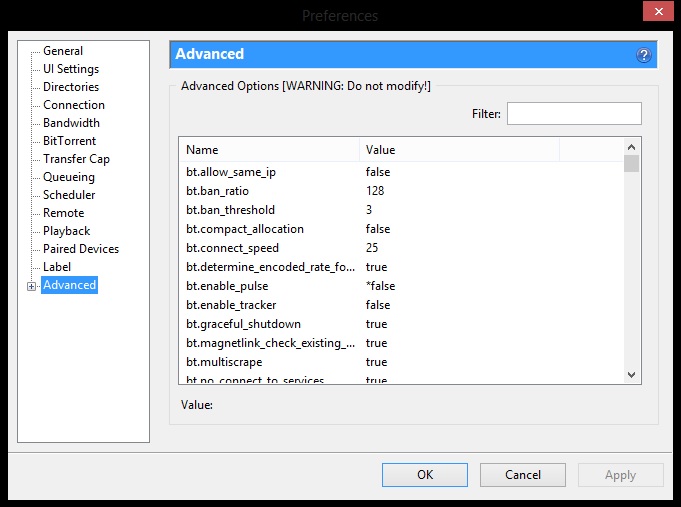
Advanced setting with Flags
Be careful when editing these flags in the Advanced group and do not unnecessarily edit any other flag not mentioned in the list above. You don’t want to break the installation, right? After doing the step above, just restart the uTorrent and poof all ads would be gone! :D
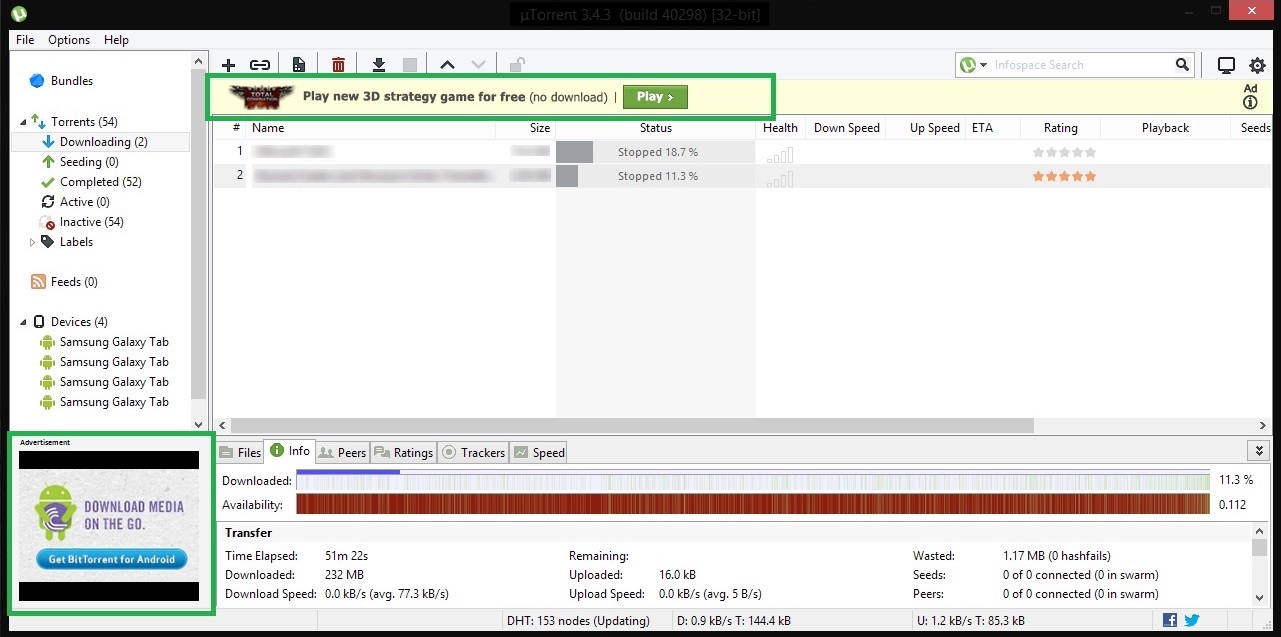
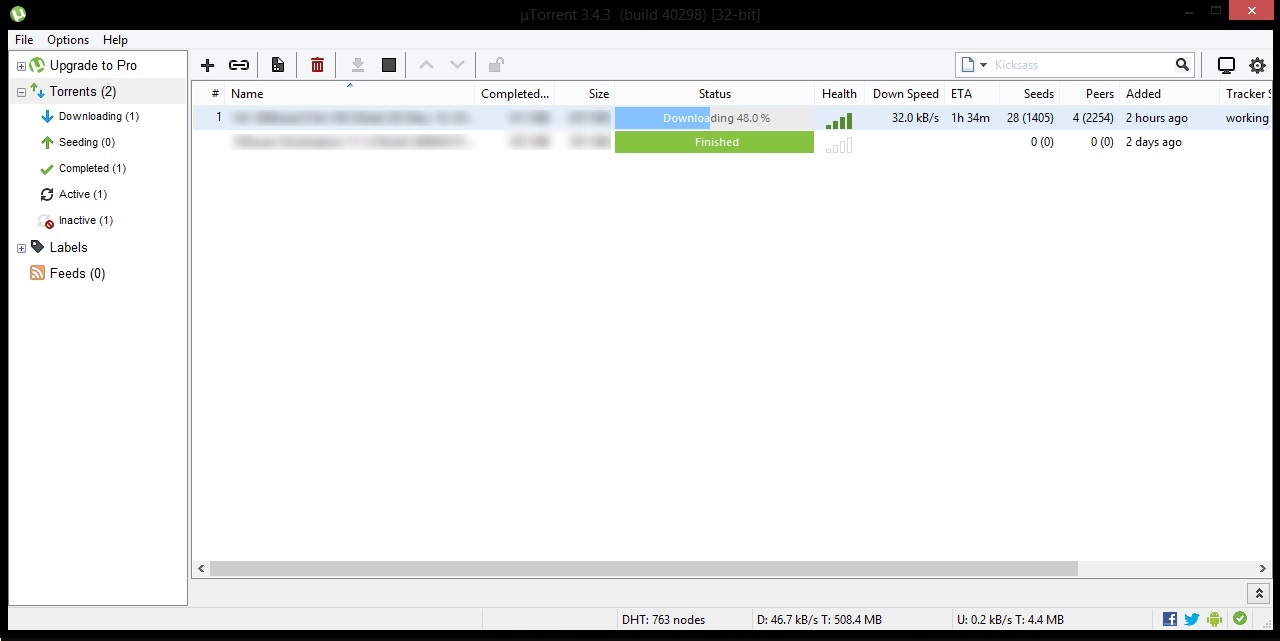
So here you have your clean and more minimal than ever uTorrent working like a pro ;)
Bonus ProTip:
Isn’t it a trouble to launch searches for your torrent on your multiple favourite sites? Well, it’s time to be a power-user and harness search torrent functionality built-in uTorrent itself. So you must have noticed the search bar on the top right side of uTorrent but never used it because it’s preconfigured with Infospace search(another attempt to monetize) which isn’t remotely useful.
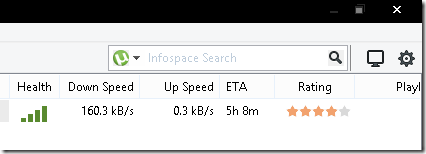
Infospace! Seriously? NO!
So to remove that and make your uTorrent experience awesome, I have compiled a mega list of torrent search engines that you can use in your uTorrent configuration. The list consists of 20+ search engines that you can use to search for torrents directly from within uTorrent instead visiting the sites manually one by one. The list is sorted based on my preference so you can adjust the order as you desire.Wherever possible, I have included the parameters to sort the list of results by descending a number of seeds, so you always get the legit torrent with the maximum number of seeds.
Steps to add a custom torrent search engine list:
- Open uTorrent Preferences.
- Expand the Advanced options on the left and click on “UI Extras”.
- Optionally you may want to delete all your currently listed search engines.
- Open and Copy the whole torrent search engines list as-is and paste it into the box for search engines.
- Click OK and it’s done!
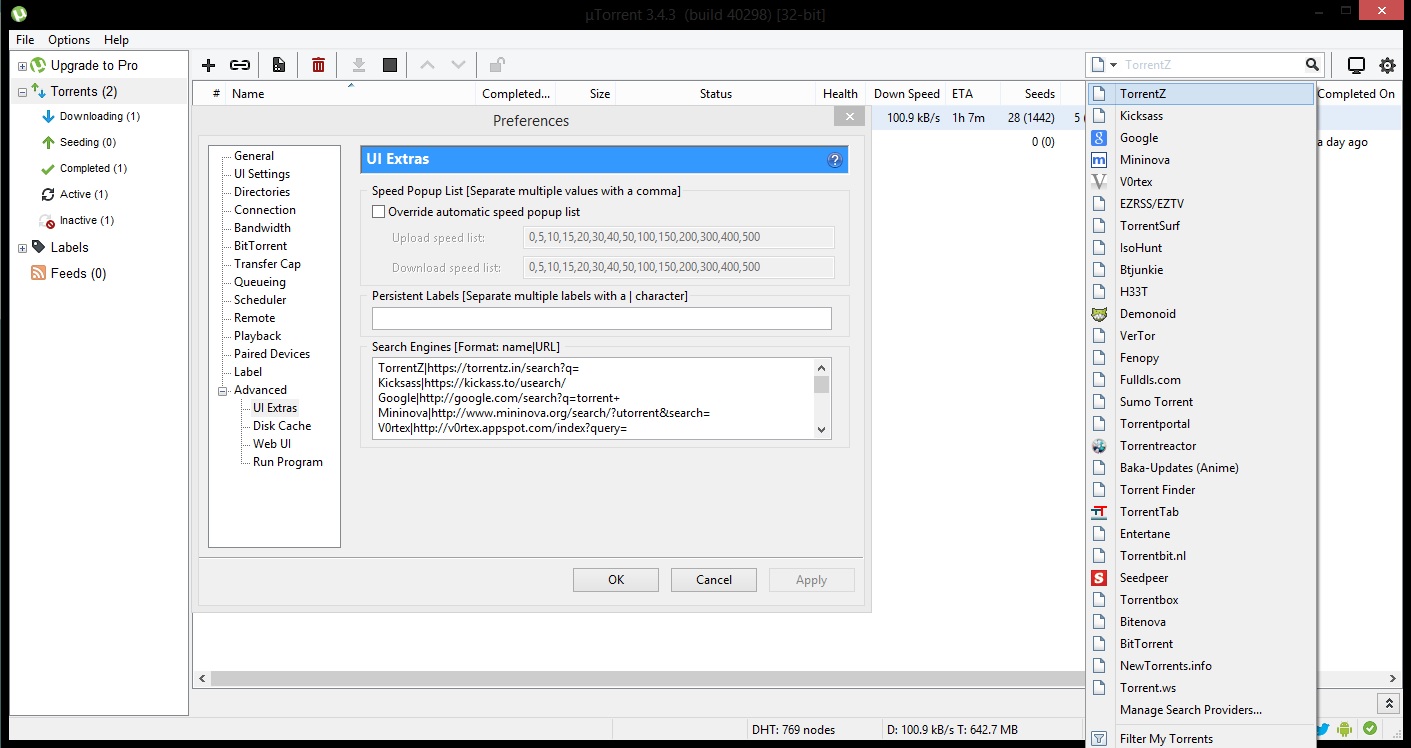
It should look like this when done.
Now all you need to do is type a search term into the form and either hit the enter key right away to search the default torrent search engine or click on the down arrow next to the search icon to pick one of the available search engines from the list. Enjoy. 8-)
Keep reading
How to block intrusive MTNL broadband ad popups in your browser?
Learn how to block the annoying MTNL pop up ads which appears out of no where in your browser on bottom right side. Say no to shady practises by MTNL!
5 cool ways to surf blocked sites in your office/college
One click process to unblock banned sites in Chrome, Windows, Android, and iPhone. Now you can watch youtube, download torrents without getting noticed.
Getting around site blocks in India: VPNs, proxies and one nasty VPN scam
How to get back on Telegram during India's ban, why incometax.gov.in barely loads for me without a VPN, and a fake VPN sponsorship that stole a dev's creds.
147 commentsfrom BitSnapper
Carried over from the original post and read-only. Add a new comment below.
thanks, those ads made me quit utorrent. i know utorrent is the best but i can't see those ads taking half of the screen. Installed it again, used ur trick, now everything looks normal... :) ?
Glad to help Saurabh. :)
Hide pro UPGRADE button:
set true
gui.pro_installed
Hi Senkihazi, I tried your tip but it just did this for me. It just made the sidebar darker, didn't remove the button.
Thank you very much helped me !
meant advice from Senkihazi
This worked for me, on 8/31/15. Thanks!
Welcome Ron! :D
#PiratesForever
all the tips worked for me running 3.4.3 except that suggested by Senkihazi the button is gone but it still has the upgrade setting in the now black sidebar still better than the original button.
Hi Bud, same is the case with me.
How do I get the black sidebar? Looks sweet!
Hi Elzafir,
You can set true for the flag gui.pro_installed to get that black sidebar. :cool:
Thanks a lot. Its wonderful...
Thanks Arpan!
Don't forget to seed ;)
Yeah, I seed :)
Thank you, sir!
I didn't mind ads, I did mind ads that were blocking the program and that I couldn't close (or at least I didn't figure out how).
No problem Pavel! Cheers :cool:
Don't forget to seed
BADASS bro thanks a lot! i was tempted to buy PRO because of those danm intrusive ads
Hey Erick! Thanks mate :D
#SeedEmAll
thanks so much
Cheers! :)
"Keep seeding" does NOT remove utorrent ads. Thanks for nothing.
Hey Connor! Are you sure you followed it correctly? Works for everyone here. :)
Thank you sooooo much, this made all the difference!
Welcome mate!
#PiratesForever :P
Hate spam! :D
Thanks a bunch man! Those ads were sucking the fun out of my life. Very much appreciated! :)
No problem Razib. Keep torrenting :D
Thanks you soooooo much, it worked perfectly!
Welcome Ozzemie. Make sure to share this post with your mates. Cheers. :)
Thanks so much! I have been trying to figure out the ad issue for a long time (don't generally mind ads for this type of program, but these were unbearable) and this worked perfectly. Also took your advice on the search engine update - rad!
Thanks Horace. Like a boss! :cool:
Happy Torrenting!
Thankx it works.....
Nice work.....
Welcome Shashank! Make sure you share this post with your friends so that they can have an Ad-free torrenting experience.
#KeepSeeding :)
Worked for me in version 3.4.5. Thanks!
Welcome localdog. :D
perfect, thank you man.
:cool: #KeepSeeding.
This worked great, thanks. Didn't even need to restart uTorrent for it to take effect.
Welcome THGhost! :D
#KeepSeeding
Thank you Loads
This helped a lot (Y)
No problem bro. :cool:
#KeepSeeding and ask your friends to block those ads as well!
I have the ad on the side removed but theres an inappropriate one on the top that stayed there.
Hi Stuped!
Can you please check if you have disabled (set to false) all the flags?
Here's an issue, there's quite a few flags not being addressed by not accessing the hidden advanced menu in preferences. To do so, you exit preferences while on the advanced menu; then, hold down Shift+F2 while clicking preferences again, to view a whole new world of flags yet unseen.
These should be (set to) false:
gui.show_gate_delete
gui.show_gate_explaination
gui.show_gate_notify
gui.show_plus_av_upsell
gui.show_plus_conv_upsell
gui.show_plus_upsell_nodes
offers.backup_left_rail_offer_enabled
offers.upgrade_panel
offers.upgrade_toolbar
offers.backup_sponsored_torrent_offer_enabled
Hi Hakurei06,
Great find mate!
Although, I don't see any difference in the UI after disabling these flags but still I can confirm these are related to advertisements. Maybe backup flags to use in future or something.
Anyways, I will add the newly discovered flags in the post above for our readers to find.
Thanks,
Jatin K Malik
It worked like a charm, Thanks!
Welcome Bernard! :)
#KeepSeeding :cool:
This is marvelous. Thank you!
Welcome Sweetpea430! Cheers and Keep seeding! :D
U da man! #adfree
:cool:
#KeepSeeding
Mod: Link removed
I would suggest you to not spam here! :)
If you wanted to promote your video, you could have asked me in person or gave credits where it's due and maybe I would have included it in the post above for users.
Spam next time and I will block your IP address.
I see that you are a software engineer at Adobe. Adobe charges $1000+ for most their software. Free apps like Flash Player have counterparts like Flash which costs a lot. That is how they pay your salary. Then, why did you supported blocking ads in FREE uTorrent? That is how they make their money. Or people buying the PRO version for $19.90. Not $1000 like Adobe software. I hope you rethink what you are doing.
Hi Feruz,
I love questions like your which makes one think about their own moral compass. :D
Flash business model and uTorrent's one are 2 different concepts you are confusing upon. There is a thin line in being a Power user and being Unethical. Thankfully, here it's more of the power user scenario.
Did you know uTorrent is a proprietary BitTorrent client owned and developed by BitTorrent, Inc (founders of bittorrent protocol). But untill 2006, it was an Open source program owned by Ludvig Strigeus which was later acquired and is now maintained by Bittorrent, Inc.
Quoting from Wikipedia:
In August 2012, BitTorrent announced the addition of advertising in the free version of µTorrent which could be individually dismissed by users. Due to response from users, a few days later, the company stated that ads could be optionally turned off.
Src: http://www.tomshardware.com/news/uTorrent-Ads-Optional-Opt-Out-Sponsored-Torrents,16967.html
So, I don't quite get your point above. uTorrent itself has given flags in the product. Provided, a lot of simple users may never open it or tinker with it but a power user is allowed to do so if needed, which is exactly what we are doing here. :)
I am against cracking/hacking a product especially when it's from an indie/small team of developers. Being a software developer myself, I understand the sheer amount of work that goes behind creating such a well polished product.
But hey, if I can open the hood, I may as well tinker with the engine as per my liking. :)
Cheers,
Jatin
Excellent research!! Totally subscribe to that philosophy. Information is meant to be shared and credit given when appreciated.
Thanks Jerry! Appreciate it.
Addendum:
You don't make money by just *displaying* ads. You get money by people clicking on the ads. If you have absolutely no intention of clicking on ads, then they're literally just wasting screen space - not to mention that ads can contain malware, executing upon display.
If you have no intention of clicking on them anyway, you're doing no harm by disabling them.
Worked awesome, no restart. You rock! Seeding just for you :)
Thanks Random dude! More power to you! :cool:
All I can say is a HUGE THANKS for taking the time for this.
A did exactly as you suggested and then *POOF* all those annoying ads were certainly gone AT LAST!
So thanks again for taking your time on explaining us this, since w/out that certainly using this app feels lots nicer!
Hola Rax!
Welcome mate. :cool:
I agree. uTorrent feels much better without those annoying ads.
Cheers,
Jatin
Hats off to you, my fellow system beater!
More power to you Raoul.
#PiratesForever :cool:
You, my good sir, are doing a GREAT service. Way to #LeadByExample
Aye aye Captain! #KeepSeeding. :cool:
I did this and refreshed uTorrent but the top banner ad was still there. I restarted uTorrent a couple times and it finally disappeared. Thanks bro. Just posting this before someone tries to quick comment saying it doesn't work
Misspelled my link, dang
Thanks EvTheProducer! Could be helpful to some users.
p.s: I fixed the link for you. ;)
Hey man, your link to your mega list of search engines is dead. Could you re-enable that please? Thanks I'll check back in a few days....appreciate the great advice though!
Hi Tim,
It works fine for me. Try http://bitsnapper.com/wp-content/uploads/2015/05/Torrent-search-engines-list-Bitsnapper.txt and let me know if it works for you else I will do a pastebin.
Cheers,
Jatin
Thanks for finally talking about >How to disable
ads from uTorrent w/o buying the pro version? <Loved it!
Sure!
Did they now? o.O
Oh my goodness! Impressive article dude! Thanks,
However I am encountering difficulties with your RSS.
I don't know the reason why I am unable to subscribe to it.
Is there anybody else having identical RSS issues? Anybody who knows the
solution can you kindly respond? Thanx!!
Hi Oculus,
Glad you liked the post. As far as I can see, the RSS is working just fine. You can validate the same from http://feedvalidator.org/check.cgi?url=http%3A%2F%2Fbitsnapper.com.
Use - http://bitsnapper.com/feed/ with your favorite feed reader and it should work.
Cheers,
Jatin K Malik
thanks dude works superb
Welcome, Gopi!
Keep seeding and be awesome!
Thanks Mate - fantastic
Welcome mate! :)
thanks bhai this was so helpful. bohot kaam aaya.
No problem Siddharth!
#KeepSeeding
I changed the options from True to False, but after restarting uTorrent, all of them are True again and ads are shown again.
I tried to run the app as admin and changed "settings.dat" attribute to "read only"... but does not work.
gui.show_notorrents_node
gui.show_plus_upsell
offers.left_rail_offer_enabled
offers.sponsored_torrent_offer_enabled
Where is the problem? thank you.
Hi Jorge,
You need to run uTorrent as Administrator. I think you are usinh a less privileged account. Try that and let me know.
To do the same: Right click uTorrent icon and click Start as Administrator.
Cheers,
Jatin K Malik
Tips above dont work with 3.4.5 build 41865. I did a downgrade for 3.4.3
Thanks for information Neophitus. I will check the new version and update the lost accordingly. ☺
I have same version recently upgraded. For year prior, I had set the appropriate flags to false from list obtained years ago from U-torrent community forum (thread now deleted), except for the ones behind the Shift+F2, which thanks to your page I just set those too. Everything was fine until this new version 3.4.5 build 41865. Problem is that every few days, it kept resetting my false flags to true, without permission (scratches head!). It has now become rather a PITA to keep re-falsing. I use Windows 8. I am hoping the new false flags behing the shift+F2 curtain will solve the problem. We'll see...
the answer is nope. Today, opened Utorrent and there were the left side rail with the upgrade ad. Sure enough the Preferences> Advanced ads were reset to "true" without permission. I will probably just downgrade to my last good version, rather than fiddle with it anymore.
Hi David,
Before you go that route, can you try once more by starting uTorrent as an Administrator? It works fine for me, would be interesting to check this.
I will try that over the weekend. I usually allow the magnet link to auto-open, but I suppose I could open it manually first, as admin.
I also tried something off the cuff that may work. Before exiting U after the downloads completed, I opened preference and clicked the OKAY (all my previous *false were still set). I was thinking this might reset whatever timer keeps resetting for the ads. Today, there were no ads, plus I opened several times last night and still no ads.
will let you know re: in a few days.
Looks like we didn't jynx it ;)
Thank you so much, dude! You are awesome. uTorrent is so much better now, thanks to your suggestions!
Hey, hey!
Welcome, Chad. Glad to help a fellow pirateer ;)
#KeepSeeding :cool:
RE: ads returning after "falses" were set. I have still not tried running app as administrator since last Thursday, 3/17. Instead, my idea to trick the reset timer by opening preferences > advanced, prior to exiting after downloads completed SEEMED to be working just fine. No ads or left rail appearances as of tonight 3/22, then .... I forgot to do my trick before exiting, so I quick opened the app to do this, and guess what--- the left rail and upsell ad reappeared. D---it! I thought my trick was working but now ---- not sure. I will repeat the experiment for awhile and report back. See you next week. sigh.
Does anyone following this have any idea which setting is the timer? gotta be there somewhere.
Well, that's nuisance. I would rather not update my uTorrent then. Though, I will dig in the latest update and match for any new flags, if any. :)
offers.left_rail_offer_enabled/left_rail_offer
offers.sponsored_torrent_offer_enabled/sponsored_torrent_offer_enabled
offers.content_offer_autoexec
didn't get these preferences and hence my ads aren't gone
Just search for "offer" and set all of them to false
Thank You
Well, looks like they're changing the names of these flags with every other version...
BUT... basically all you have to search for is "offers" and set all those to false!
Thanks for the tip Voskat! I will check and update if it works! :)
I did it, it worked. But when i restarted utorrent, the ads were back.
I tried the steps with utorrent as an admin too. It works only if i dont close utorrent :/
Well, I guess Team uTorrent read this post too. ;)
I will need to check with the new one as I am still using the old version.
Can you tell me in which version it works?
Well, I am using uTorrent 3.4.6 (build 42094) [32 bit]. It seems to work for me.
Thanks a lot...
Glad it worked for you.
Totally worked for me, even after exiting and restarting multiple times. I'm a full administrator on my machine, also.
One request though, could you alphabetize the process list on this page? It a pain to bounce back and forth between this page and within the list.
Sir, A great suggestion. Done!
You can also just copy and paste from the website directly into the Filter bar in Advanced Preferences. Pops up immediately. (Highlight, CTRL+C = copy, CTRL+V = Paste).
Thanks a lot worked like a charm ;)
Great!
SOLID can't say thank you enough should have done this ages ago. Took a whole 2min. THANK YOU!!!
Great!!
update from March 23 re: ads returning after setting "falses". Since then I can now confirm my reset trick works perfect. No recurring ads if I just remember to open preferences (mine is set to open on the "advanced" ) and click OK at the bottom during downloads sometime before exiting. This keeps all my false setting active, whereas if I don't do that, some of the offer setttings are changed back to "true" next time the app opens. SMH! I am just going to keep this version 3.4.5 (build 41865) instead of updating to avoid the games they are playing with the ads.
Hi David,
Thanks for the update. It's weird as it still works for me on the latest version. Not sure what could be the problem.
-- Jatin
Thanks, works for me on 3.4.7 (build 42330 32 bit).
I couldn't work out the last bit about searching for torrents from within utorrent though.
I just couldn't find the "torrent list" - I only have two engines - infosearch and minova.
So, I'm clearly missing out here but will just have to continue switching manually between torrent sites.
Thanks again.
Hi Bob,
Here is the torrent list - http://bitsnapper.com/wp-content/uploads/2015/05/Torrent-search-engines-list-Bitsnapper.txt
Make sure you follow the steps in second half to add custom search engines.
Happy Torrenting.
That is a really good tip especially to those new
to the blogosphere. Brief but very precise info… Appreciate your sharing this one.
A must read article!
I'm excited to uncover this great site. I wanted
to thank you for ones time for this particularly wonderful read!!
I definitely enjoyed every little bit of it and I have you saved to fav to check out new stuff on your website.
Hey this worked 100 percent thank you very much,am using the latest version utorrent 3.4.8
Superb!
How to remove the link "Take our survey" in the toolbar as given in the image http://i49.tinypic.com/30uziuq.png
Hi Ashok,
I think setting the aforesaid flags to false should remove it. If not, there is a simple trick. Just click the link once and reopen uTorrent, it should be gone! :)
I just clicked the link once and reopened the uTorrent. Now it is gone!
Cool! ;)
You should split the line: offers.sponsored_torrent_offer_enabled/sponsored_torrent_offer_enabled
Me and a friend had the same problem: we copied the whole line, we didn't see the slash (/).
How to block/disable "Bundles" button:
Go to "%windir%System32driversetc" and add to "hosts" file:
127.0.0.1 cdn.ap.bittorrent.com
127.0.0.1 utclient.utorrent.com
127.0.0.1 bundles.bittorrent.com
Seems like an oversight. Fixed, thanks! :)
awesome ! thanks alot
excuse me but how does this work on the latest utorrent version?
Can't find gui.pro_installed to disable upgrade button in version 3.5 (2017)
Mr. Jatin Kumar Malik, Thanks a LOT!!!
very effective, I am using uTorrent 3.5 (build 43580).
Do you have a tip on how to make the starting screen size of uTorrent smaller? with my existing resolution, 1920x1080, the default screen of uTorrent is always bigger than my monitor screen/
Hi Pusit,
Glad you found it helpful.
Yes, I do have a solution for your other problem. Just Right-click your uTorrent shortcut > Select Properties > Select your preferred Run state like below. It must be "Maximised" as of now, change it to "Normal".
Regards,
Jatin K Malik
v3.5 I dont see the list icon to change from the basic to advanced view..
Hi CD,
Are you sure you followed the steps above correctly? I just checked on v3.5 and it works. Refer to screenshot below:
- Jatin
Sorry.. Restarted pc now it is there.. And the liat of extra trackers worked great.. Thanks agaon y'all
Great! (y)
hello bro how enable F11 key its deafult disable? ho to enable
What? Try pressing Fn key (bottom right of keyboard) along with F11?
I can't get it either. When I hold F2 my mouse freezes. If I hit enter while hovering it opens advanced, but not with the hidden stuff.
How do you add piratebay to the list?
Necro(sorta): For future visitors
PirateBay|https://thepiratebay.org/s/?q=
You can definitely see your enthusiasm in the article you write.
The sector hopes for more passionate wrters like you who
aren't afraid to mention how they believe. Always go affer your heart.
Greetings Kumar.
Is there any way to remove "upgrade to pro" form the taskbar on the left?
including the subfolders "Streaming", "HD Media Player" and "Antivirus Protection"?
All the best, Pete
Hello Kumar.
would it be recommended to deactivate all the auto update and auto update install keys as well?
kind regards, Pete
"offers.upgrade_panel" is not in my version (3.5.5)
Changing "offers.upgrade_toolbar" to False removes the "Upgrade" button on top right hand side. However, the button is there again after utorrent is restarted. I notice that the settings to false is preceded by an asterisk except for "offers.upgrade_toolbar". This setting returns to true after restart.
Is there a way to make this setting permanent?
Leave a comment