How to block intrusive MTNL broadband ad popups in your browser?
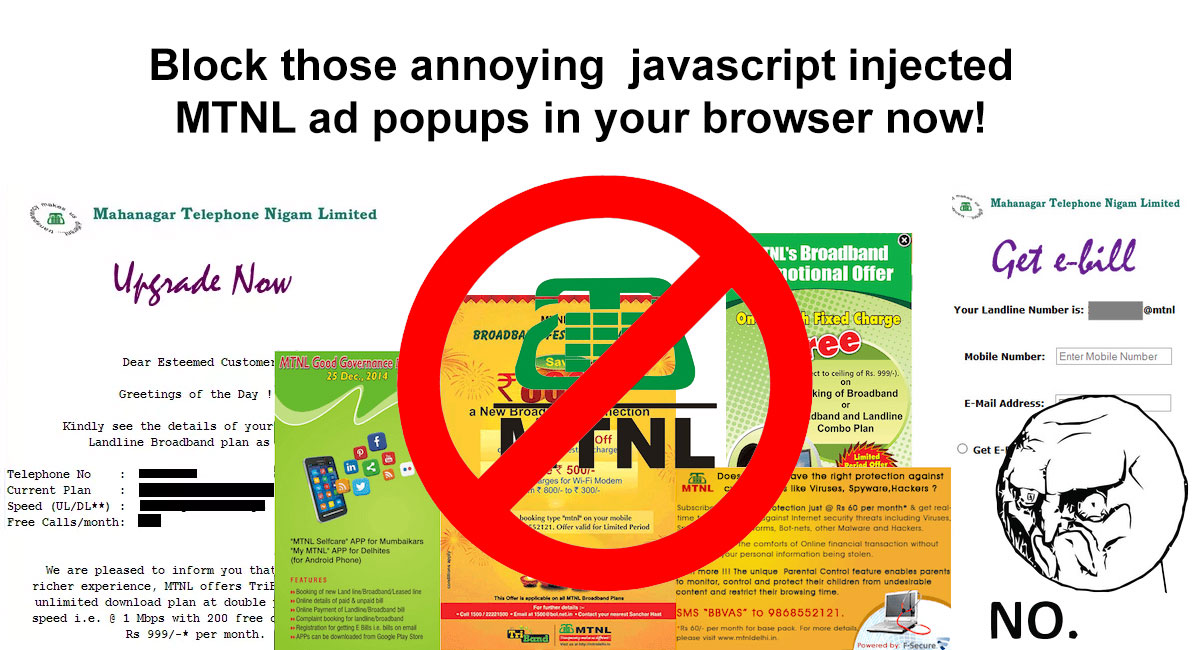
Learn how to block the annoying MTNL pop up ads which appears out of no where in your browser on bottom right side. Say no to shady practises by MTNL!
 Jatin Kumar Malik First published on
 BitSnapper
Before I start anything, here is a rant dedicated to MTNL broadband:
#Mohabbat to bass naam se badnaam hai yaaro… Asli dard toh #Slow #Internet deta hai :-\ — #MTNL hai toh ghanta sahi hai :’(
— Jatin (@jatinkrmalik) May 25, 2014
Translation: “Love is just defamed for its name, instead Slow Internet is the one behind real pain!”
Ha! Enough of jokes. Well, if you are living in Delhi or Mumbai for past decade or so, 90% of you will understand the hidden pain in my tweet above. MTNL is the slowest ISP of all times but since we people didn’t have any other good ISP, most of us are struck with it. I currently have a 1mbps (unlimited) line at my home which was upgraded from 512kbps, which was upgraded from 256kbps and so on, as per TRAI regulations for minimum qualifying speeds for “broadband”! Never once, I have seen any sane good plan from MTNL broadband BUT it just worked, until they decided to inject JavaScript ads in the browser which is super creepy IMHO. We recently saw ruckus on Reddit over Airtel trying to do the same thing, which compelled me to write this post despite me getting a new superfast internet connection.
Wait, what ADS?!
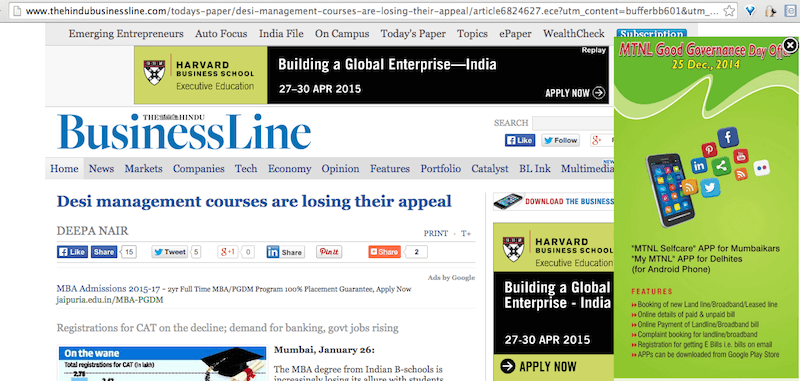
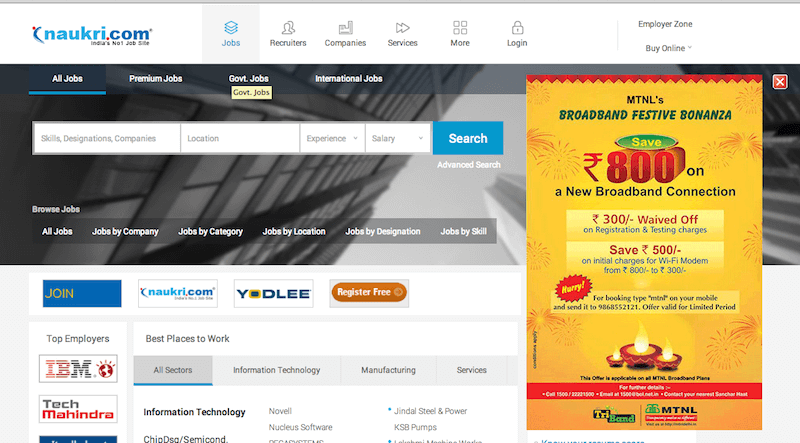
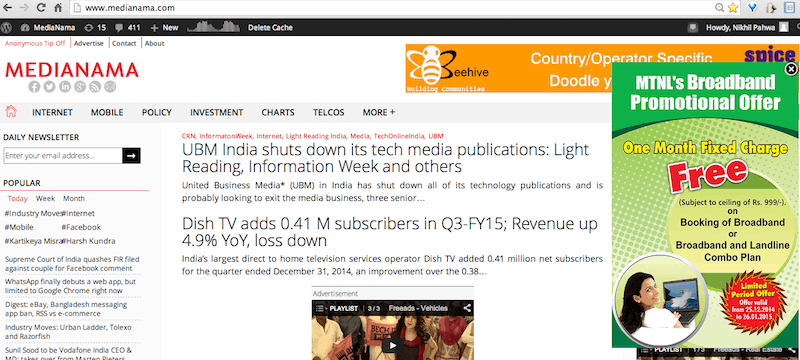
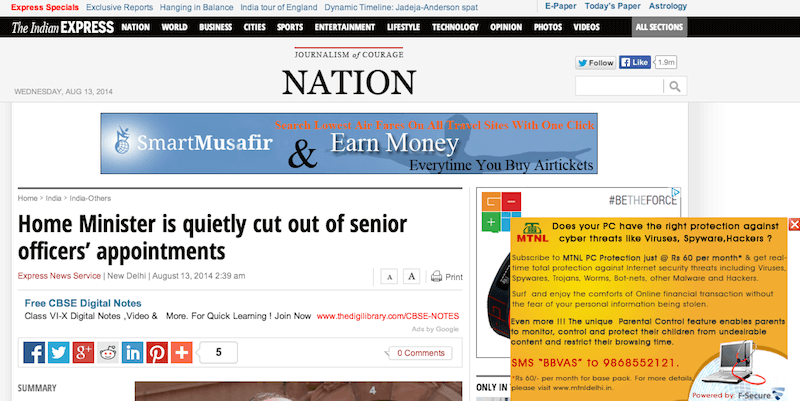
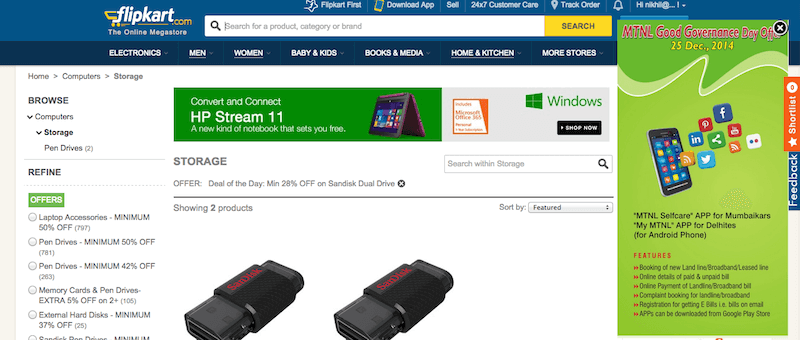
Well yes, I am sure if you use MTNL you must have noticed these ad popups recently coming from bottom right side of the browser window (from past few months now). Initially I thought they are coming due to some malware or something but later I found out that MTNL is injecting these ads and these are not served by any website. They are super intrusive and scary as they once popup in mid of an online transaction which pissed me off. So let’s understand what happening here!
How and Why MTNL?
MTNL is using Adphonso, which is a rich media ad company and directly connected with ISPs, like MTNL to inject ads. Adphonso describes its services as:
The stunning new technique of advertising on the connected devices, delivers Rich Media Advertisements to potential customer through networks. The solution reads the Machine Details, Browser and OS information and Customer Behaviour along with location and delivers a relevant impression. The network architecture is simple and is directly connected to the ISP and hence avoids the need to go to a publisher and buy expensive ad slots.
IMO, this is super shady stuff with strong entanglement on our privacy. How? Well**,** since the ad network is injecting its code onto the sites via your ISP, it is keeping a track of every website you visit/everything you browse via your browser unless it is on HTTPS (which is also subjective).
Also, it is worth noting that you will see these popups in incognito mode or any private mode of the browser as well as all your traffic goes through the Internet service provider’s DNS. So the ad network (Adphonso here) receives all packet data first before it is served to you and inject ads via javascript code in an iframe. Resulting in your privacy == screwed!
How do I get rid of these popups?
Method #1 - The Host file
Well, this is the standard procedure to block your machine from sending requests to some specific server. Just add the IP address of the server and redirect it to 127.0.0.1 (Localhost/Self). In this way, machine wont be able to fetch the pop-ups from adphonso network. To do this:
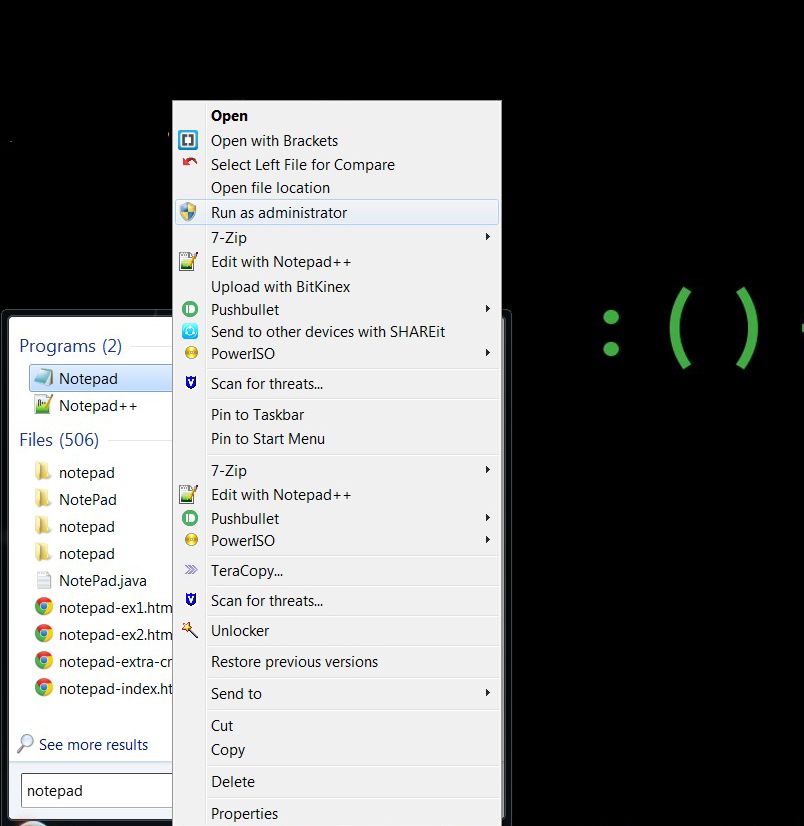
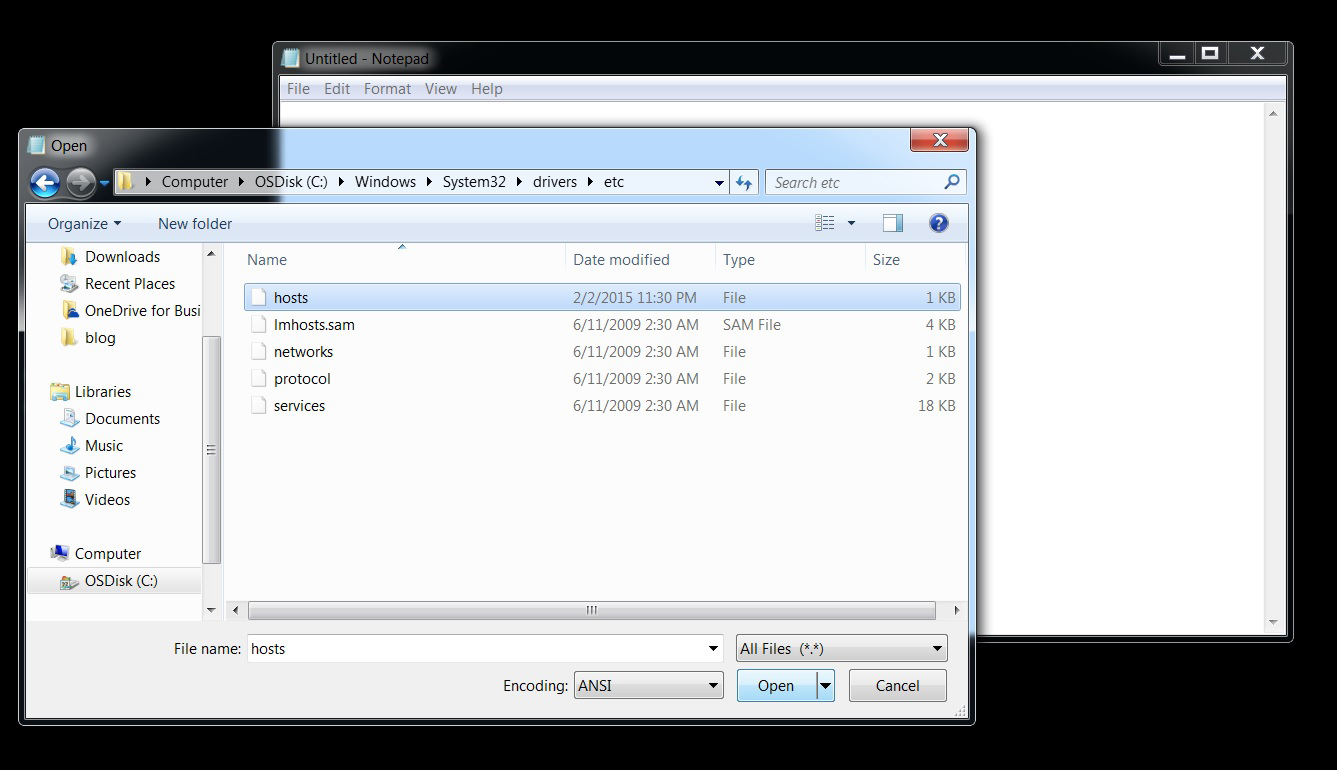
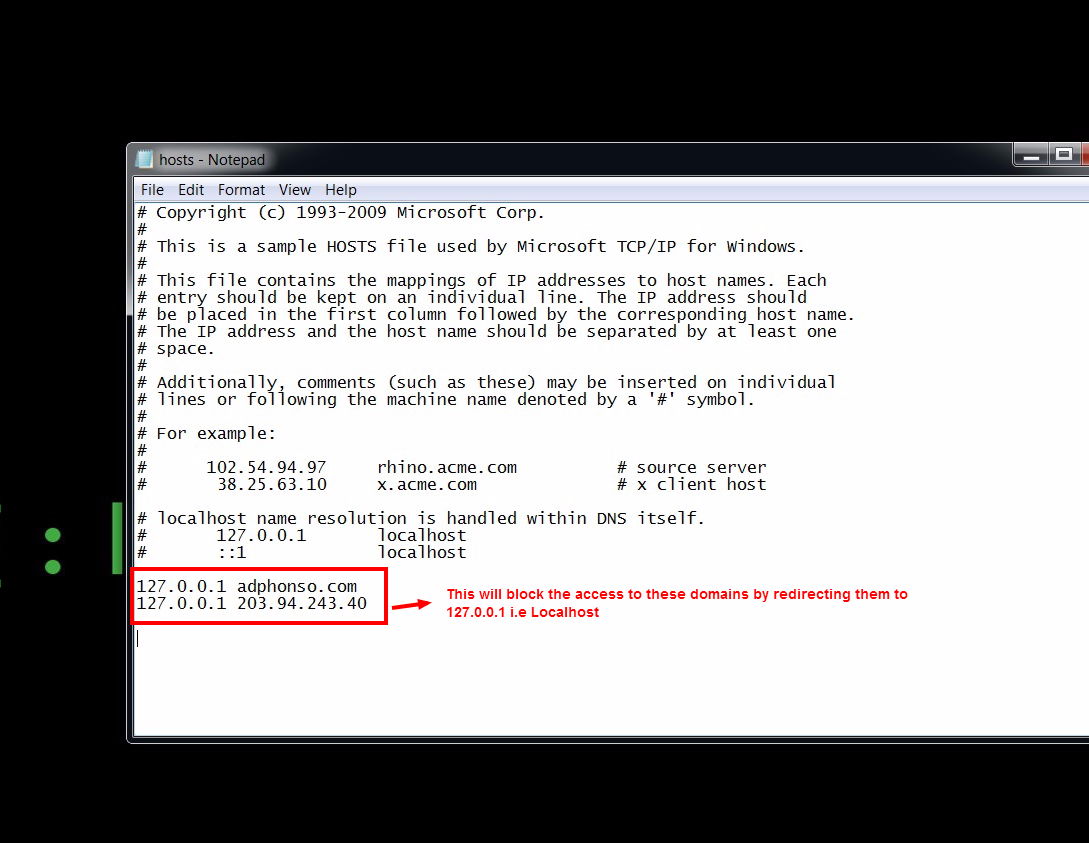
After the steps above, just clear your browser cache and reboot the system. Presto! No more annoying MTNL popup ads ;)
Method#2 - Windows Firewall Inbound rule
If you don’t have access to administrator privileges for some reason, you can always create a Windows firewall inbound rule to block the request from those IP address. This will block the IP address for adphonso.com on OS level. To do the same, follow the steps below:
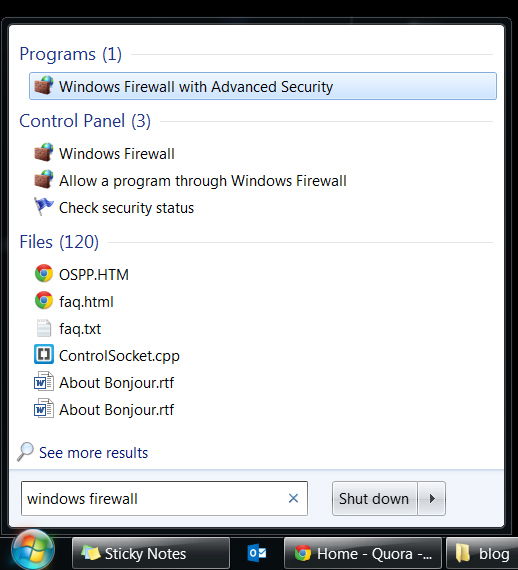
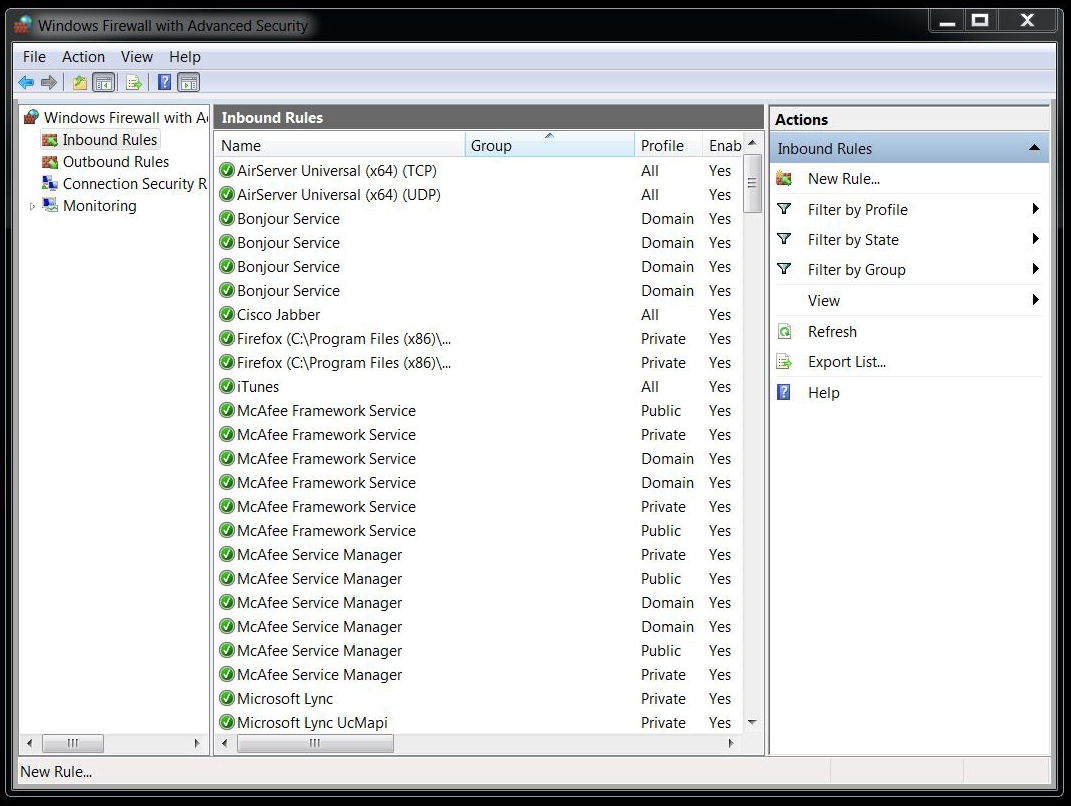
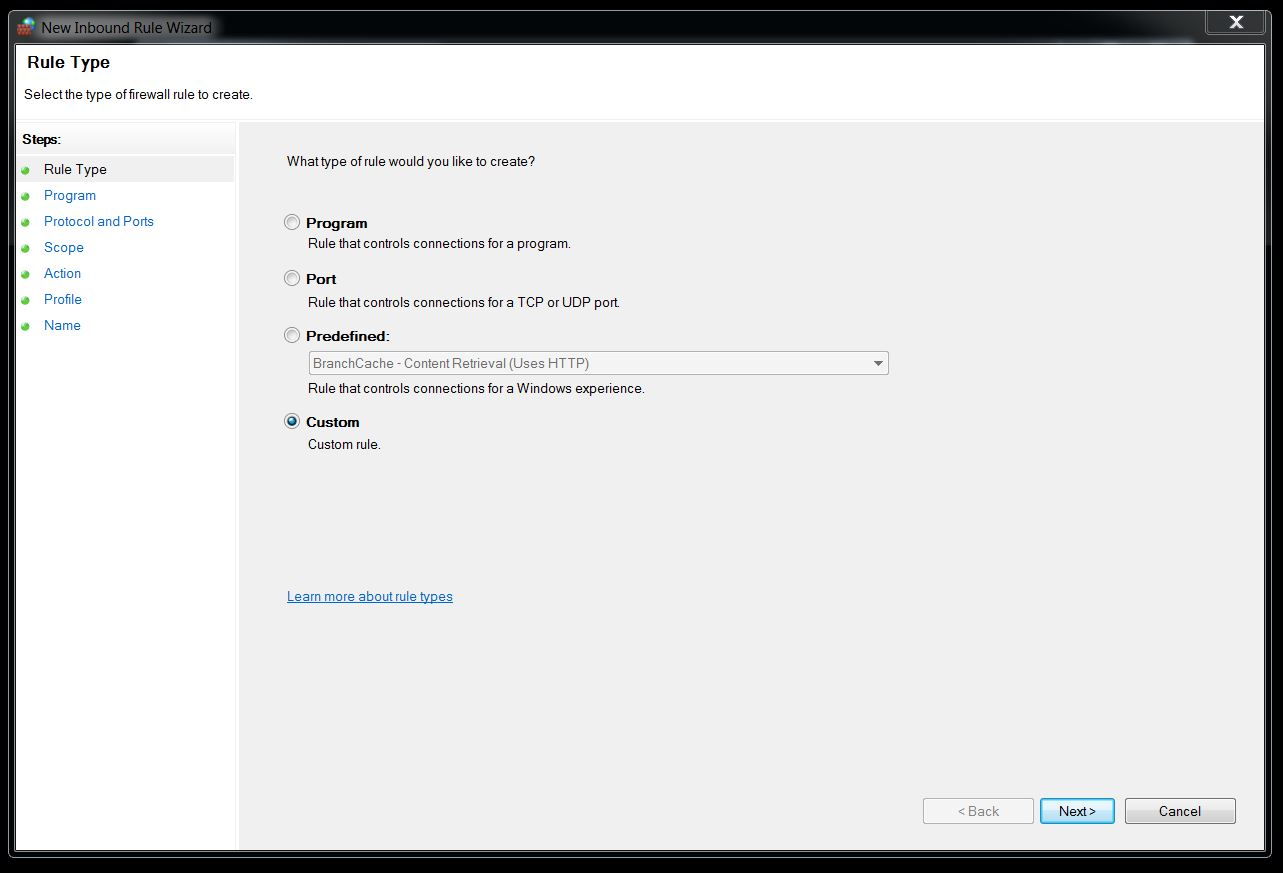
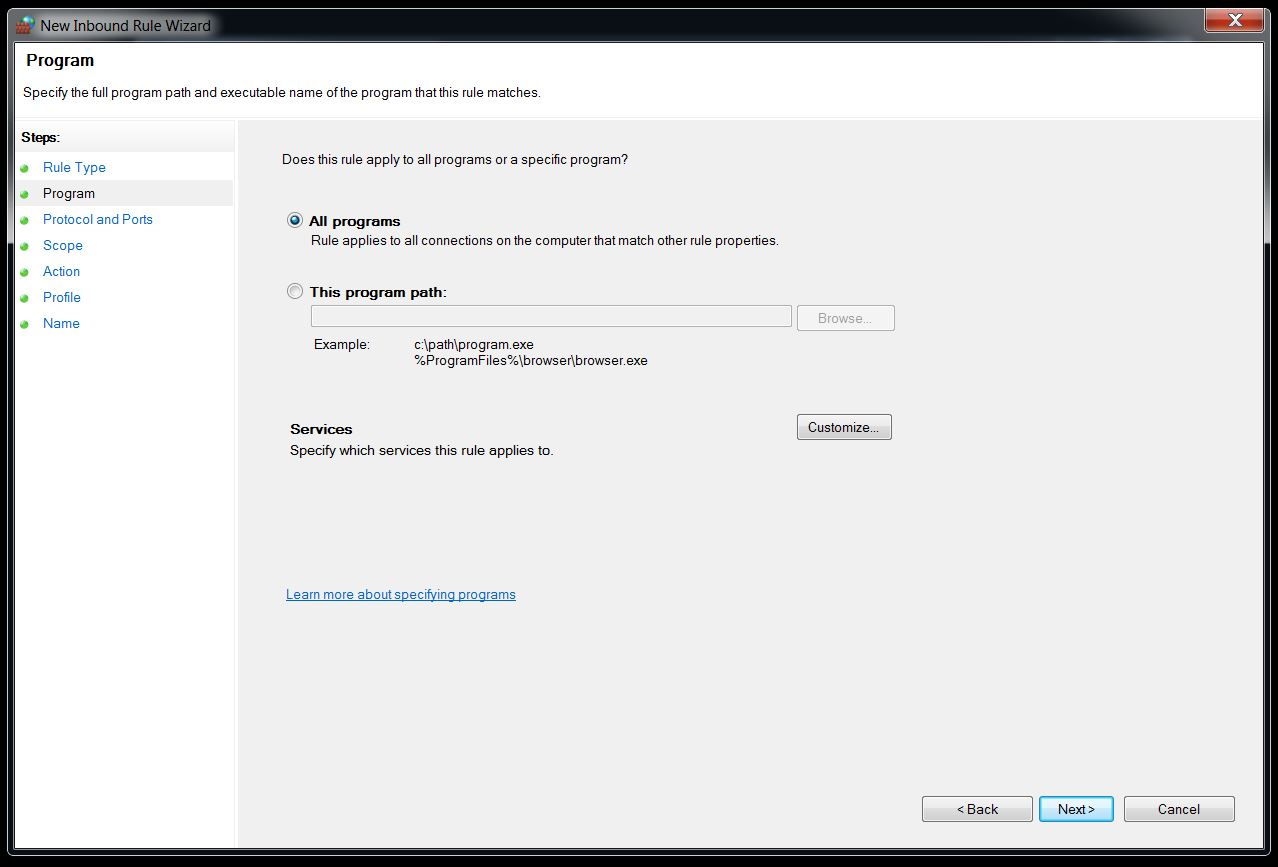
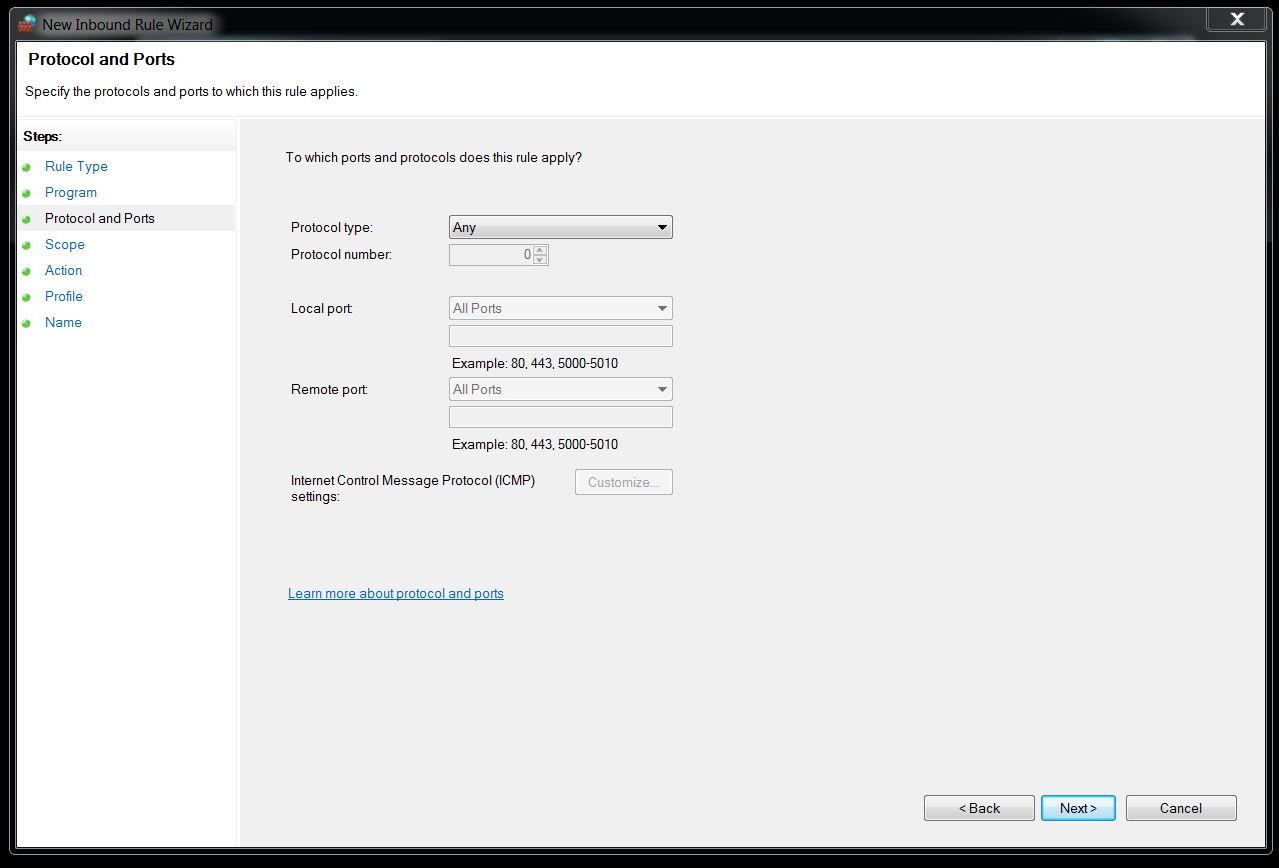
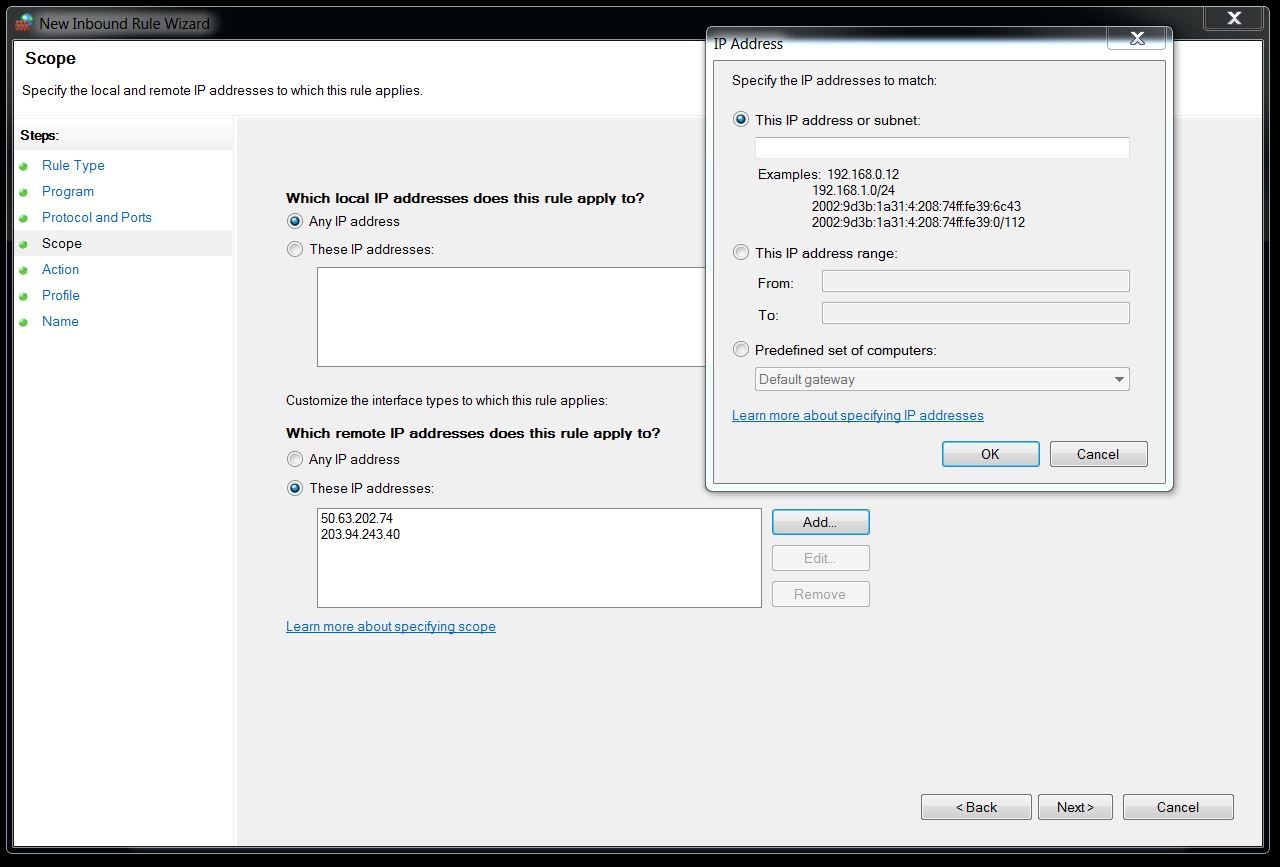
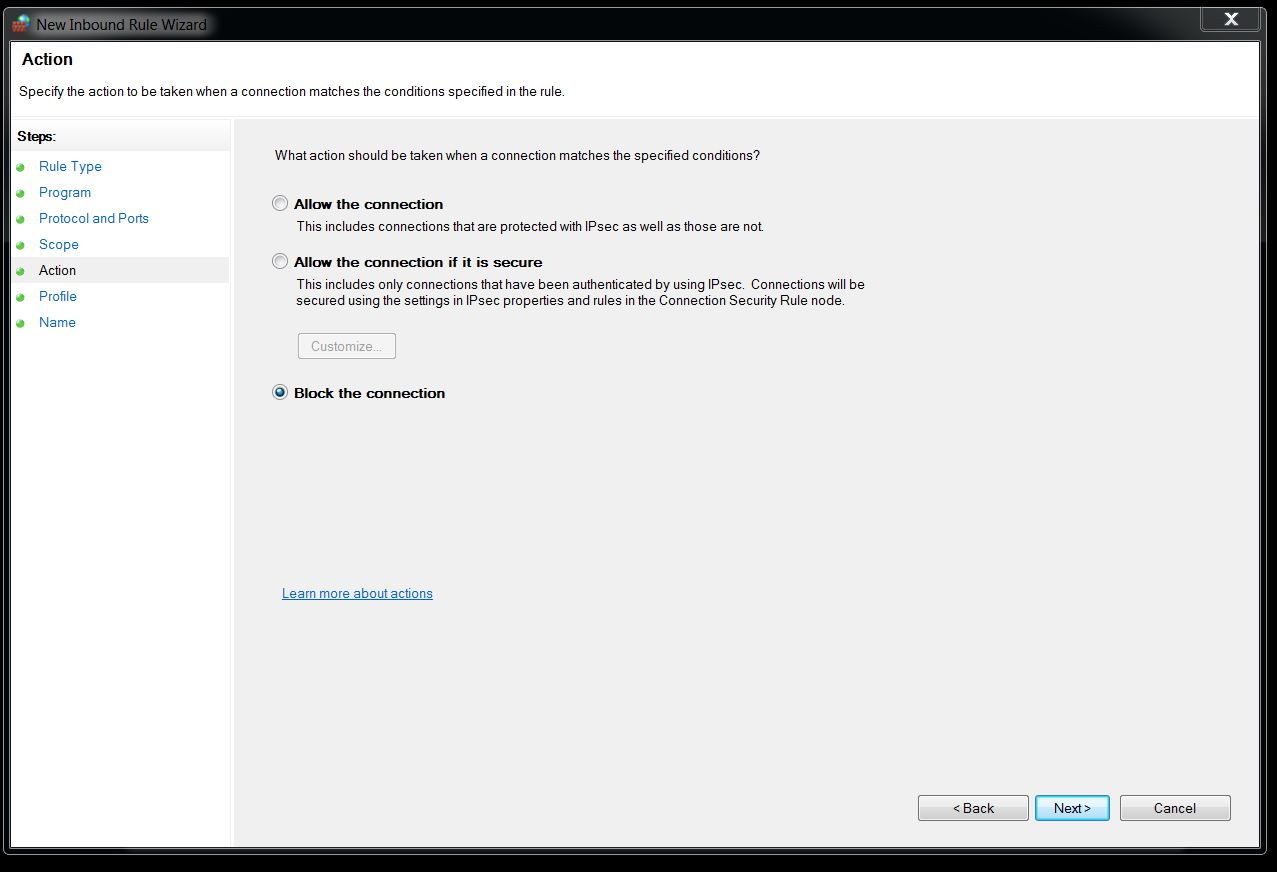
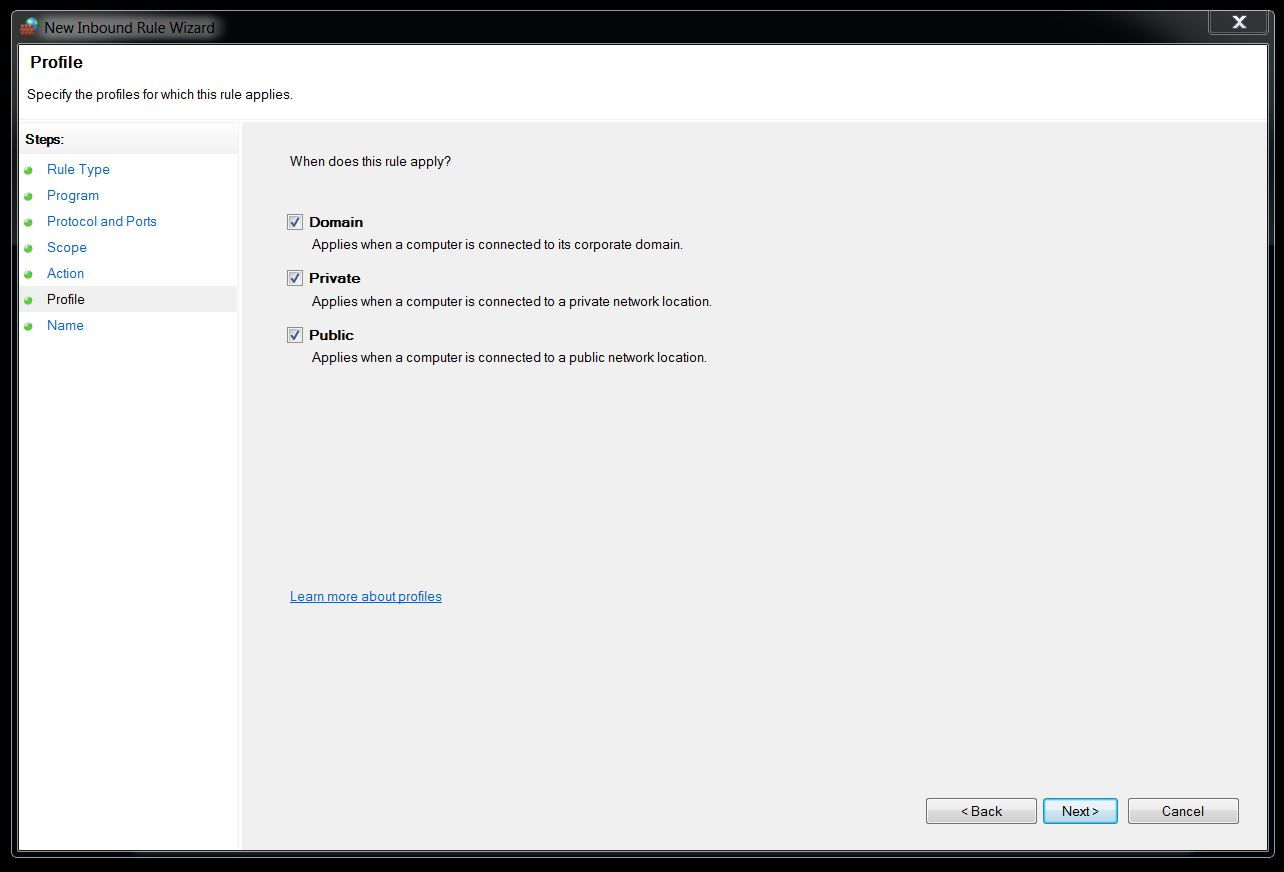
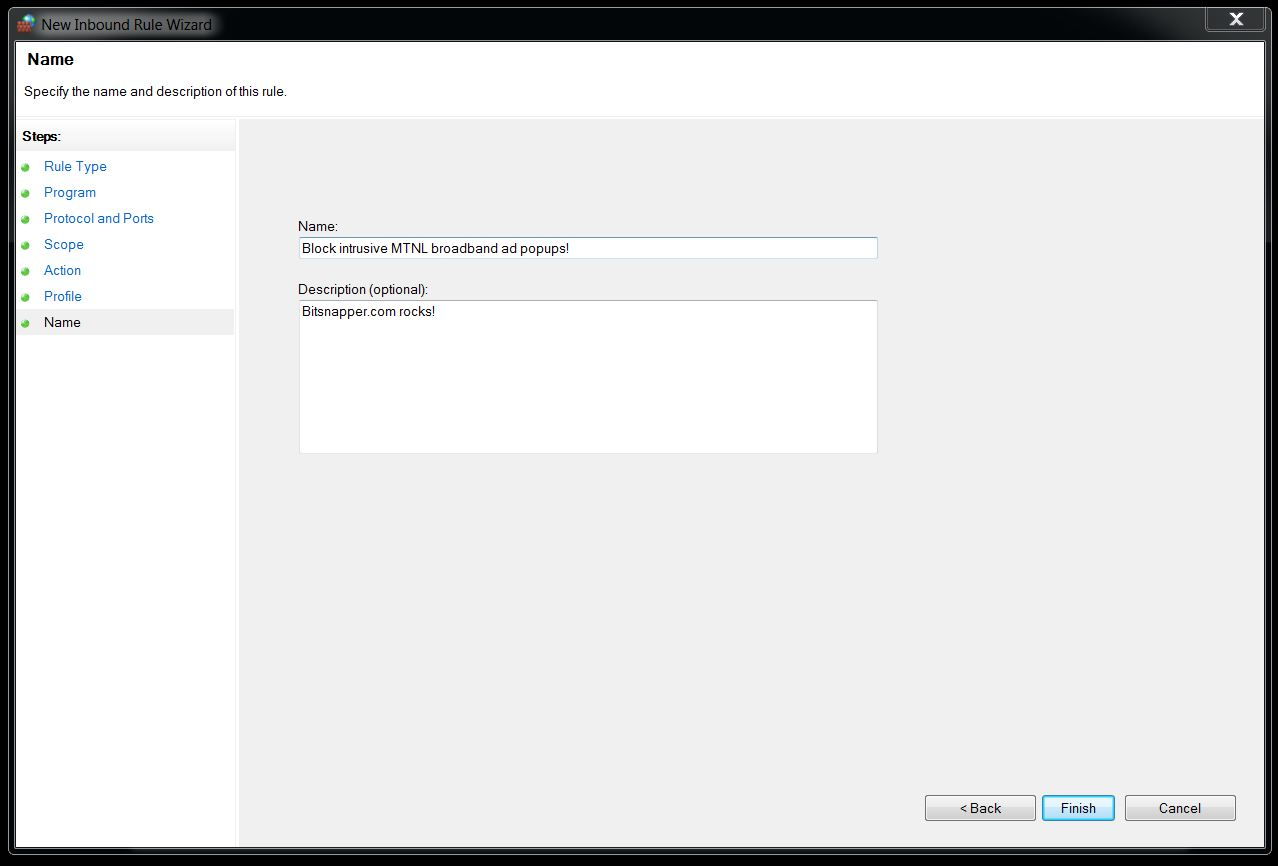
After the process make sure to clear browser cache and reboot the system. You will be good to go and won’t be presented with these annoying ad popups anymore. ;)
Method #3 - Block Adphonso via Router settings
Well the methods above will work great if you use a lan cable to access internet only on your pc or laptop but since this is 21st century - The age of portable web, almost all of us have multiple devices like smartphone, tablets etc to access the web via WiFi. The Method #1 and #2 will only block ads on machine level (for respective pc and laptop), so we need something universal which will block these popups across all the devices. This method will save us from hassle of setting up an Inbound rule or make changes in Host file.
To do the same, follow the steps below:
-
Open the router configuration page - 192.168.1.1 in web browser.
-
Login via defacto username/password: admin (if you haven’t modified it).
-
Navigate to Access Management > Filters.
-
Chose URL Filter in Filter Type Selection and enable it from the radio button below it.
-
Enter http://adphonso.com and 203.94.243.40 in URL Index 1 and 2.
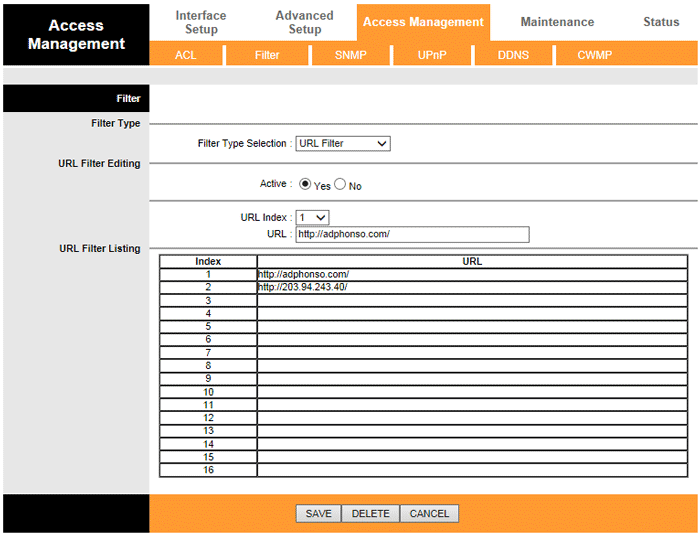
MTNL router > Filter URL -
Hit save and reboot the router from Maintenance.
But this is wrong, right?!
It’s really a shame that we, a customer, have to resort to such workarounds and hacks after paying relatively more bucks per month for poor service and bandwidth. MTNL being a government-owned service provider should not resort to such cheap means of promotion and instead should work forward to improve their infra and support team which is in ruins.
I would suggest all of us MTNLers to drop a complaint by calling, emailing or visiting the exchange in person for which details can be found here. Better yet would be to move ahead and look for other options and boycott mtnl. We do have a lot of competitive Internet service providers in Delhi now but still not as competitive as Bangalore which is a nerd dreamland(maybe, a future post with explanation eh?).
So, what’s your take on MTNL’s shady implementation of javascript injected popup ads? Let me know in comments below!
Do your bit:
One of our reader, Akshay Badhe, has made it easy for you to complaint against this shady practise to MTNL by drafting up a template. All you need to do it, copy paste the draft below, edit your details and email it to MTNL.
To,
ED / GM / PGM / CE,
MTNL Mumbai,
15th floor, Telephone House,
MTNL Road, Prabhadevi, Dadar (West),
Mumbai – 400 028
Dated: <Date>
Respected Sir,
I am a customer of MTNL for many years. For last few months I am getting ads on my Web Browser from MTNL (I have attached screen shot of the same). After further Investigation I came to know that you are:
-
Injecting data (Ads) in the requested information, which means you are altering the information.
-
You are collecting my:
- Machine details
- Browser Details
- OS Information
- My usage pattern
- And my location
All of that, without my approval or knowledge which means you are spying on my web browsing.
-
You are collecting all my personal data for your own financial benefits.
-
You are breaching my Privacy by collecting my search & behavior pattern.
-
These ads are affecting my speed of access which I pay for.
I expect you to take required measures & stop these shady practices of breaching my privacy else I won’t have any other option than moving on to other ISP and would encourage all my friends and relatives to do the same.
Regards,
<Your name>
<Your number>
Keep reading

How to disable ads from uTorrent like a pro?
Admit it! Web user like us hates ads to the core! They are just omnipresent. Discover how to disable ads from uTorrent & make p2p file sharing a breeze?
5 cool ways to surf blocked sites in your office/college
One click process to unblock banned sites in Chrome, Windows, Android, and iPhone. Now you can watch youtube, download torrents without getting noticed.
Getting around site blocks in India: VPNs, proxies and one nasty VPN scam
How to get back on Telegram during India's ban, why incometax.gov.in barely loads for me without a VPN, and a fake VPN sponsorship that stole a dev's creds.
43 commentsfrom BitSnapper
Carried over from the original post and read-only. Add a new comment below.
Wow! Thanks a lot. I was annoyed by these ads. MTNL is really messing up with it's customers.
I know right? MTNL should not resort to such cheap methods to promote their business and should instead focus on improving quality of their services! :(
Thanks for the post. I am MTNL customer from thane and I am seriously considering switching to another internet service provider due to pop-up ads.
Yes sir. You should drop a mail to MTNL and TRAI (in cc) and openly tell them that you are switching and then you should switch. But the trouble is even Airtel is doing shaddy business by monitoring the web-browsing habit for it's users. Maybe it's time to boycott all suck TSP/ISPs. :(
I have created a reply for them You can copy & paste them. You can find their email IDs from these links.
http://mtnlmumbai.in/index.php/contactus
or
http://delhi.mtnl.net.in/gm_dgm.htm
Date: 09-09-2015
To,
ED / GM / PGM / CE,
MTNL Mumbai,
15th floor, Telephone House,
MTNL Road, Prabhadevi, Dadar (West),
Mumbai - 400 028
Dear Respected Sir,
I am a customer of MTNL for many years.
For Last Many months I am getting ads on my Web Browser from MTNL (I have attached screen shot of the same). After further Investigation I came to know that you are
1. Injecting data (Ads) in the requested information, which means you are altering the information.
2. You are collecting my
a. Machine details
b. Browser Details
c. OS Information
d. My Behaviour
e. And My location
Without my approval or knowledge which means you are spying on my searches.
3. You are collecting all my data for financial benefits.
4. You are breaching my Privacy by collecting my search & behaviour pattern.
5. These ads are affecting my speed of access which I pay for.
I expect you to take required measures & Stop these shady practices of breaching my privacy.
Great effort Akshay! I will add this in the post above so that people can do their part for it. :cool: :idea:
Thanks for the info only problem that I am facing right now is that I don't use the MTNL Provided router and instead us the TP-Link WDR 4300 router. I am not able to find where I should put in the URL Filters in the router as you have suggested,
Can you help Jatin?
Try logging into Admin console for Router settings. Just connect your machine use ethernet to the wireless router and hit 192.168.1.1 and you should be in. Let me know?
Thank you for sharing this information. Those ads were annoying.
No problem Gaurav. Cheers! :D
Or you could just use AdBlock :) Do not that the IP is not same evreytime
I think I did mention that using any plugin won't help here because it's is JavaScript injected ad on runtime that happens in between when ISP is fetching the data-packets and serving to the client, i.e. You! :)
Thanks Jatin. Those MTNL pop-up ads were really annoying, not to mention breach of my privacy by collecting personal info I enter (or surf) using any web browser. Strange that MTNL, being a PSU with no pressure of profitability, is resorting to such dirty tricks, while private ISPs haven't yet done so.
I agree Ramesh. It's a shame that instead of improving their service and infrastructure, they are now breaching privacy of their own customers. :(
Thx for the gr8 post...I'm using TP-Link TD-W8968 Router, I can't seem to find the access management settings on its page...could u pls guide me on that...
Hello Mohd. Haneef,
Did you try reading your modem's user guide? It should be there.
Here is the link to it: http://www.tp-link.in/resources/document/TD-W8968_V3_User_Guide_1910010970.pdf
Go to page: 106. There you will find the same. :)
Thx for the help....but my router is a version 1....the guide u pointed was for version 3...anyways...my router had firewall settings, so i setup a rule there...hope it works out....anyways thx for the response & support....
That's Great! :D
Here is the User manual for v1 just in case: http://www.tp-link.in/Resources/document/TD-W8968_V1_User_Guide.pdf
Let us know if it doesn't work for you.
Cheers,
Jatin
I had the version 1 user guide....but thx anyways...the firewall rule didn't work....I use chrome and i right clicked on the popup window to inspect the element and i found ip addresses different than what u stated here...namely - 203.94.227.140 & 203.94.227.138...so i gave an ip address range in my rule as 203.94.227.140 to 203.94.243.40....but i'm still getting the popups...but lesser and on fewer pages than before...so i think i'm still stuck up and confused...I really need to do this at the router level 'cos I'm using the router only as a wireless device...and my wireless network includes my pc and mobile devices...so i still need some help & guidance here...hoping for ur positive response...
Hello!
Follow the approach here and just Deny access for all time in the router's firewall. Let me know how it works out?
http://www.tp-link.com/sa/faq-467.html
Thx Jatin for the help...there was no option to reply so am writing as a separate comment...I had already gone thro' the post u suggested...it details abt a LAN host to be added...but to block we need to add a WAN Host...I already did that as stated in my earlier comment...after restart, popups seem to have been blocked...but occasionally and rarely they do seem to popup especially on this page...otherwise its OK...so i think the problem is solved....thx for all the help & suggestions...if the problem arises again then maybe i'll bother u again....hope u won't mind...thx....
That's great! Feel free to ask for help anytime.
Also, rare popups could be due to a different IP. Make sure to inspect and check the source of them and block them too. :cool:
Good day! :)
Thanks Jatin. The ad used to annoy even while surfing on Mobile.
No problem! Cheers! :)
Thanks, Jatin
MTNL is my favorite but their ads, I hate it so much and it's annoyed me a lot. The tips that you shared here looks useful and I'll try them and hope it works.
Hey Mia!
Sure!
Let me know if you face any problem while doing the same. :cool:
Cheers,
Jatin
To stop unwanted popups you should install pop up blocker software.It will stop phishing scam,Annoying ads,misleading message etc.Here i am suggestion you some pop blockers.popup blocker pro. ablockplus.org, popupblocker etc.
Hi Alva,
If you read the post, I have mentioned that no Adblock extension or pop-up blocker software helps as the ads are pushed by the ISP after receiving the response from the server. So, we have to block the same on router level only. :)
Cheers,
Jatin
Hey man
thanks for the info.
can u please tell me how you were able to find out the url/IP address of the source of these ads? I mean adphonso or whatever the fk in this case. I use chrome with adblock so I dont see them in browser but other places other than browser, like a game client or my phone browser etc. still shows up these ads. I tried blocking them ads by putting that IP addesss and website mentioned by you in all threee places, host file/windows firewall/router firewall but somehow its not working.
if you can share how to find out IP/domain of where the ads come from, I can try doing that and add them to block list and see if it works.
Thanks again :)
Hello noobUser,
There are multiple ways actually, but the best one to use is Chrome's Developer tools. Just follow the below:
#1. Disable your Adblock extension.
#2. Open a new tab and press F12 key. You will notice a console will open.
#3. Load the page where you observe the ad pops.
#4. Right click the ad and click "Inspect element" and check the src filed for some image url.
#5. Switch to "Network" tab in the Dev console and enter that src name in the Filter and try to find that resource.
#6. Once found, click the resource and in a newly open secondary panel of right, chose general.
#7. You will find something like Remote Address:216.58.196.97:443 there. This is the address you have to block in your router settings. :)
I know, it can be complicated. If you want I can add screenshots tonight, when I reach home.
HI
I am facing same problem ,but its not popup ads - my browser is being redirected always - no virus,no adawares,no malwares,used malwarebytes,adware,and other tools on internet,finally i reinstall the system,still the same ads - so its ISP AIRTEL doing this - i dont know what can be done for this, but i am using dnsjumper , it stops every bad activity,now my browser is no more redirecting, ...But helas,the internet speed has gone down to 6 or 7 kbps frol 70....Still waiting for a better solution
Best regards
Vick
Hi Vick,
I think there is a very easy way to troubleshoot this. Do you have a WiFi connection or are you using a LAN cable? If you are also getting redirects on your smartphone connected over WiFi, then it's quite rare and surely an issue with your ISP's router. But, if you are only getting those redirects on your PC/Laptop connected via LAN, I think your machine is being ridden with Malwares and Browser jackers which aren't easy to get rid off, but we can try. Let me know your findings?
Regards,
Jatin K Malik
I use two profiles in Chrome browser and I have the "Send a Do Not Track request" setting enabled in one profile and disabled in the other one. I have observed that the banner ads from BSNL do not show up where I have Do Not Track enabled.
That's really interesting. BSNL must be tracking on client level.
I used ad-block for the issue.
Simply right clicked the ad and select adblock -> block this ad.
Yes but as I wrote above, it will only work for that specific machine. So, you will see ads on other devices if you are using WiFi. Best way is to block ads at router level.
It's a shame you don't have a donate button! I'd without a doubt donate to this brilliant blog!
I guess for now i'll settle for bookmarking and adding your RSS
feed to my Google account. I look forward to fresh updates and will share
this website with my Facebook group. Talk soon!
Hello Jaki,
Glad this post helped you. I really don't have any need for donation.
Thanks,
Jatin
Ignomorons! Booh MTNL! Like the real shit living out there actually used the internet or doesn't know how to evade spying.
They are so clever adphonso.com don't even respond to a ping address and they keep changing IPs, I got a 50. sub net address on trying to get to contact that URL! I also notice a lot of ad traffic coming lately on this ISP, but all they kin do is try and pop up! Tsk Tsk!
Herez what the nslookup on adphonso.com returns right now:
Non-authoritative answer:
DNS request timed out.
timeout was 2 seconds.
Name: adphonso.com
Address: 50.62.98.1
But one IP geolocater reports it as being hosted by GoDaddy in AZ:
http://www.geoiptool.de/?ip=50.62.98.1 Is MTNL scamming IPs now? Looks like they are!
Just morphed to 50.62.98.1 so MTNL is phishing IPs now....... lol! No wonder they crawl! 4G Wimax is over the moon compared to this antiquated network!
50.62.98.2
Leave a comment