I left GoDaddy after 15 years and moved every domain to Porkbun with zero downtime
Why I finally walked, how I picked Porkbun over Cloudflare and Namecheap, and the exact downtime-free playbook you can steal for any registrar move.
 Jatin Kumar Malik First published on
 Medium
Why I finally walked, how I picked Porkbun over Cloudflare and Namecheap, and the exact downtime-free playbook you can steal for any registrar move.
Fifteen years. That is how long I stuck with GoDaddy before I finally moved all my domains out. Eight of them, once I counted the parked ones I had forgotten I owned.
I kept putting it off because I assumed a migration meant a scary window where my sites would go dark. It turns out that fear is mostly misplaced. If you understand one simple thing about how domains work, you can move a whole portfolio and never drop a single request.
This is the guide I wish I had when I started. The method works for any registrar-to-registrar move. I will use my real migration as the worked example: GoDaddy out, Porkbun in, with most of my sites running on GitHub Pages.
Here is the post that kicked the whole thing off:
Why I finally left GoDaddy
I did not leave over one big betrayal. I left because of a hundred small ones that add up when you own more than a couple of domains.
If you have bought anything from GoDaddy recently, you know the checkout. It runs across seven or eight screens, and half of them have add-ons pre-selected for you. Click through too fast and you have signed up for a website builder, an email plan, and a security bundle you never wanted. Some of that even auto-enrolls: I have watched Microsoft 365 email and a “Websites + Marketing” plan attach themselves to domains I only wanted parked.
Then there is the pricing. WHOIS privacy, which almost every modern registrar throws in for free, is billed as a roughly twenty-dollar-a-year add-on. Renewals creep up quietly until a plain .com I have owned forever is renewing at three or four times what it should cost. And in early 2025 they cut the refund window from thirty days to seven, which tells you where their priorities sit.
None of it is illegal. It is just a business model built on hoping you are not paying attention. After fifteen years, I got tired of paying attention.
The three contenders
Once I decided to leave, three names came up over and over: Cloudflare, Porkbun, and Namecheap. Here is how they actually compared for me.
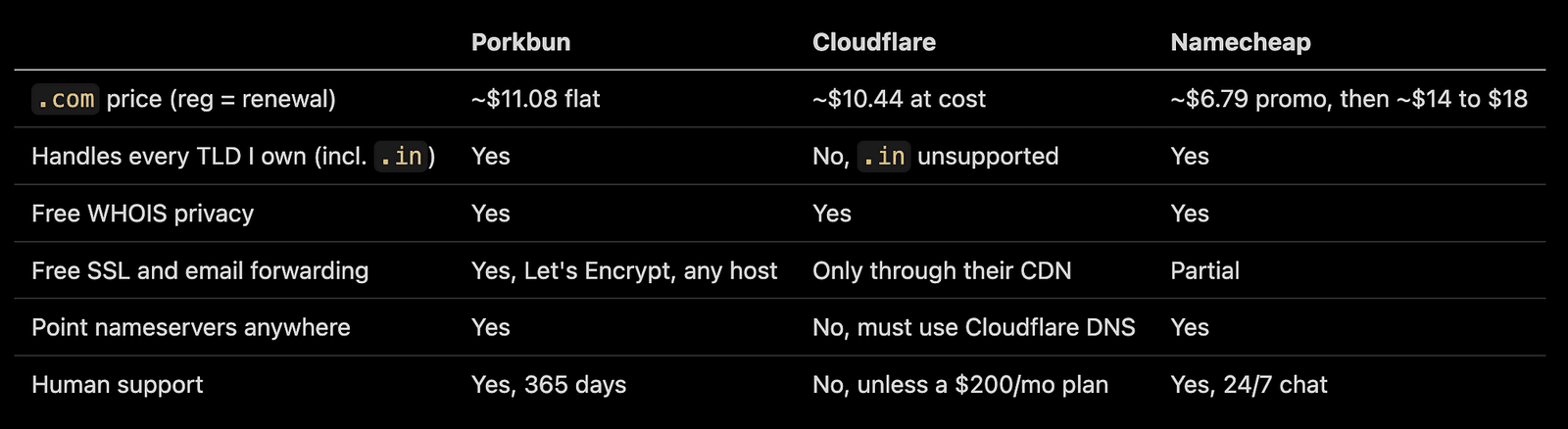
Cloudflare is the cheapest by a hair and has genuinely excellent DNS. But it comes with two strings I did not love. You are forced to use Cloudflare’s own nameservers, and there is no human support unless you are on an expensive business plan.
Namecheap I ruled out on renewal math. That six-dollar first year balloons past fourteen at renewal, and I plan to own these domains for years, not months.
The .in domain that killed Cloudflare for me
There was also a hard blocker. One of my domains is j47.in, and Cloudflare Registrar does not support .in at all.
This is not a fluke. Cloudflare supports basically every generic TLD, but only a short list of country-code TLDs: .co, .io, .me, .us, .uk, .ca, .mx, .nz, .tv, .fm, .cc, and .ai. Almost every other national extension is missing, including big ones like .de, .fr, .it, .es, .eu, .au, .jp, and yes, .in. They also do not do internationalized or punycode domains.
So Cloudflare would have forced me to split my portfolio across two registrars. Porkbun handles .in and the rest of those ccTLDs happily, which meant one login for everything. That settled it.
Is Porkbun even trustworthy?
Fair question before you hand over eight domains. The pig branding does not exactly scream “enterprise.”
Porkbun has been around since 2014. It is the registrar arm of Top Level Design, a company that actually operates its own TLDs like .design, .ink, and .wiki, so these are people who work at the registry level, not just resellers. They are ICANN accredited, they crossed three million domains under management in late 2025, and they have been USA Today’s top-rated registrar three years running with a five-star Trustpilot average across tens of thousands of reviews.
The one honest knock: support is not 24/7. It runs 365 days a year but on business hours, so a 3am emergency waits until morning. For a batch of GitHub Pages sites, I could live with that.
The one idea that makes zero downtime possible
Almost nobody explains this part clearly.
A registrar transfer and your DNS are two separate systems. Moving who you pay for the domain does not, by itself, change where the domain points. The only thing that can take your site offline is your nameservers going quiet.
And that is the trap with GoDaddy specifically. If you use their default nameservers, the ones ending in domaincontrol.com, those stop answering the moment a domain leaves GoDaddy. So if you just yank the domain out, your DNS falls off a cliff.
The fix is simple once you see it. Move your DNS to the new home and confirm it is serving correctly before the registration transfer ever completes. Do it in that order and there is never a gap.
Step 0: map your DNS before you touch anything
You cannot recreate records you did not know you had. Before I started, I ran dig against every domain to build a full inventory of nameservers, where the site points, email, and verification records.
for d in yourdomain.com anotherdomain.com; do
  echo "==== $d ===="
  dig +short NS  "$d"     # who answers DNS today
  dig +short A   "$d"     # where the apex points
  dig +short www."$d"     # the www record
  dig +short MX  "$d"     # email, do NOT lose these
  dig +short TXT "$d"     # SPF, domain verification, etc.
  dig +short DS  "$d"     # DNSSEC, if present
done
This one pass saved me. It confirmed every domain was on GoDaddy nameservers, that none had DNSSEC, that seven of eight were plain GitHub Pages, and it caught the two landmines I talk about below.
Protip: Use EXODUS at checkout for transfers to save $1 / domain.
The zero-downtime transfer, step by step
This is the sequence I ran for each domain. Porkbun documents a version of it, and it maps cleanly onto any registrar that lets you edit DNS before the transfer finishes.
- Leave the domain locked at the old registrar. Counterintuitive, but the lock is what stops the transfer from completing before your DNS is ready.
- Start the transfer at the new registrar. When it asks for the auth or EPP code, the domain is still locked so you do not have a usable one yet. Enter a placeholder to get past the screen. (Porkbun posts transfer coupons on their socials from time to time, so it is worth checking before you pay, I just used XX.)
- Rebuild your DNS at the new registrar. Re-enter every record from your
diginventory, formatted exactly the same. Take your time here. - Switch the nameservers at the old registrar to the new ones. For Porkbun that is
curitiba,fortaleza,maceio, andsalvadordotns.porkbun.com. Because you pre-loaded the records in step 3, the site keeps resolving through the switch. - Wait 24 to 48 hours for the nameserver change to propagate, then verify (see below).
- Unlock the domain and copy the real auth code from the old registrar.
- Finalize the transfer with the real code and approve the confirmation email. Since your DNS already lives at the new host, this last step has zero effect on your live site.
The magic is in the order. By the time the registration actually moves, your traffic has already been served by the new nameservers for a day or two.
If your sites are on GitHub Pages
Most of mine were, which made the DNS side trivial. GitHub Pages needs the same handful of records everywhere:
A      @     185.199.108.153
A      @     185.199.109.153
A      @     185.199.110.153
A      @     185.199.111.153
CNAME  www   yourusername.github.io
Two tips that are easy to miss.
- Add your custom domain in the repo’s Pages settings before you point DNS at it, otherwise you leave a small window for someone to hijack the subdomain.
- And since GitHub’s IP addresses never change during a move, its Let’s Encrypt certificate just keeps working. Re-tick “Enforce HTTPS” after the dust settles and you are done.
The gotchas that will bite you
The generic steps are easy. The details are where sites break.
Email is the big one. One of my domains routed mail through Mailgun. A single missed MX record there means silently broken email, and email failures are the kind you notice a week too late. If a domain has any mail on it, open the old DNS panel by hand and copy every last record, including SPF and DKIM entries that often hide on a subdomain like mg.yourdomain.com where an apex dig will not show them.
Do not transfer a domain that is about to expire. I had one expiring in about four weeks. Transfers can take several days, and if one stalls past the expiry date you can actually lose the domain. If it is close, renew it at the old registrar first to buy a safe year, then move it later.
Kill DNSSEC before you move. If a domain has DNSSEC enabled, remove it at the old registrar first. Mismatched keys after a transfer cause resolution failures that look exactly like an outage. Mine had none, which I only knew because I checked the DS records up front.
Keep your verification TXT records. Several of my domains had Google site-verification strings. Losing them does not cause downtime, but it quietly breaks Search Console and anything else tied to that proof. Carry them over.
How to verify each move
After the nameserver switch, three commands tell you everything:
dig +short NS  yourdomain.com    # should now show the new registrar's nameservers
dig +short A   yourdomain.com    # should still show the right target IPs
curl -sI https://yourdomain.com  # expect a 200
If the nameservers have flipped and the site still answers on HTTPS, you are safe to finalize the transfer.
Was it worth it?
Completely. Eight domains now live under one clean dashboard, at flat pricing, with privacy and SSL included and nobody trying to upsell me at checkout. The whole batch moved without a second of downtime, because at no point was there a gap between the old DNS answering and the new DNS taking over.
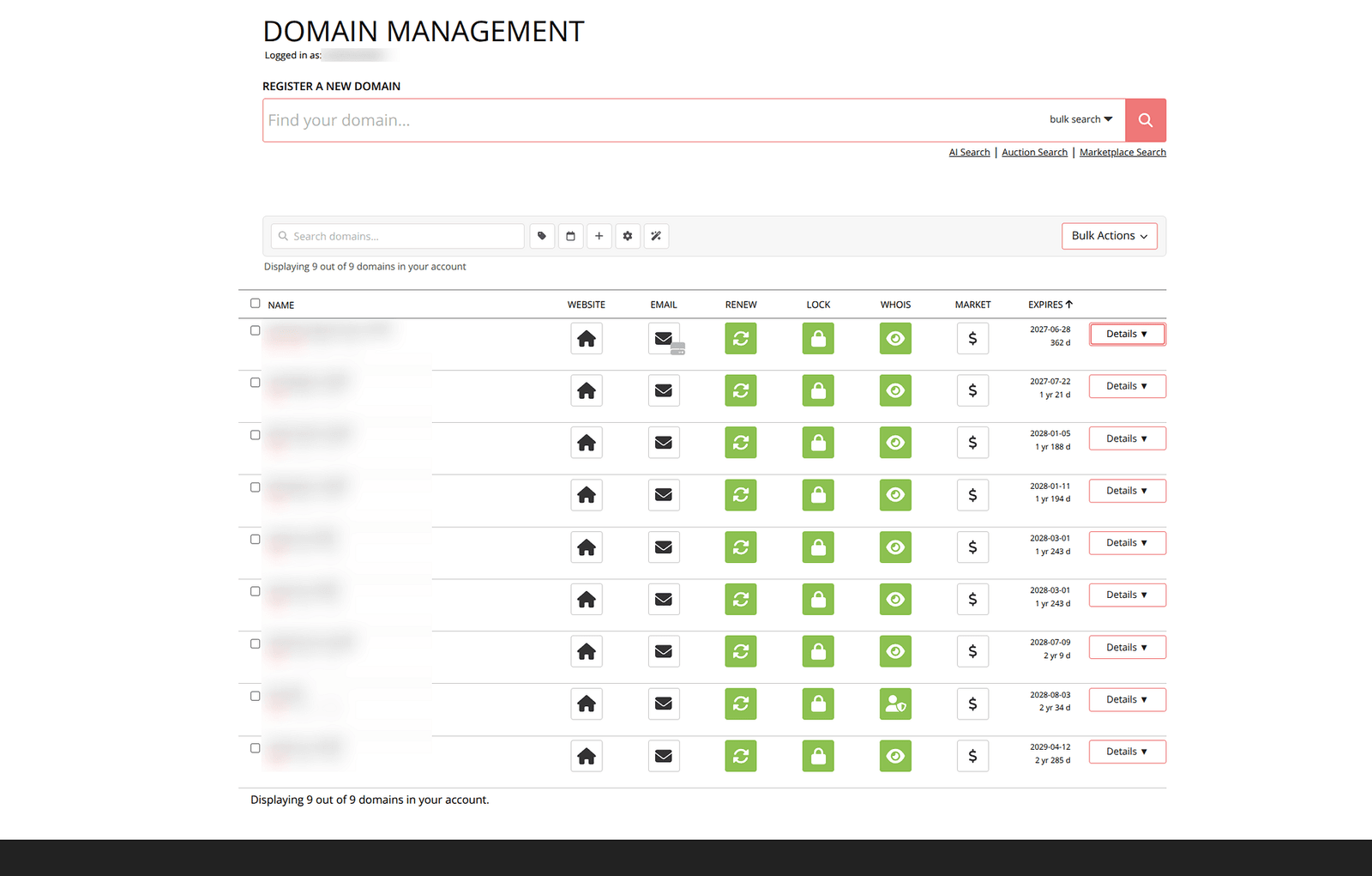
super clean dashboard
If you have been sitting on a GoDaddy account you have outgrown, the move is far less scary than it looks. Map your DNS, rebuild it at the new home first, switch nameservers, verify, and only then finish the transfer.
The 60-second cheatsheet
- Inventory every domain with
dig(NS, A, www, MX, TXT, DS) - Pick a registrar that supports all your TLDs (check ccTLDs like
.incarefully) - Renew anything near expiry before you move it
- Remove DNSSEC on the old side
- Leave the domain locked, start the transfer, rebuild DNS at the new registrar
- Switch nameservers, wait 24 to 48 hours, verify with
digandcurl - Unlock, grab the real auth code, finalize
- Re-check email, HTTPS, and any verification records
- Start with your least important domain as a test run
Start small, prove the process on one throwaway domain, then run the rest on autopilot. That is exactly how I did it, and I only wish I had done it years ago.
Keep reading
Getting around site blocks in India: VPNs, proxies and one nasty VPN scam
How to get back on Telegram during India's ban, why incometax.gov.in barely loads for me without a VPN, and a fake VPN sponsorship that stole a dev's creds.
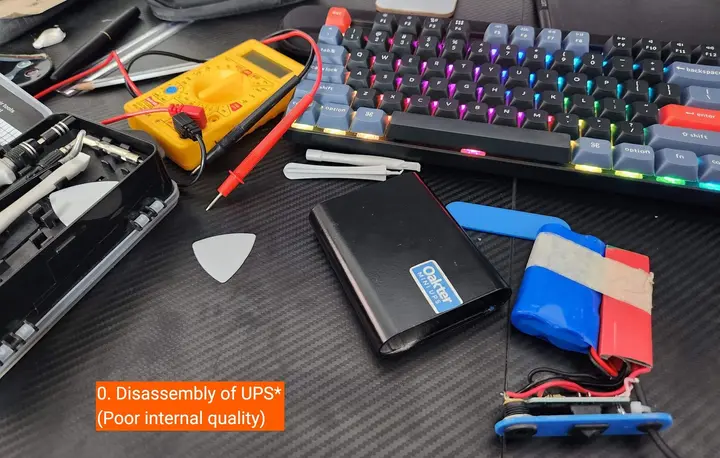
I opened up my Oakter Mini UPS and it's not really a UPS
My router started rebooting at random a year after I bought an Oakter Mini UPS. A multimeter and a teardown showed why it's built to die just after warranty.
Renewing my Indian passport online: an engineer's UX review
I renewed my Indian passport on the Passport Seva portal in Feb 2022 and reviewed the flow like a product, sticky pop-up and broken DigiLocker included.
Leave a comment