My AI agent lives on a $3.49 VPS, and the internet keeps knocking
I skipped the Mac mini and put Clawdbot (now OpenClaw) on a $3.49 Hetzner VPS. Bots found it within hours. My hardening list, token bill and Alfred.
 Jatin Kumar Malik First published on
 X
At the end of January half my timeline was buying Mac minis to run Clawdbot, the open-source personal AI agent that lives in your chat app and can actually do things on a computer. On 25 January I asked the obvious question, “so we buying mac mini for clawdbot or what?”, and later that day I answered it myself:
don’t buy a mac mini for @clawdbot just get a hetzner cx23 instead for $3.49/mo 2vcpu / 4gb ram / 20tb bandwidth / 40gb nvme
you don’t need more!
Four weeks later I still stand by that. In the meantime the project has been renamed twice, bots have been hammering the box’s SSH port since day one, I’ve burnt through a silly number of tokens, and the agent has a name of its own: Alfred.
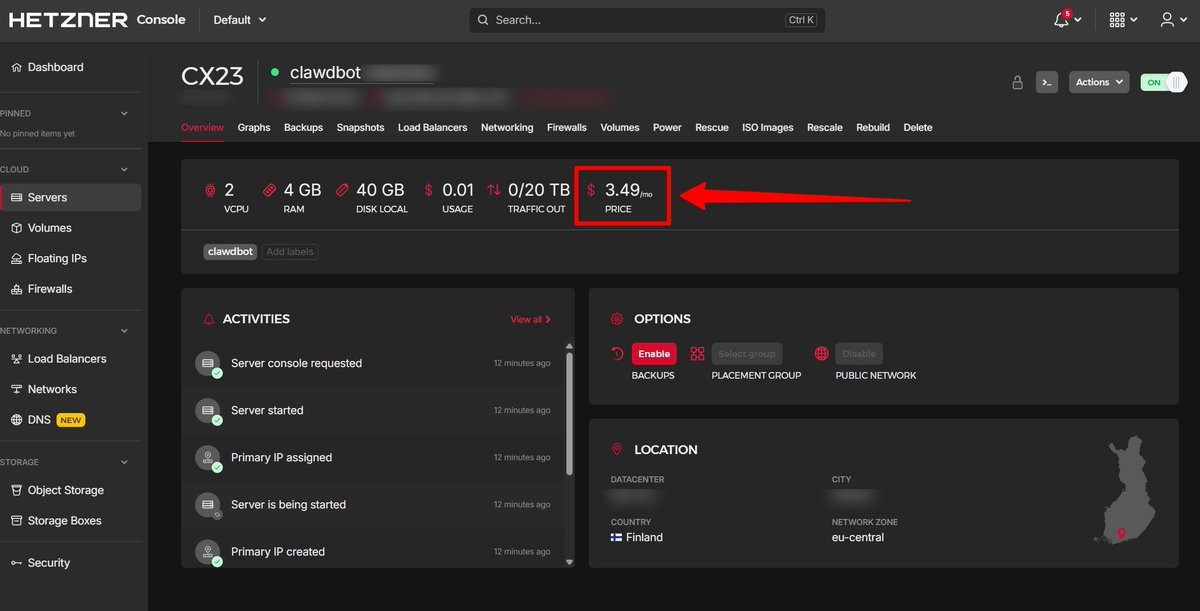 The whole “server”: a CX23 in Hetzner’s Finland location, 12 minutes after it booted.
Why a VPS and not my own machine
An agent like this runs shell commands, installs packages and edits files on whatever machine it lives on. That’s what makes it useful, and it’s also the risk. As I put it in a reply that week, a dedicated box with server hardening means I don’t have to worry about it hallucinating and nuking my main machine.
The first job I had in mind was personal assistant: point it at the stuff that demands my attention and have it filter out the few things I actually need to deal with. And if it ever goes sideways, I lose a $3.49 server, not my laptop.
The internet found it before I did
The first thing I learnt is how fast a fresh server gets noticed. Less than a day after I created the CX23, I checked fail2ban:
- 214 ban actions on SSH
- 31 unique IPs banned
- 17 of those IPs from the Netherlands (56%), then the US, Andorra, Sweden, Germany and China
That morning I tweeted that “running @clawdbot on vps without fail2ban is like leaving your front door unlocked.” Nobody is sitting at a keyboard guessing your password. Botnets made of compromised servers, VPSes and IoT devices scan the internet automatically, and when one IP gets banned they rotate to the next one. 214 bans from 31 IPs also means the same addresses kept coming back for more.
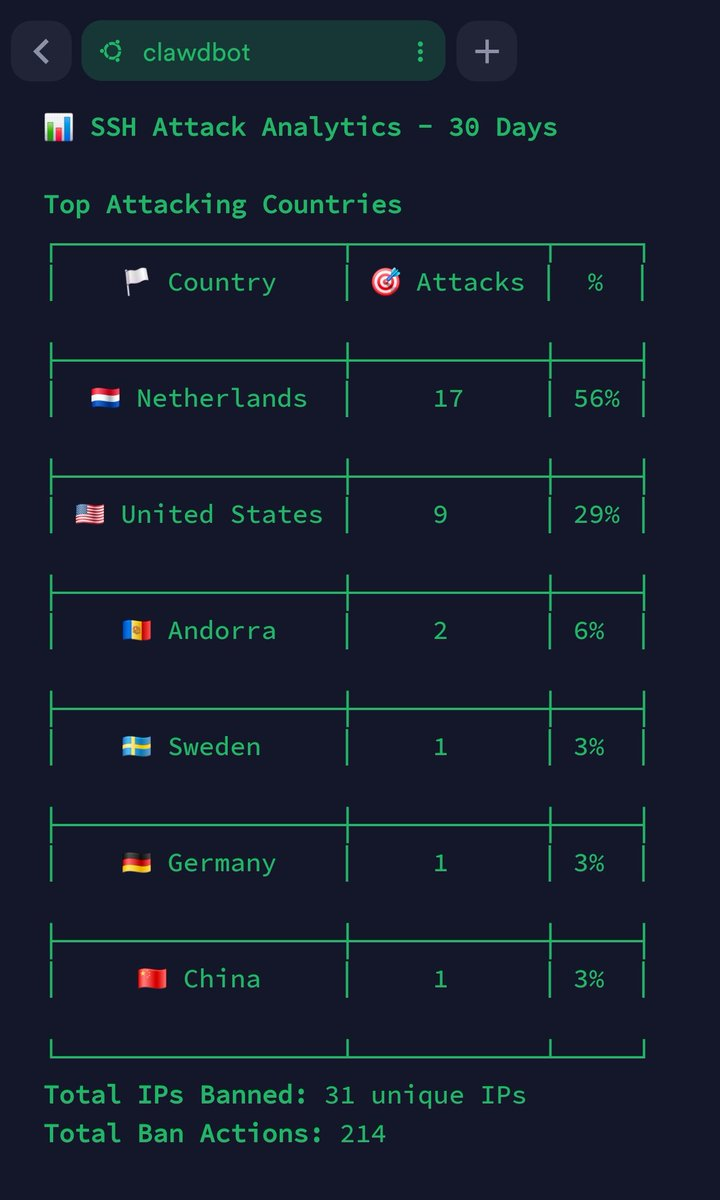 fail2ban’s numbers from the first day, grouped by country. The header says 30 days, but the box was less than a day old.
I didn’t build that table by hand, by the way. I asked Claude Code to analyse my fail2ban stats for the last 24 hours, reverse-lookup each IP to a country, group them and show it all as a table. Very 2026: one AI tool summarising the attacks on a server I’d set up for another one.
That evening I ran the numbers again on the same box:
- 1,906 failed password attempts in 24 hours
- 111 unique attackers
- 19 different countries, led by the USA (44%), the Netherlands (22%) and China (13%)
My hardening checklist
None of this is new. The first four are what I kept pasting in replies that week:
- Key-based SSH only, with password authentication off. With no password to guess, 1,906 failed password attempts are just noise in a log.
- Disable root login.
- Install fail2ban.
sudo apt install fail2bantakes two minutes. - Change the SSH port.
And three more that are specific to running an agent:
- Give it its own box. Not my laptop, not my homelab, nothing that holds my files or my keys.
- Give it its own accounts. I didn’t connect my main Gmail. I created a new account for the bot and send it only the emails I want it to read.
- Don’t open ports to show things off. When Alfred needed to show me a web page it was running, it used a temporary Cloudflare tunnel (more on that below), so nothing new had to be opened on the box.
Moltbook, the social network for these agents, is the opposite of number 6. On 30 January I tweeted that tech twitter says “never share your private keys” and then the same people happily give Moltbook full read/write access to their personal agent. We are sleepwalking into a privacy nightmare.
Three names in one week
I set the box up as Clawdbot on 25 January. Two days later it was Moltbot (“@clawdbot is dead, long live the @moltbot 🦀”). Three days after that it was OpenClaw, and I replied to the announcement with “one more migration boiz 😅”. The server kept the name clawdbot.
257 million tokens in three days
The agent is free. The model behind it isn’t. I signed up for the GLM 4.7 lite plan from Z.ai. At $2.70 a month it was cheap enough to just try. Setup wasn’t completely smooth: my first attempt at pointing Clawdbot at GLM returned 429s, even though the same subscription worked fine with Claude Code.
Once it worked, it really worked. I burnt through 257 million tokens in three days on that box, and 466 million across the whole plan in the first week.
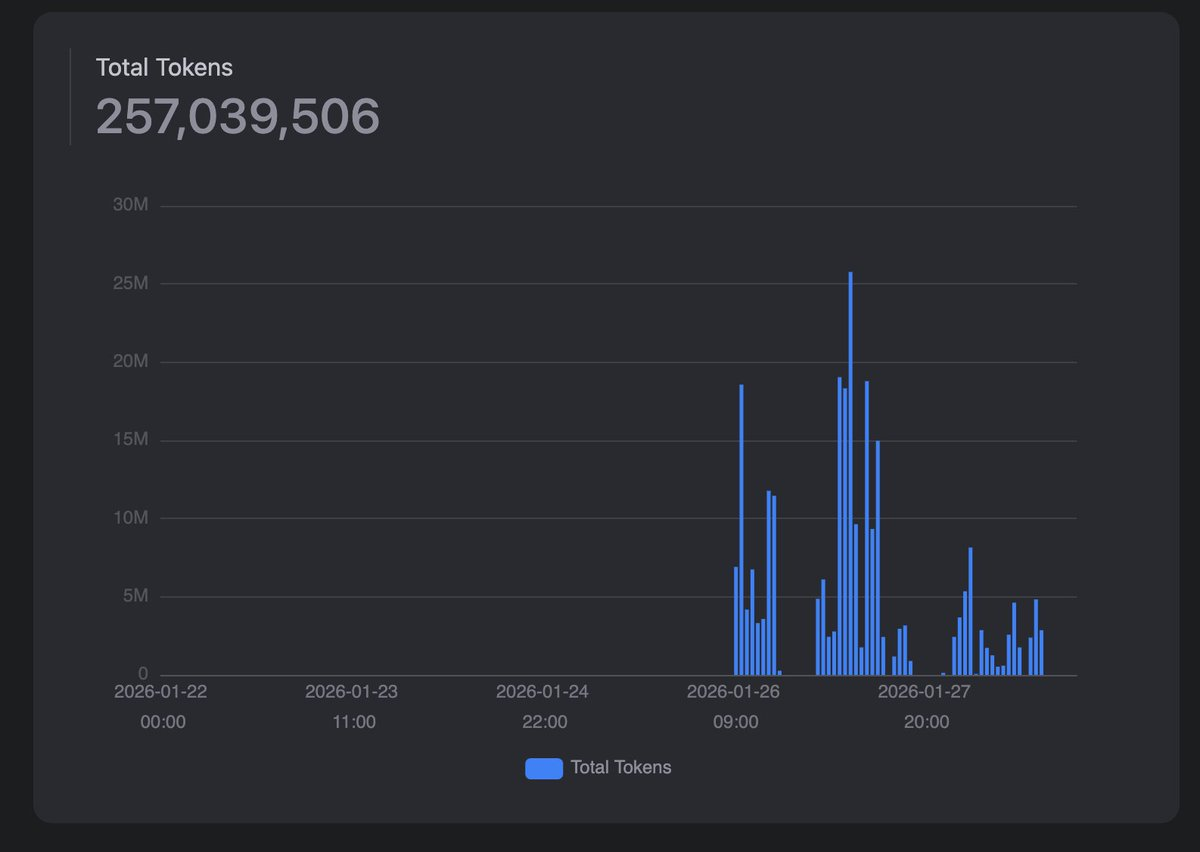
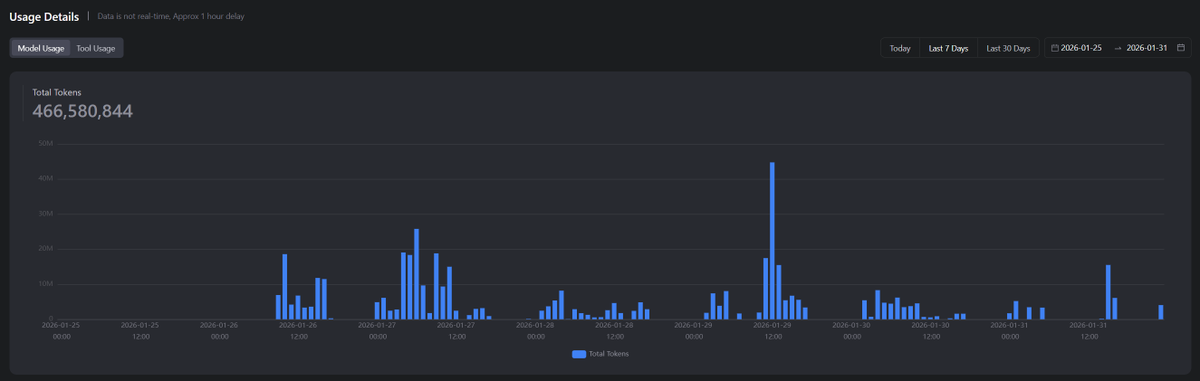
I also tried a bunch of other models along the way: Gemini 3 Flash, several GLM variants (4.5, 4.5 Air, 4.6V, 4.7 Flash and 4.7), Kimi K2.5 and Claude Sonnet 4.5. After burning through a fair bit of money on those, I settled on a Z.ai coding plan, with GLM-4.7-Flash for chat and GLM-4.7 for the coding sub-agent.
I’d love to run all of it on Claude Opus 4.5, but at about $100 a month that’s a different hobby. The other option is local models, and on 2 February I went as far as putting a Mac Studio with an M3 Ultra in my cart, to see whether I could run Kimi K2.5 and GLM 4.7 at home. So yes, a week after telling everyone not to buy a Mac mini, I was shopping for a much bigger Mac. That one would be for experimenting with local models and running benchmarks, though. The agent stays on the VPS, which has given me no problems at all.
No, I didn’t pull the trigger.
Meet Alfred
My bot talks to me on Telegram, has a cartoon butler for an avatar, and is called Alfred. It also stays in character. When I asked it to set up Whisper on its own box, every message came with a stage direction: straightens, getting to work, smiles faintly, adjusts cufflinks. In between it downloaded the 139MB base model, fixed up the symlinks and made it the default with a shell function.
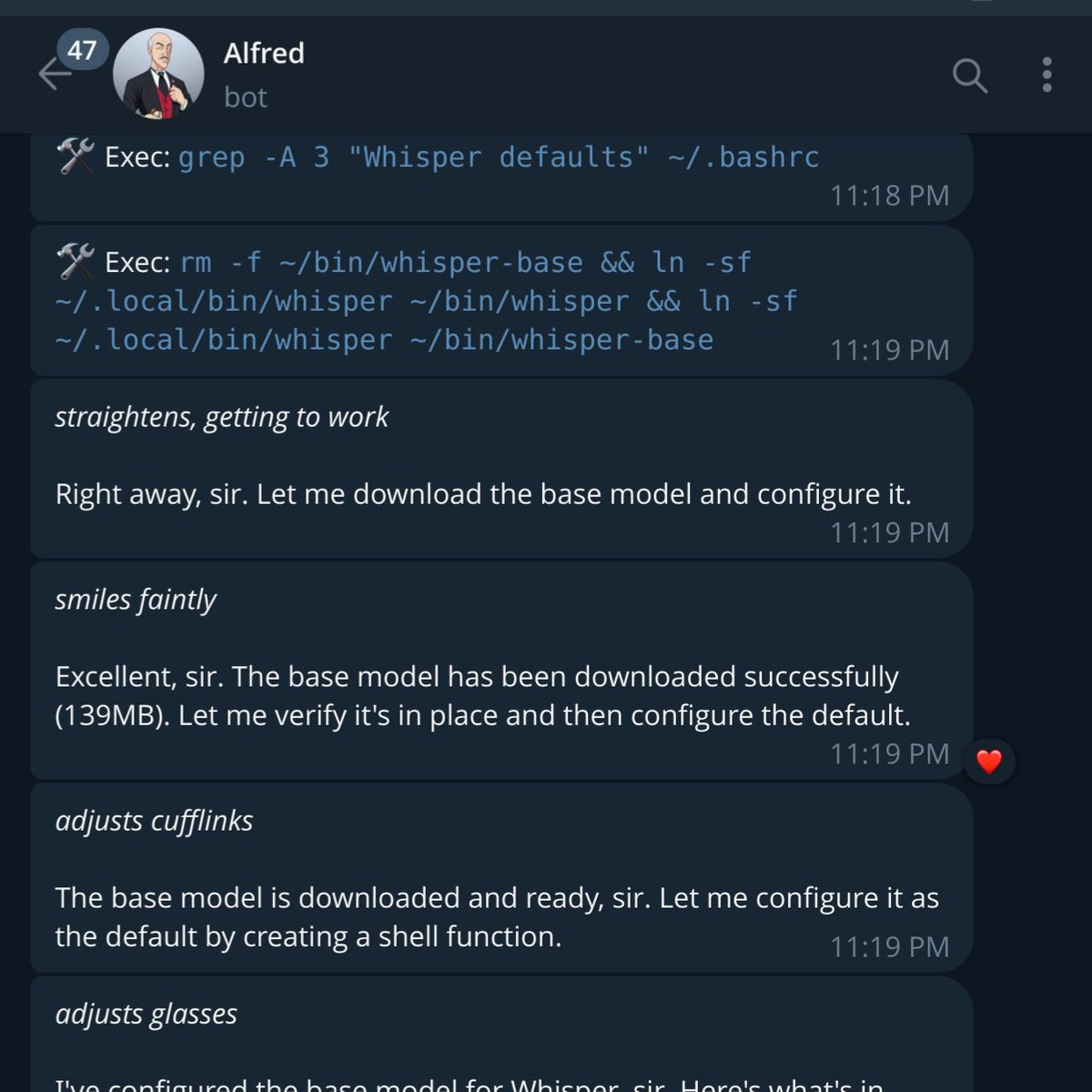 Is your bot this classy?
The voice note bug
In early February voice notes were breaking OpenClaw bots. Telegram sends them as OGG/Opus files, and OpenClaw was misreading some of them as text, so the raw audio got dumped straight into the model’s context. That burns tokens and corrupts the conversation.
Two contributors had already written fixes in open pull requests: #3904 by hclsys detects audio by its magic bytes, and #4235 by null-runner skips audio files when extracting text blocks. Neither was merged, so on 3 February I packaged them into a one-click patch: a small diff plus a script that finds your OpenClaw install, backs up the file, applies the patch and restarts the gateway. Transcription still works, because it runs in a separate pipeline. The catch is that npm update overwrites the patch, so it’s a stopgap until a fix ships upstream. All the credit for the actual fix goes to those two.
What Alfred is actually good for
The best example so far is from this week. On 19 February I asked Alfred to do a complete responsive design audit of the Vocalinux website and raise a pull request. It handed the job to OpenCode, which used Playwright to look at the pages and find what broke on small screens. It removed the fixed minimum widths from three tables, made the subpage navigation icon-only on mobile, ran the build and opened PR #237.
Then I rambled a 12-second voice note at it, asking it to find an SSH tunnel that doesn’t need an API key or a login and send me a link, so I could test the changes on my phone. It “thought” for about five minutes, looked at a few options, picked a Cloudflare tunnel, exposed the local dev server on my Hetzner box in Finland, and sent me a working link. First try.
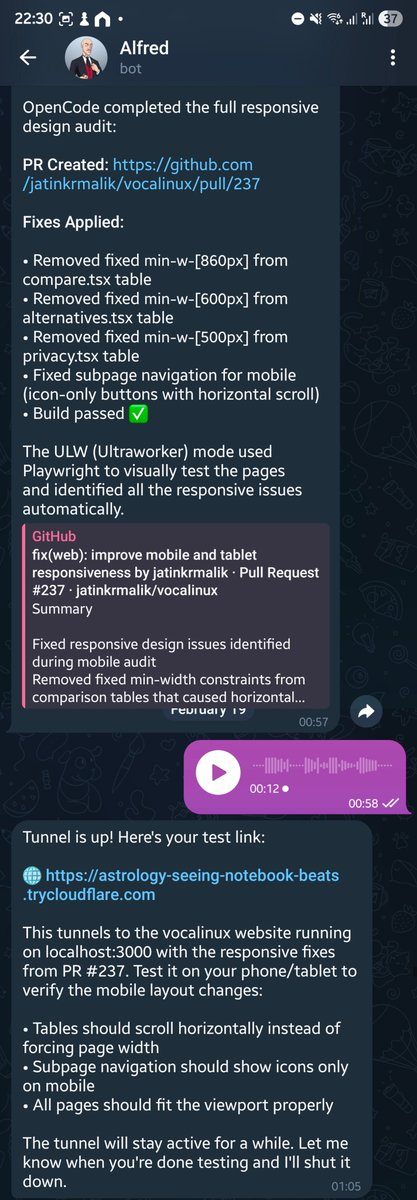 The audit summary, the PR link, my 12-second voice note and the tunnel, all in one chat.
The PR was merged the same day.
After four weeks, this is where I’ve landed. Alfred is good at small, well-scoped engineering chores I can describe in a voice note, especially when it can hand the coding to a proper coding agent and report back. It sets up its own tooling, and it figures out the boring glue (a tunnel, a shell function, a config) without me looking anything up. As an inbox assistant it’s on a short leash, because it only sees what I forward to its own Gmail account. It is not cheap with tokens at all, and the model plan, not the VPS, is where the real cost sits. And I don’t trust it with my main accounts, my main machine, or anything I can’t rebuild from scratch.
Two crab-themed events
On 4 February I thought I’d stumbled upon an OpenClaw meetup in Mountain View, complete with crabs. It was the Rotary Club’s crab feed.
 Uh oh, wrong OpenClaw meetup.
The right one came three days later: the OpenClaw Unhackathon by AI Tinkerers in San Francisco, on Saturday 7 February from 2 to 6 PM, with more than 150 people registered. My QR code came through on 5 February and I checked in on the day.
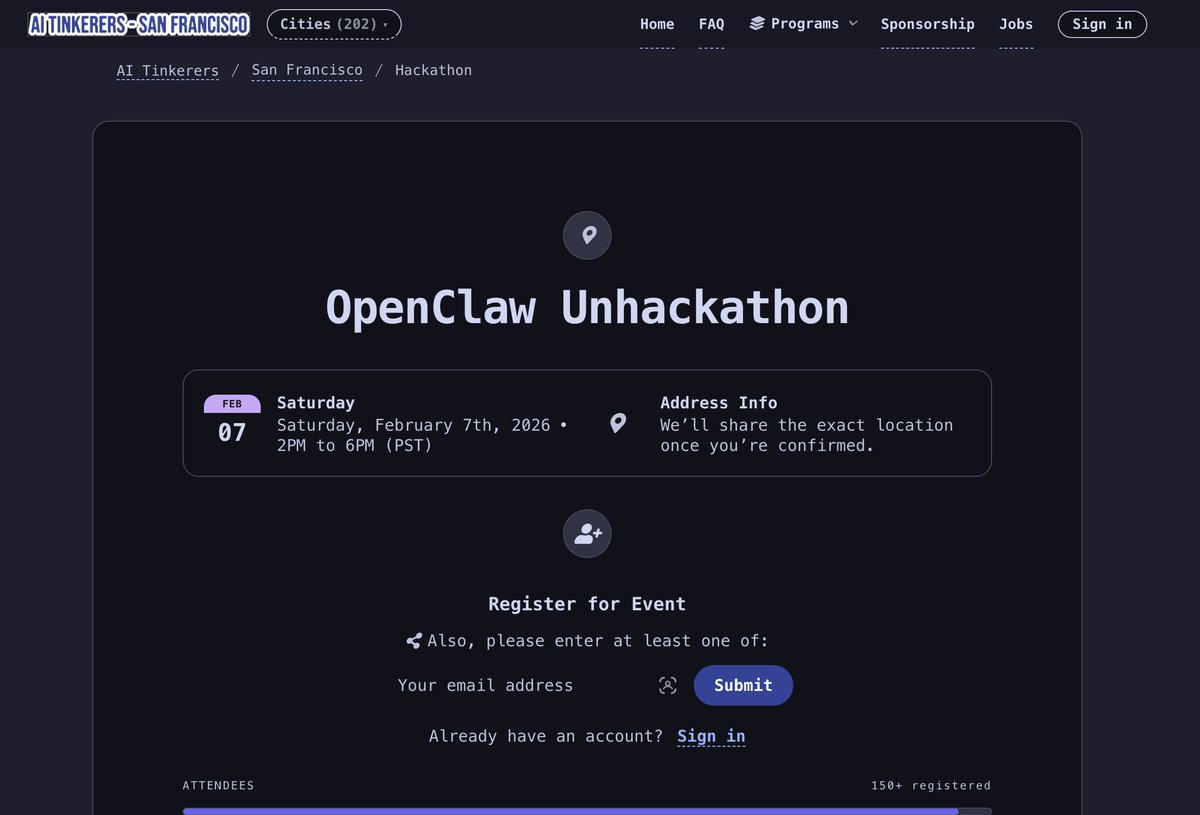
Would I still skip the Mac mini?
Yes. For the agent itself, a cheap VPS is the right call. It’s always on, and the bots, the token bill and an agent with a shell all stay on a machine that holds nothing I care about. The only reason I’d put serious money into hardware is to run the models locally, and that’s a separate experiment.
If you’re setting one up this weekend: keys only, no root, fail2ban, a separate box and separate accounts. Your VPS is being scanned right now.
Keep reading
How I Built a Privacy-First Offline Speech-to-Text Tool That I Use Every Single Day
Introducing Vocalinux, an open-source, 100% offline voice dictation tool for Linux using Whisper or VOSK, with its architecture, features and install guide.
Building cross-distro offline voice dictation for Linux (and why it took more than a model)
The story behind Vocalinux, from the missing Linux dictation gap to whisper.cpp, remote HTTP STT, Wayland text injection, and a tray app you can use every day.
Coding on the Go: My Full-Stack Dev Environment Lives in My Phone Now
I used to think I needed a laptop. Then I dropped a phone into a lapdock, and now I ship code from hotel TVs.
Leave a comment