How I Built a Privacy-First Offline Speech-to-Text Tool That I Use Every Single Day
Introducing Vocalinux, an open-source, 100% offline voice dictation tool for Linux using Whisper or VOSK, with its architecture, features and install guide.
 Jatin Kumar Malik First published on
 Medium
For years, macOS and Windows users have enjoyed built-in voice dictation. Just speak, and your words appear on screen — no cloud services, no subscriptions, just pure productivity. Linux users? We were left behind.
Until now.
I’m excited to announce Vocalinux v0.5.0-beta, a voice dictation system for Linux that’s 100% offline, privacy-first, and actually works. I’ve been using this tool daily, and it’s transformed how I interact with my computer.
Updated March 2026 — now at v0.9.0-beta.
See the latest features on GitHub!

Finally, Voice Dictation That Works on Linux!
The Problem
Voice dictation on Linux has historically been a fragmented experience:
- Janky solutions: Some tools only work in specific apps or require complex setup
- Cloud dependence: Many services send your voice data to servers, raising privacy concerns
- Poor integration: Desktop shortcuts and system tray integration were often missing
- Limited offline support: Most solutions required an active internet connection
As someone who spends hours typing every day, I wanted something better. Something that worked everywhere: terminals, browsers, IDEs, email clients, anywhere I could type, I wanted to dictate.
What Makes Vocalinux Great
1. True 100% Offline Operation
All speech recognition happens on your machine. Your voice data never leaves your computer. No cloud services, no internet required after installation, complete privacy guaranteed.
This isn’t just a privacy feature, it means Vocalinux works even when you’re offline. Perfect for coffee shops, flights, or any situation where internet connectivity is spotty.
2. Universal App Support
Vocalinux works with any text input field on your Linux system. Whether you’re typing in:
- Terminal or shell
- Web browsers (Chrome, Firefox)
- IDEs and code editors (VSCode, Neovim, JetBrains)
- Email clients
- Office applications
- Chat apps (Discord, Slack, Telegram)
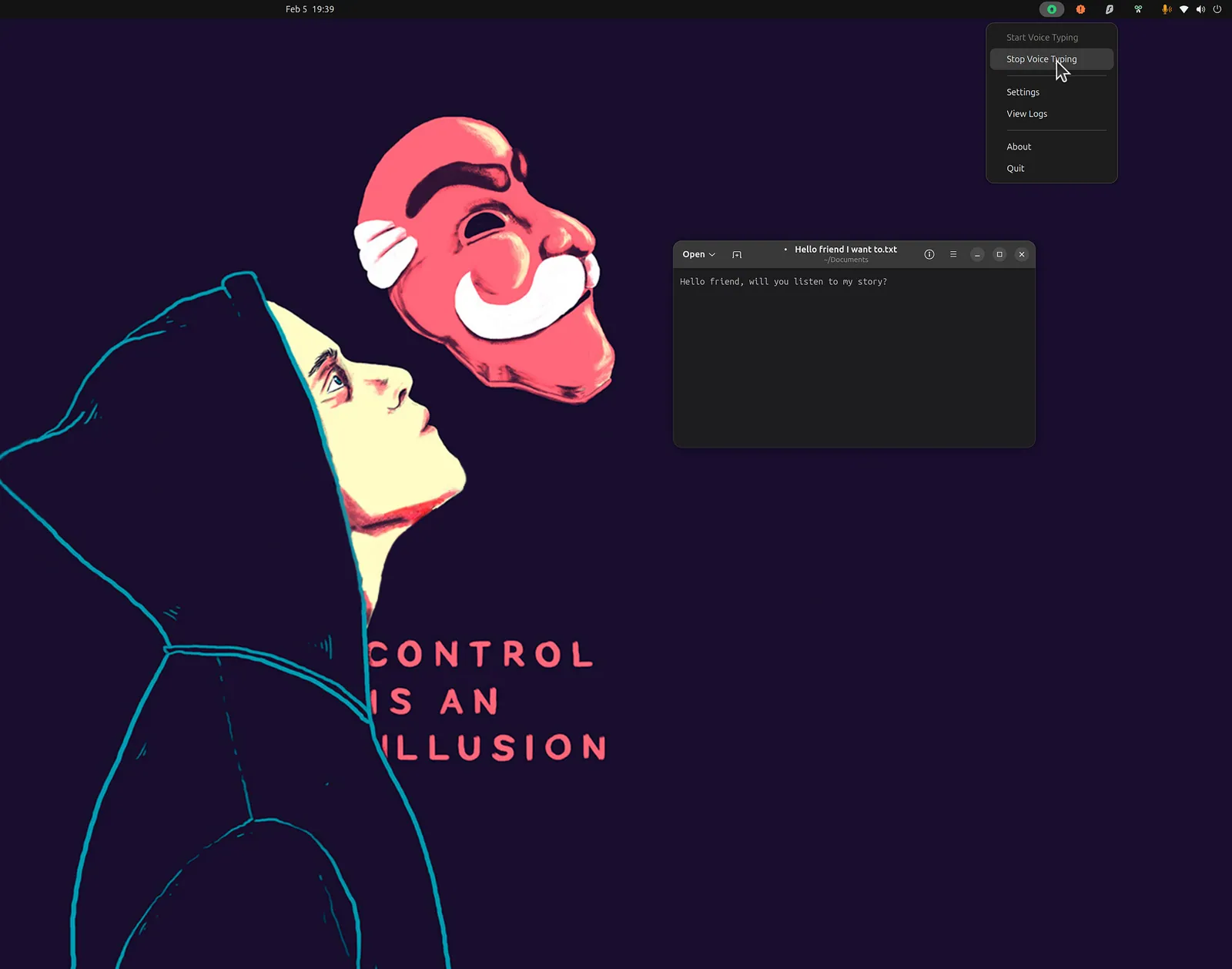
Just double-tap Ctrl, and start dictating. The text appears exactly where you would have typed it.
3. Multiple Speech Recognition Engines
Vocalinux supports two powerful engines, each with different strengths:
Whisper AI (Default)
- OpenAI’s state-of-the-art model
- Highest accuracy available
- Multiple model sizes (75MB to 3GB)
- Excellent multi-language support (99+ languages)
- Best for clear, accurate transcription
VOSK
- Lightweight and fast
- ~50MB model size
- Low memory footprint
- Perfect for lower-powered systems
- Great for real-time streaming
You can switch engines on the fly via settings or command line.
4. Modern Native Linux Integration
Vocalinux isn’t just a web app wrapped in Electron. It’s built with:
- GTK 3 for the native desktop UI
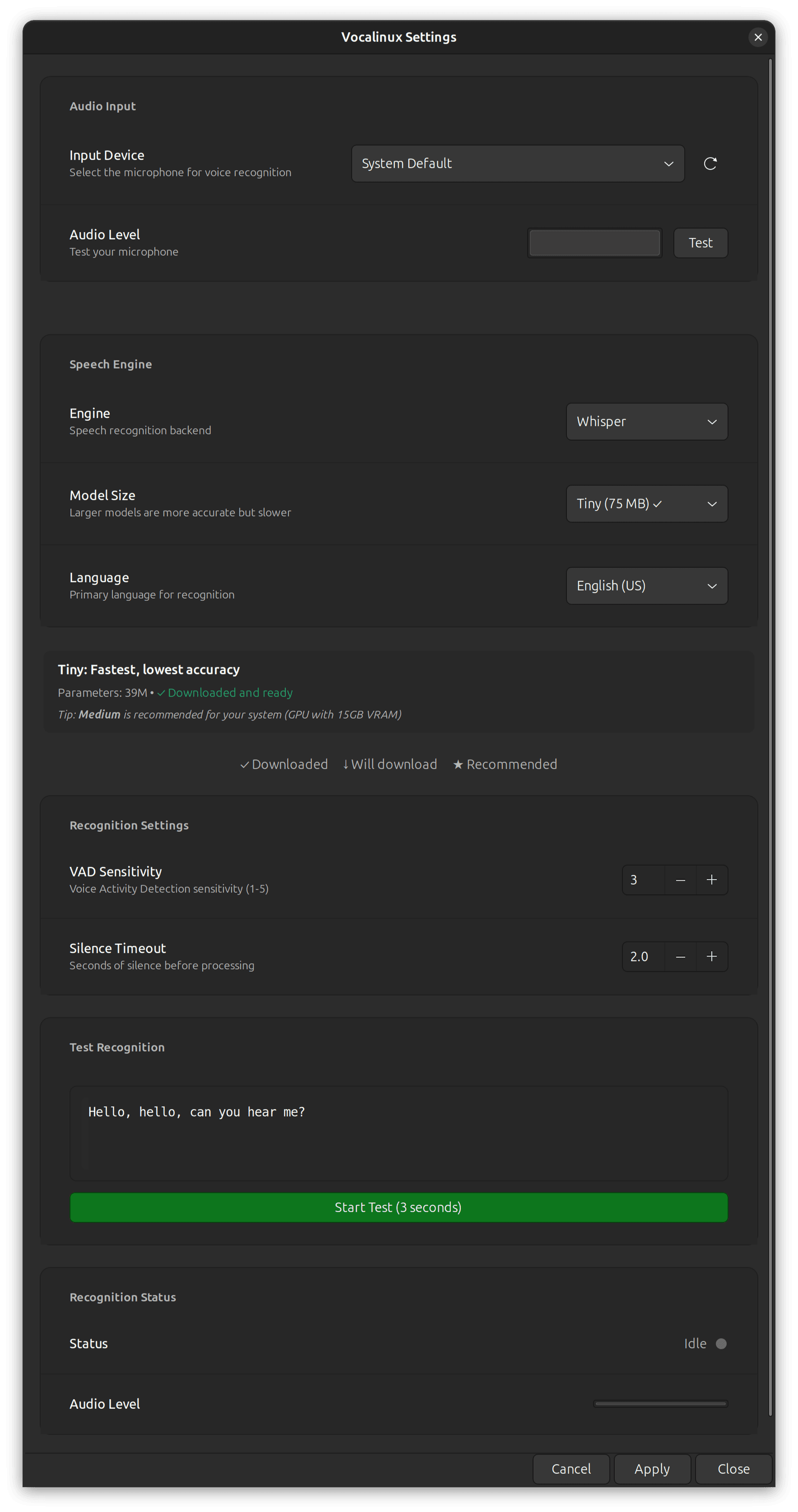
- System tray icon for quick access
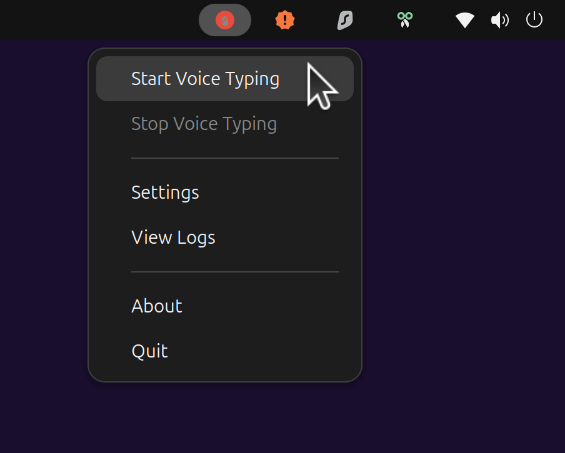
- GNOME HIG-compliant settings dialog with modern styling
- Native keyboard shortcuts using double-tap Ctrl (customizable)
- X11 and Wayland support — we’ve got you covered regardless of your display server
5. Smart Installation
Installing Vocalinux is incredibly simple:
curl -fsSL raw.githubusercontent.com/jatinkrmalik/vocalinux/main/install.sh \
  -o /tmp/vl.sh && bash /tmp/vl.sh --interactive
That’s it.
The installer:
- Detects your Linux distribution
- Installs system dependencies
- Downloads the appropriate speech recognition models
- Sets up desktop integration
- Adds Vocalinux to your PATH
The interactive mode even detects your GPU and suggests the optimal Whisper model size based on your hardware.
Under the Hood: Technical Architecture
Vocalinux is built with a sophisticated multi-threaded architecture that balances performance, reliability, and cross-platform compatibility.
High-Level System Design
┌──────────────────────────────────────────────────────────────────────────┐
│                          VOCALINUX APPLICATION                           │
├──────────────────────────────────────────────────────────────────────────┤
│                                                                          │
│   ┌──────────────┐          ┌──────────────────┐          ┌────────────┐ │
│   │   GTK 3 UI   │◄────────►│   Main Process   │◄────────►│   Config   │ │
│   │              │          │                  │          │   Manager  │ │
│   │ ┌──────────┐ │          │ ┌──────────────┐ │          │            │ │
│   │ │   Tray   │ │          │ │ Recog        │ │          │ ┌────────┐ │ │
│   │ │   Icon   │ │          │ │ Manager      │ │          │ │  YAML  │ │ │
│   │ └──────────┘ │          │ └──────┬───────┘ │          │ │ Config │ │ │
│   │              │          │        │         │          │ └────────┘ │ │
│   │ ┌──────────┐ │          │ ┌──────▼───────┐ │          └────────────┘ │
│   │ │ Settings │ │          │ │ Action       │ │                         │
│   │ │ Dialog   │ │          │ │ Handler      │ │                         │
│   │ └──────────┘ │          │ └──────┬───────┘ │                         │
│   │              │          │        │         │                         │
│   │ ┌──────────┐ │          │ ┌──────▼───────┐ │                         │
│   │ │  Audio   │ │          │ │ Text         │ │                         │
│   │ │ Feedback │ │          │ │ Injector     │ │                         │
│   │ └──────────┘ │          │ └──────┬───────┘ │                         │
│   └──────────────┘          │        │         │                         │
│                             │ ┌──────▼───────┐ │                         │
│                             │ │ Keyboard     │ │                         │
│                             │ │ Shortcut Mgr │ │                         │
│                             │ └──────────────┘ │                         │
│                             └────────┬─────────┘                         │
│                                      │                                   │
└──────────────────────────────────────┼───────────────────────────────────┘
                                       │
                                       ▼
                     ┌───────────────────────────────────┐
                     │       EXTERNAL DEPENDENCIES       │
                     │  - PyAudio/PortAudio (Audio)      │
                     │  - Whisper/VOSK (Speech)          │
                     │  - X11/XTest/Xdotool              │
                     │  - Wayland/wtype                  │
                     │  - evdev/pynput (Keyboard)        │
                     └───────────────────────────────────┘
Core Components
1. Recognition Manager
- Multi-threaded audio capture (PyAudio/PortAudio)
- Voice Activity Detection (VAD) for efficient processing
- Dual engine support: Whisper AI (accuracy) and VOSK (speed)
- Real-time transcription with minimal latency
- Automatic model loading and management
2. Text Injection Layer
- Cross-platform text injection supporting both X11 and Wayland
- X11 Backend: Uses XTest extension for native keyboard simulation
- Wayland Backend: Leverages
wtype(Wayland native) withxdotoolfallback for XWayland - Runtime compositor support detection
- Focus-aware injection into active window
3. Keyboard Shortcut System
- evdev Backend: Direct
/dev/input/event*device access (works on Wayland) - pynput Backend: Cross-platform X11 event monitoring
- Configurable double-tap shortcuts (default: ctrl+ctrl)
- Time window detection (500ms configurable)
- Automatic backend selection based on environment
4. GTK 3 Native UI
- System tray integration with AppIndicator
- GNOME HIG-compliant settings dialog
- Modern, accessible interface components
- Real-time configuration changes
- Logging viewer for debugging
Threading Model
Main Thread (GTK Event Loop)
│
├─ Audio Capture Thread (Continuous)
│  ├─ PyAudio stream management
│  ├─ Audio buffer (FIFO queue)
│  └─ Voice Activity Detection
│
├─ Recognition Thread (On-demand)
│  ├─ Whisper/VOSK inference
│  ├─ Result post-processing
│  └─ Text injection queue
│
└─ Keyboard Monitoring Thread (Continuous)
   ├─ evdev/pynput event loop
   └─ Double-tap detection logic
This multi-threaded architecture ensures:
- Low latency: Audio capture and recognition run in parallel
- Responsiveness: UI never blocks on speech processing
- Reliability: Isolated threads prevent cascading failures
Data Flow: End-to-End
User                  Keyboard                  Main                   Audio                Recognition                Text
 │                    Backend                 Process                 Capture                 Engine                 Injector
 │                       │                       │                       │                       │                       │
 │   Double-tap Ctrl     │                       │                       │                       │                       │
 │──────────────────────>│                       │                       │                       │                       │
 │                       │  Signal: Start Rec    │                       │                       │                       │
 │                       │──────────────────────>│                       │                       │                       │
 │                       │                       │                       │                       │                       │
 │                       │                       │   Play "Start" Sound  │                       │                       │
 │<──────────────────────────────────────────────│                       │                       │                       │
 │                       │                       │ Start Capture Stream  │                       │                       │
 │                       │                       │──────────────────────>│                       │                       │
 │                       │                       │                       │───┐                   │                       │
 │                       │                       │                       │   │ Read Mic          │                       │
 │                       │                       │                       │<──┘                   │                       │
 │                       │                       │                       │                       │                       │
 │                       │                       │                       │   [If Speech Detected]│                       │
 │                       │                       │                       │──────────────────────>│                       │
 │                       │                       │                       │      Audio Chunk      │                       │
 │                       │                       │                       │                       │───┐                   │
 │                       │                       │                       │                       │   │ Inference         │
 │                       │                       │                       │                       │<──┘ (Whisper/VOSK)    │
 │                       │                       │                       │                       │                       │
 │                       │                       │                       │                       │───┐                   │
 │                       │                       │                       │                       │   │ Post-process      │
 │                       │                       │                       │                       │<──┘                   │
 │                       │                       │                       │                       │                       │
 │                       │                       │   Transcribed Text    │                       │                       │
 │                       │                       │<──────────────────────────────────────────────│                       │
 │                       │                       │                       │                       │                       │
 │                       │                       │      Inject Text      │                       │                       │
 │                       │                       │──────────────────────────────────────────────────────────────────────>│
 │                       │                       │                       │                       │                       │
 │  Simulate Keystrokes  │                       │                       │                       │                       │
 │<──────────────────────────────────────────────────────────────────────────────────────────────────────────────────────│
 │                       │                       │                       │                       │                       │
 │   Double-tap Ctrl     │                       │                       │                       │                       │
 │──────────────────────>│                       │                       │                       │                       │
 │                       │   Signal: Stop Rec    │                       │                       │                       │
 │                       │──────────────────────>│                       │                       │                       │
 │                       │                       │ Stop Capture Stream   │                       │                       │
 │                       │                       │──────────────────────>│                       │                       │
 │                       │                       │                       │                       │                       │
 │                       │                       │   Play "Stop" Sound   │                       │                       │
 │<──────────────────────────────────────────────│                       │                       │                       │
 │                       │                       │                       │                       │                       │
Performance Optimizations
- Voice Activity Detection: Only processes audio when speech is detected
- Model Caching: Speech recognition models loaded once at startup
- Buffered I/O: Efficient audio stream handling with thread-safe queues
- Lazy Loading: GTK components loaded only after dependency checks
- GPU Acceleration: Whisper supports CUDA for NVIDIA GPUs
Security & Privacy
┌─────────────────────────────────────────────────────────────┐
│                   PRIVACY ARCHITECTURE                      │
├─────────────────────────────────────────────────────────────┤
│                                                             │
│  ✓ 100% Offline Speech Recognition                          │
│  ✓ No Cloud API Calls                                       │
│  ✓ No Telemetry/Analytics                                   │
│  ✓ Local Model Storage (~50MB to 3GB)                       │
│  ✓ No Network Access Required (post-install)                │
│  ✓ Open Source (GPL-3.0) - Full Code Transparency           │
│  ✓ User-Controlled Configuration                            │
│                                                             │
└─────────────────────────────────────────────────────────────┘
For detailed technical documentation and UML diagrams, see the full system architecture: https://github.com/jatinkrmalik/vocalinux/blob/main/README.md
v0.5.0-beta: What’s New
This release represents a massive leap forward:
➕18,252 lines of code added
➖ 4,867 lines of code removed
📂 103 files changed
🟰 Net improvement of 13,385 lines of refined code
Key Features
🎨 Modern GNOME HIG Settings Dialog: Intuitive controls, beautiful styling
🔊 Pleasant Audio Feedback: Smooth gliding tones for recording states
⌨️ Customizable Keyboard Shortcuts: Set your own activation method
🔧 Interactive Installer: Smart GPU detection and hardware optimization
🌐 Better Wayland Support: Native keyboard shortcuts via evdev
🐛 Critical Bug Fixes: Text escaping, stop sound transcription, punctuation spacing
📈 80%+ Test Coverage: Rock-solid reliability
The New Settings Dialog
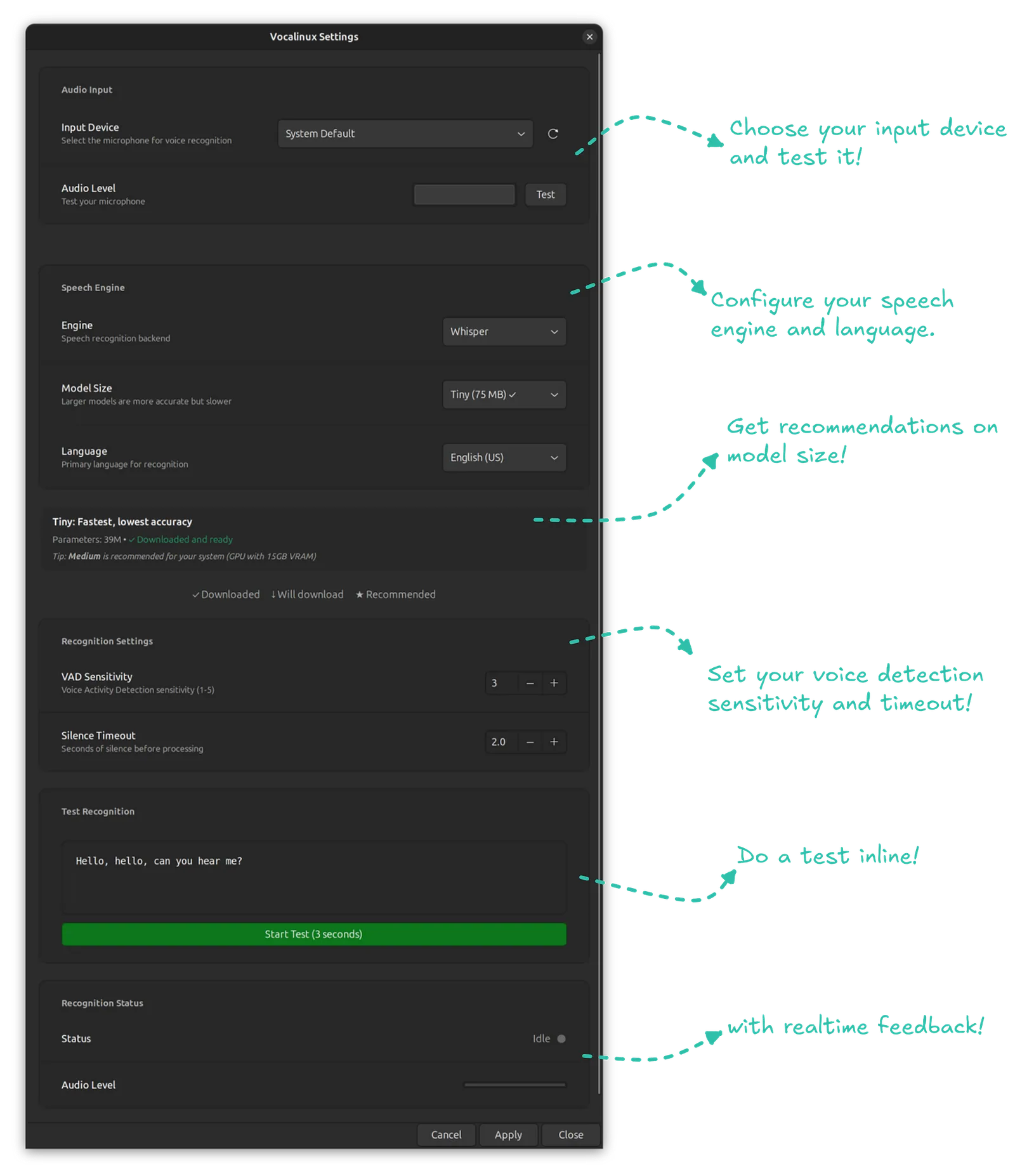
The settings dialog has been completely redesigned following GNOME Human Interface Guidelines:
- Clear, organized sections for all configuration options
- Real-time preview of settings
- Apply/Cancel for safe configuration changes
- Recognition progress indicator
- Responsive design that works across different screen sizes
Why Open Source?
Vocalinux is released under GPL-3.0. Why?
- Transparency: You can see exactly what the code does
- Privacy: No hidden telemetry or data collection
- Community: Anyone can contribute, fork, or improve the project
- Sustainability: Open source projects don’t disappear when companies lose interest
I believe voice dictation should be a fundamental tool available to everyone, not a feature locked behind expensive software subscriptions.
The Numbers Don’t Lie
This isn’t vaporware. Here’s the current state of the project:
- 4,867 lines of code removed (we clean up after ourselves)
- 80%+ test coverage across core functionality
- Support for 99+ languages (via Whisper)
- Works on major distros: Ubuntu, Fedora, Arch, Debian, and more
The project has attracted contributions from multiple developers, including community members fixing bugs and improving Debian compatibility.
I Need Your Help
Beta testing is crucial for making Vocalinux robust across different Linux distributions and desktop environments. I’d love for you to:
- Try it on your distro: Ubuntu, Fedora, Arch, Debian, Mint, Pop!_OS, report what works (and what doesn’t)
- Test your DE: GNOME, KDE, Xfce, Cinnamon, i3, etc., let me know how keyboard shortcuts behave
- Report bugs: If something breaks, file an issue on GitHub
- Share feedback: What features would make this better for you?
This isn’t just another side project, it’s a tool I rely on daily, and I’m committed to making voice dictation on Linux finally work the way it should.
Getting Started
Quick Install
curl -fsSL raw.githubusercontent.com/jatinkrmalik/vocalinux/main/install.sh \
  -o /tmp/vl.sh && bash /tmp/vl.sh --interactive
After Installation
Launch Vocalinux from your terminal or application menu:
vocalinuxDouble-tap Ctrl to start dictating. Double-tap again to stop. That’s it.
Documentation
Full documentation is available at github.com/jatinkrmalik/vocalinux, including:
- Advanced configuration options
- Troubleshooting guides
- FAQ
- Contributing guidelines
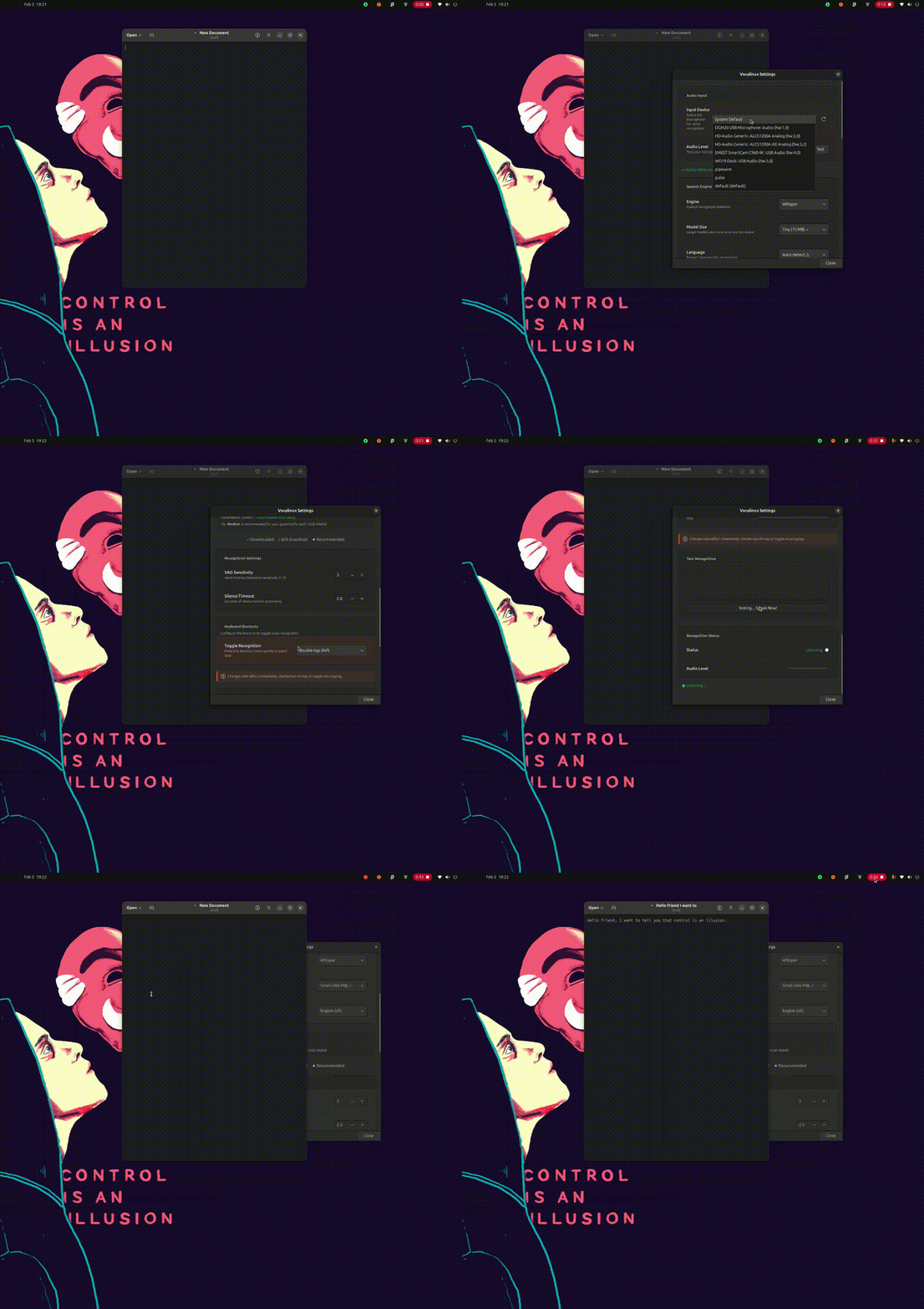
Demo
See Vocalinux in action:
What’s Next?
Here’s what I’m working on for future releases:
- Enhanced punctuation commands: Better voice control over formatting
- Additional language models: Optimized models for specific languages
- Voice commands for system actions: Launch apps, control volume, etc.
- Plugin system: Extensible architecture for third-party features
- Better accessibility: Integration with screen readers and assistive technologies
Join the Community
- Website: https://vocalinux.com/
- GitHub: github.com/jatinkrmalik/vocalinux
- Issues: Report bugs and request features
- Discussions: Share feedback and connect with other users
- Twitter: Follow for updates!
Voice dictation has the potential to be transformative — for accessibility, for productivity, for reducing repetitive strain injuries. Linux users deserve a voice dictation solution that’s private, reliable, and works everywhere.
Vocalinux is my attempt to build exactly that. It’s not perfect, but it’s functional, it’s open source, and it’s getting better every day.
Try it out. Break it. Improve it. Let’s make Linux voice dictation amazing together. 🤝
Install Vocalinux today:
curl -fsSL raw.githubusercontent.com/jatinkrmalik/vocalinux/main/install.sh \
-o /tmp/vl.sh && bash /tmp/vl.sh --interactiveKeep reading
Coding on the Go: My Full-Stack Dev Environment Lives in My Phone Now
I used to think I needed a laptop. Then I dropped a phone into a lapdock, and now I ship code from hotel TVs.
LLMFeeder: the browser extension I built to feed web pages to LLMs
A Wes Bos post, a quick prototype, a friend's Firefox PR, 100 GitHub stars in about two weeks, and the first people trying to sell me installs.
My AI agent lives on a $3.49 VPS, and the internet keeps knocking
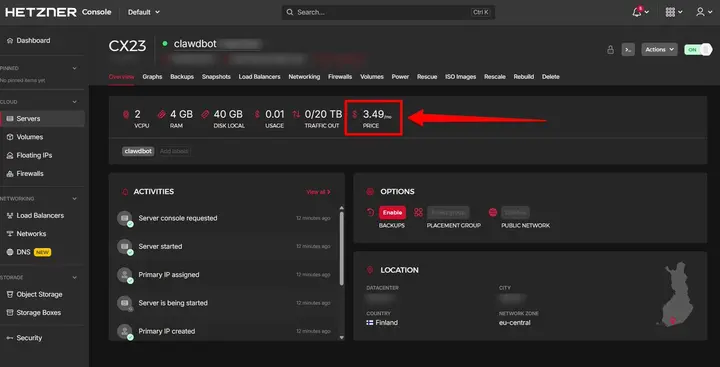
I skipped the Mac mini and put Clawdbot (now OpenClaw) on a $3.49 Hetzner VPS. Bots found it within hours. My hardening list, token bill and Alfred.
2 commentsfrom Medium
Carried over from the original post and read-only. Add a new comment below.
Thanks for this nice piece of software! I am a big privacy enthusiast and I love everything that can run locally. After finding this yesterday, i spent a bit of a time to make it run on my Debian 13, and it works flawlessly (after some manual labor, which is worth doing).
Let me also make publicity for your tool! I wrote my epxerience in a blog post:
https://medium.com/@cslev/talking-to-my-linux-box-without-talking-to-the-cloud-vocalinux-on-debian-without-the-tears-10bf053ea21b
Thank you so much for your work
Thank you!! Please feel free to contribute to the project either by reporting bugs or contributing pull requests. Happy to review them.
Leave a comment