Coding on the Go: My Full-Stack Dev Environment Lives in My Phone Now
I used to think I needed a laptop. Then I dropped a phone into a lapdock, and now I ship code from hotel TVs.
 Jatin Kumar Malik First published on
 Medium
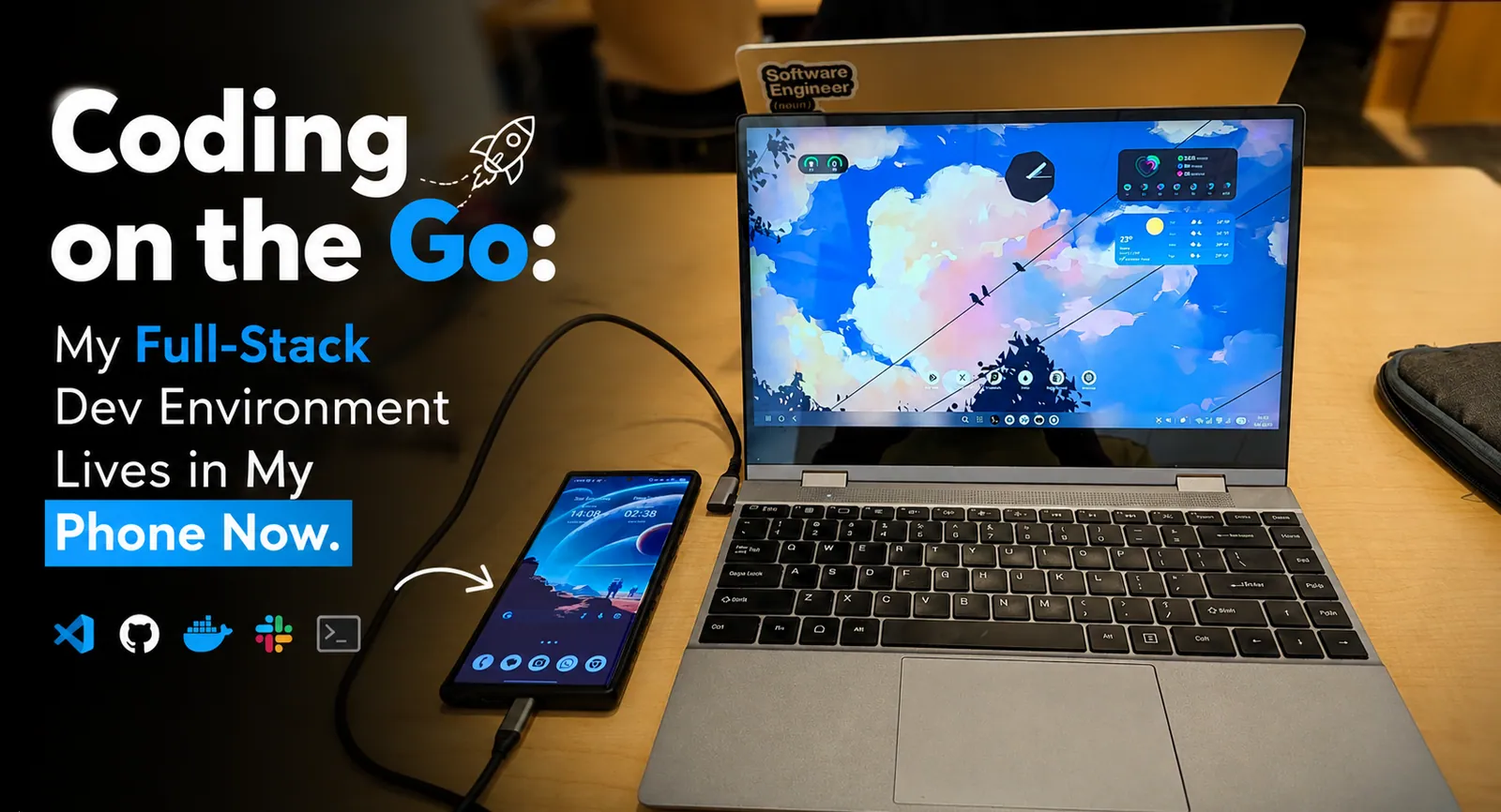
this is not a “laptop” 👆
I used to think I needed a laptop. Then I dropped a phone into a lapdock, and now I ship code from hotel TVs.
There’s a moment every traveling developer knows: you’re at an airport, in a hotel, at a coffee shop with bad wifi, and a critical bug lands in your repo. The Mac is in your hotel safe. The Linux box is at home. You have your phone.
For years, that meant: open GitHub mobile, read the issue, swear, and wait.
It doesn’t have to.
I’m writing this on a phone. Not “drafted on phone, polished on laptop.” This post was written inside a Termux session, inside a proot Ubuntu container, on a three-year-old Samsung Galaxy S23 Ultra, with OpenCode as the coding agent and gh talking to GitHub. The setup is reproducible, cheap, and more capable than it looks in a photo.
A Dream 15 Years in the Making
This is not a new idea. I’ve been chasing it since the early 2010s, watching the industry get close and then walk it back.
2011: Motorola Atrix and Webtop.
The Atrix 4G had a “Laptop Dock”: a clamshell with a screen, keyboard, and battery, but no compute. You slid the phone in and got Ubuntu with Firefox and Nautilus.
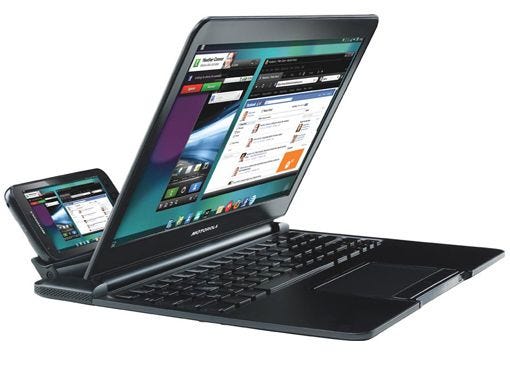
I remember reading about it and thinking that’s the future. The hardware was too slow, the lapdock was overpriced, and the software was a gimmick. Motorola killed the line in 2012.
2015: Windows Continuum and the Lumia 950.
I was a Windows Phone fan (still am, in a quiet way). When Microsoft announced Continuum, the dream came back. Plug a Lumia 950 into a Display Dock and the phone threw a Windows-like desktop onto a monitor.
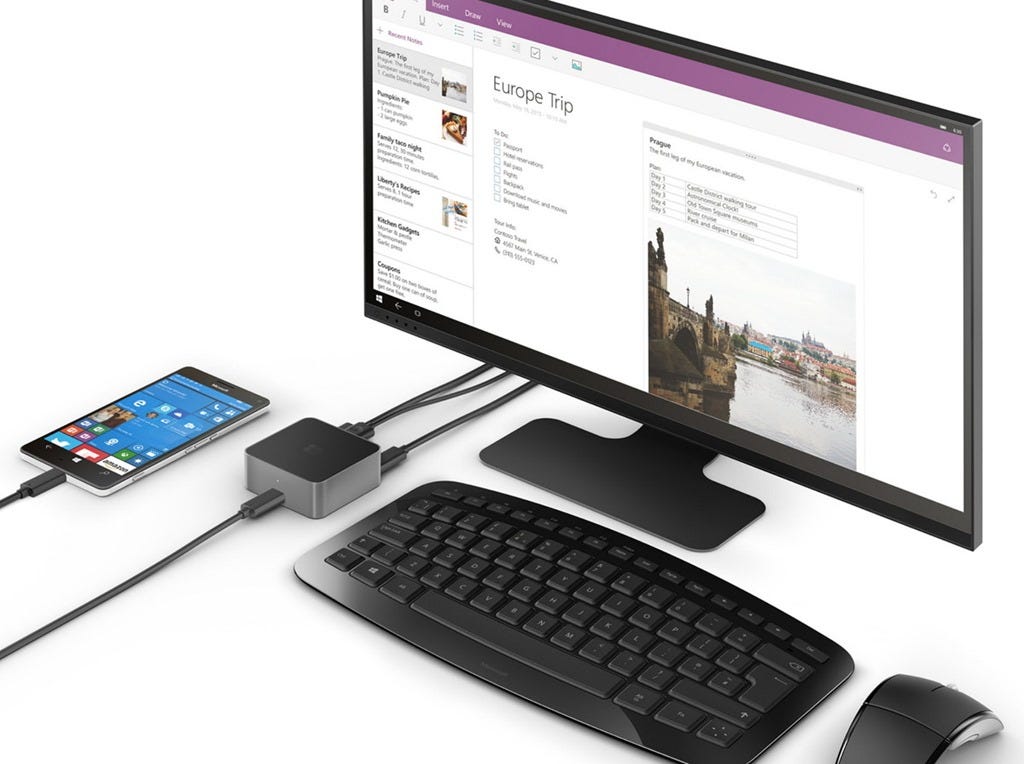
UWP apps scaled up. Keyboard and mouse worked. For a minute it looked like Microsoft had cracked it. Then Windows 10 Mobile died in 2019, and Continuum died with it. I had to let it go.
2017: Samsung DeX, and the long patient wait.
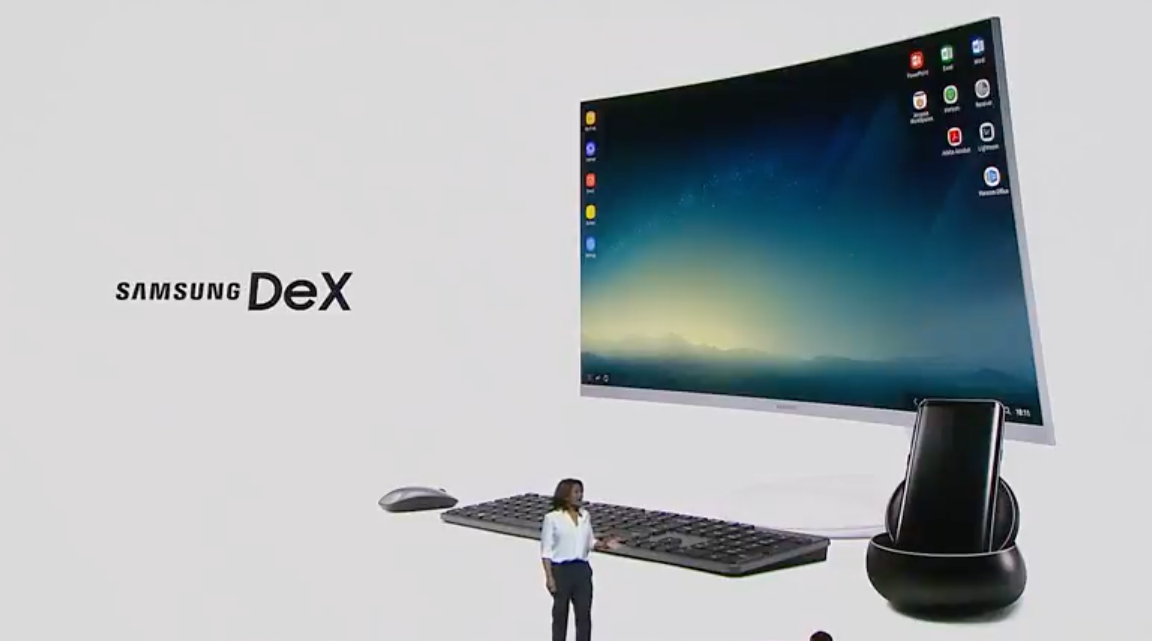
Samsung shipped DeX on the Galaxy S8: wired, dock-based, locked to their ecosystem. I watched. I waited. Year after year they kept iterating: DeX over HDMI, DeX over a single USB-C cable, DeX wireless, DeX on PCs, DeX on cars, DeX on TVs.
They even tried Linux on DeX in 2018 (actual Ubuntu on the phone), then Android 10 killed it in 2019. Samsung has been pushing this for nine years. They never quite nailed the software story. They did prove the hardware story, over and over: the phone can do this.
2025 to 2026: the ARM catchup.
And then, finally, the rest of the stack caught up. Two things happened in the last 3~4 years that made this dream actually work:
- Phone chipsets became genuinely desktop-class. A 2024 to 2026 flagship ARM SoC (Apple A18, Snapdragon 8 Gen 3, Exynos 2400, Google Tensor G4) has 8+ CPU cores, dedicated NPUs, multi-GHz clocks, and GPU compute that rivals a 2019 laptop. The Apple M-series proved you could put a Mac-class CPU on a phone-class power budget; the Android ecosystem followed. The phones in our pockets are now mini full-fledged PCs. They always have been, but now the silicon actually has the headroom.
- The ARM software stack matured. Linux on ARM64 went from “mostly works, lots of edge cases” to “first-class.” Ubuntu, Debian, Fedora, and Arch all have solid aarch64 ports. The build tools, the container runtimes, the agentic CLIs (Claude Code, Codex, OpenCode, oh-my-openagent) are all native ARM64, no emulation. Termux + proot is now stable enough to run a real dev workflow for hours without breaking.
- The thing I love about phones, and the thing that’s always been true, is that they’re absurdly underutilized. Most people use them for WhatsApp, Instagram, and a few mobile games. The SoC spends 99% of its life idling, throttled, waiting. We’re running 8 cores, dedicated NPUs, and 8+ GB of RAM to scroll a feed. The same hardware, given the right software, can compile Go, run agentic refactors across 50 files, and serve a web app on
localhost:3000for testing. The hardware was never the bottleneck. The software was.
So here we are. 15 years after the Atrix, a decade after Continuum, 9 years into DeX, and the dream finally works. Not because someone had a brilliant new idea, but because the boring fundamentals (silicon, software, accessories) all matured in parallel until the moment arrived.
The Stack
The full chain, bottom-up:
- Android device. Any recent flagship with USB-C display output. I daily-drive a Galaxy S23 Ultra (2023), Snapdragon 8 Gen 2 for Galaxy, 8 cores, 12 GB RAM. It runs this whole stack without getting interesting in the heat. Older Samsung flagships work too if they do DeX. Pixel 8 and newer do Android’s own desktop mode over DisplayPort alt-mode. That is not “every phone since 2017.” The S8 needed a dock. A lot of Pixels before the 8 cannot drive an external display at all.
- A lapdock. This is the accessory that makes it feel real. A lapdock is a laptop shell: screen, keyboard, trackpad, speakers, battery, no motherboard. NexDock, Uperfect/Uplay, and a pile of AliExpress clones start around $200 to $300. USB-C in, clamshell out. The lapdock battery charges the phone, so a work day fits in a pocket plus a bag. Don’t want a lapdock? A $10 USB-C hub with HDMI-out, a USB-A port, and an SD slot turns a phone plus any monitor plus any keyboard into a desk. That’s the floor.
- Samsung DeX. Samsung’s desktop-mode UI. Since 2017, every Galaxy S/Note/Z Fold phone can output a real windowed desktop to an external display with proper keyboard, trackpad, and resize behavior. Not a stretched phone screen, an actual desktop.
- Termux. The F-Droid build (not the Play Store version, which is abandoned). Linux userland for Android: bash, gcc, python, go, the usual suspects, no root required.
- proot-distro + Ubuntu. Drop into a full Ubuntu 26.04 rootfs inside Termux.
aptworks, systemd doesn’t (proot is fakechroot-style, not a real container), but for 95% of dev work you don’t care. - OpenCode. The open source coding agent, installed with a single
curlpipe. Same TUI you’d get on a Mac. ghCLI. For repo operations, PRs, issues. Auth once, then it just works.- An OpenCode Go API key. or whatever you already pay for. OpenCode will talk to Claude, OpenAI, Gemini, Copilot, or Go. I use Go at $10/month; the catalog and the routing config live in the other post.
That’s it. No cloud VM, no remote box, no SSH tunnel. The whole dev environment runs on the device in your hand.
Why This Actually Works
“Why would you code on a phone?” is a fair question.
Three reasons that changed my mind:
1. The phone is not the bottleneck anymore.
The S23 Ultra has 12 GB of RAM, 8 ARM64 cores, and hundreds of GB of fast storage. I compile Go, run a local HTTP server, and let OpenCode fan out a few subagents, and the phone does not notice. “Phones are toys” died somewhere around Snapdragon 800. A three-year-old Ultra is more computer than most laptops that shipped in 2019.
2. The real trick is subscribed compute, not local compute
OpenCode, oh-my-openagent, Claude Code, Codex CLI: those are API clients. The model runs on someone else’s GPUs. The phone is the terminal. Same mental model as Codespaces or Gitpod, except the “cloud” is the model provider, the IDE is in your pocket, and you pay $10 to $20/month instead of per-minute for a remote box.
That changes the math. You can leave an agent looping for hours, refactor a service, write tests, and open a PR from hotel wifi, and the bill is the tokens.
3. You stay in control of your repo
This is the part I care about more than the form factor. Cloud coding products (Cursor Background Agents, Devin, and the rest) spin up a sandbox you do not own. You don’t watch the install. You don’t have the git config. The audit trail lives on their machine.
Here the agent runs in your filesystem, with your git and your gh auth. Every file it touches is a git diff away. Every command prints in the same Termux pane you started. If it does something dumb, Ctrl-C and git reset. If it does something good, git add -p and you read the hunks before you commit.
The agent is a tool in your hand, not a coworker in a VM you can’t SSH into.
Desktop Mode Is Coming to All Phones
The DeX question is the one I get most, so: Android is growing a desktop mode that is not Samsung-only.
Google shipped a DeX-like desktop session in Android 16. It started as a developer toggle in the September 2025 Pixel Drop (QPR1), on Pixel 8 and newer (DisplayPort alt-mode is the hardware gate; Pixel 7 and older don’t have it). By the March 2026 Pixel Drop (QPR3) it was on by default for those phones: plug in an external display, pick Desktop instead of Mirror, get a taskbar, free-form windows, keyboard and mouse. Google built it with Samsung. It is still rougher than DeX. It is also no longer a side quest.
Google has also said, in public, that they are putting the ChromeOS experience on Android internals (the Aluminium OS work, the “combine the PC and phone stacks” comments from late 2025). I would not bet a laptop purchase on the branding. I would bet that windowed Android on an external display is now a platform feature, not a Galaxy extra.
There is a Linux Terminal app too: a real Debian VM via the Android Virtualization Framework, KVM, its own kernel. On Pixel it is interesting. On Samsung, AVF is often disabled, which is why I still live in Termux plus proot on the Ultra. Don’t wait for Google’s VM if you have a Galaxy. The path below works today.
Everyone else has been quietly shipping a version of this for years. Motorola Ready For / Smart Connect on Edge and Razr. Huawei Easy Projection on the Mate 10/20/30. LG Screen+ on the Velvet and V60. If you want it polished today, Samsung is still the one. Pixel is native and early. Motorola already has it. The rest of Android has had a half-version of it for a long time.
The lapdock (NexDock, Uperfect, Uplay, the AliExpress specials) does not care which OEM is painting the windows. HDMI is HDMI.
This fragmentation is temporary. “Phone is a desktop” is becoming a stock Android feature. It will not be even across price tiers next year. It will be boring a couple of years after that.
The Setup, In 10 Minutes
1. Install Termux
Get it from F-Droid. Once installed, run:
pkg update && pkg upgrade
termux-setup-storage   # grants access to /sdcard if you want it
Pin Termux in Android recents and turn off battery optimization for it. Android will kill a 6-hour agent run the moment the screen goes off, and Samsung is extra enthusiastic about it (phantom process killer, “deep sleeping” apps). If a long session dies overnight, this is why.
2. Install Ubuntu via proot-distro
pkg install proot-distro
proot-distro install ubuntu # currently lands on 26.04; pin ubuntu:24.04 if you want fewer surprises
proot-distro login ubuntu
That’s it. You’re now in a real Ubuntu shell, with apt, gcc, python, the whole lot. A few things to know:
- No systemd.
systemctlis a brick. Start Postgres withpg_ctl, Redis withredis-server &, long jobs intmuxorscreen. Docker-in-proot is a bad time; if you need containers, run rootless Docker on the Termux side, not inside the distro. aptis fine.apt install -y git curl wget build-essential python3 nodejs npm ripgrep fd-find- Newer Ubuntu can be weird under proot. 26.04 works for me. If
gdk-pixbufstarts wantingbwrap(needs real namespaces), pinubuntu:24.04. - Termux home is bind-mounted. Files in
~/on Termux and/root(or/home) inside Ubuntu are the same files. Edit in either place.
3. Install OpenCode
curl -fsSL https://opencode.ai/install | bash
opencode --version   # should be >= 1.4.x
It’s a Go binary. ARM64, no native deps, starts in under 200ms.
4. Authenticate
opencode auth loginPick a provider. If you have OpenCode Go, pick that. $10/month, currently 27 coding models, dollar caps per model rather than one shared bucket. The routing config I actually run is in the Go + oh-my-openagent post. If you already pay for Claude, OpenAI, or Copilot, pick that. OpenCode does not care.
5. Install gh CLI
apt install -y gh
gh auth login
Pick HTTPS, paste a GitHub PAT (or use the device flow), and you’re done. You can now gh pr create, gh issue list, gh workflow run, all from the phone.
6. (Optional) Install oh-my-openagent
If you want the multi-agent setup (Sisyphus / Hephaestus / Oracle / Explore / Librarian, fallback chains, parallel subagents):
bunx oh-my-openagent installSame ~/.omo/omo.jsonc I use on the laptop. It does not know or care that the kernel underneath is Android.
The Daily Workflow
Here’s a real session, slightly cleaned up:
# hotel room, TV as monitor via USB-C to HDMI
# (or lapdock clamshell open on the desk)
proot-distro login ubuntu
cd ~/code/payments-service

gh pr list --search "is:open review-requested:@me"
gh pr checkout 482

go test ./... -run TestRefundFlow

opencode
# > TestRefundFlow is failing in checkout/482. Read the test, read the
#   handler, find the race, fix it. Run the test until it passes.
#   Don't touch unrelated files.
#
# Sisyphus → Explore reads the code, finds the race
# Hephaestus writes the fix, re-runs the test
# Momus nags about unrelated edits
# Sisyphus: "Fixed. Test passes. Here's the diff."

git diff          # I actually read this
git add -p
git commit -m "fix race in refund flow"
git push
Total time: about 12 minutes, including my manual review. The agent did the investigation and edit. I did the validation and the push. The audit trail is in my terminal, in my git history, in my GitHub PR.
When I travel lighter, I do the same thing from a coffee shop with no external display, just the phone in DeX mode, the on-screen keyboard for short prompts, and a paired Bluetooth keyboard for the rest.
A $25 Logitech K380 + the phone + a USB-C cable to whatever screen is around is the entire “laptop.”
The Hardware Configurations
I’ve tested three setups. All work. Pick your poison:
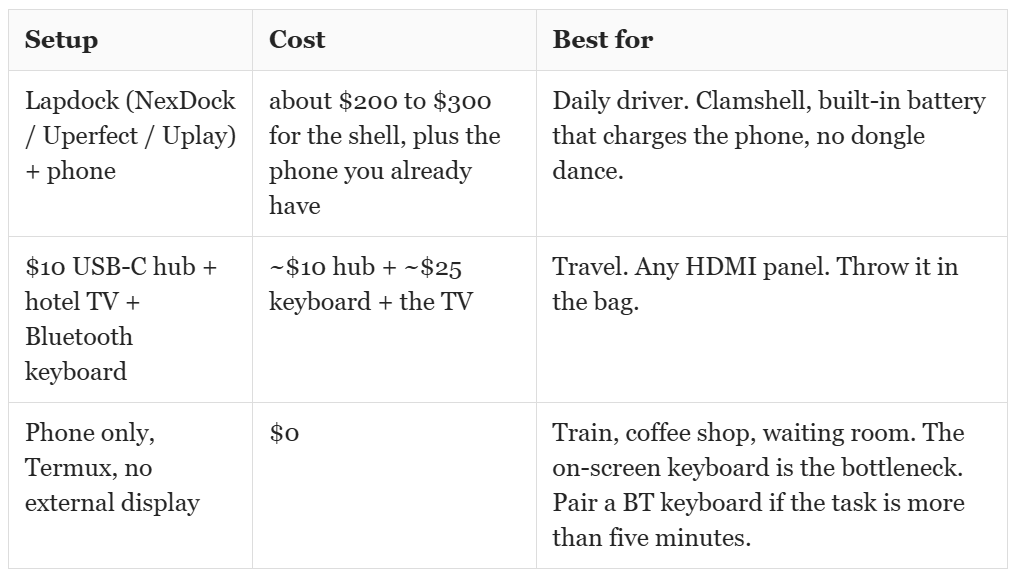
The one I use most: lapdock on the desk, phone in via USB-C, lid open like a normal laptop. The lapdock battery keeps the phone alive, so I don’t end the day with 4%. Keyboard and trackpad are laptop-quality. Screen is a real 13 to 15” panel. It feels like a thin-and-light because, physically, it is one. The phone is the motherboard.
What This Setup Is Not Good For
A few honest limits:
- GPU work. No CUDA, no ROCm, no local LLM at useful speed. Fine-tunes stay in the cloud. That’s fine; OpenCode was going to send the model off-device anyway.
- Docker-in-Docker. Rootless Docker can live on the Termux side. Inside the proot, don’t bother. For services,
aptand a process in tmux is simpler anyway. - systemd. No
systemctl.pg_ctl,redis-server &,tmux new -d. - iOS. Termux is Android. iSH exists and it is a much weaker emulation layer. I don’t have a recipe for iPhone, and I’m not going to pretend I do.
For web work, Go services, Python, refactors, tests, PR review, long agent runs, even compiling C++: it works.
Why Am I Doing This?
The cost of “where” you code is falling off a cliff.
Ten years ago you needed a $1200 MacBook, fast wifi in a specific chair, and a disk image you were afraid to wipe. Today I need a phone, a screen, a Bluetooth keyboard, and a $10 to $20/month model subscription. The environment is in the pocket. The weights are in the API. The repo is on GitHub. Desktop mode is slowly becoming a boring Android feature. The SoCs that have always been tiny PCs are finally getting a userspace that treats them that way.
This is what I wanted in 2011, reading about the Atrix on a 4-inch screen and thinking “one day.” I am writing this from a phone. The PR is open. The test passed. The agent is already on the next task.
The install is about 10 minutes. The first time you push a fix from a hotel TV, the laptop starts to feel optional.
Related:
- OpenCode Go + oh-my-openagent: The Complete Guide to SOTA Model Routing Without Hitting Limits, the model-routing config that runs on this setup.
- Android 16 Desktop Mode / Samsung DeX / NexDock / proot-distro on GitHub / Termux on F-Droid
If you set this up, drop a comment with your hardware config. I’m collecting “phone-as-laptop” setups and want to see what others are running.
Keep reading
Building cross-distro offline voice dictation for Linux (and why it took more than a model)
The story behind Vocalinux, from the missing Linux dictation gap to whisper.cpp, remote HTTP STT, Wayland text injection, and a tray app you can use every day.

How I Built a Privacy-First Offline Speech-to-Text Tool That I Use Every Single Day
Introducing Vocalinux, an open-source, 100% offline voice dictation tool for Linux using Whisper or VOSK, with its architecture, features and install guide.
From Vocalinux to the Voca family: a Mac port, a phone app and three app stores
Porting Vocalinux to macOS, moving it all into one Voca org, and pushing VocaPhone through Google Play, the App Store and F-Droid in a single autumn.
Leave a comment