From Vocalinux to the Voca family: a Mac port, a phone app and three app stores
Porting Vocalinux to macOS, moving it all into one Voca org, and pushing VocaPhone through Google Play, the App Store and F-Droid in a single autumn.
 Jatin Kumar Malik First published on
 X
In February I wrote about building Vocalinux, and in July about why cross-distro dictation took more than a model. Both posts were about Linux. This one covers what happened once the same idea left Linux: a macOS port, an org for the whole family, a phone app, and my first time going through three app stores at once.
The idea stayed the same throughout. Press a key, talk, and the text shows up where your cursor is, with the audio staying on your machine.
VocaMac: the port I wanted for myself
I was tired of not having reliable offline voice-to-text on my Mac without signing up for something or installing bloatware. So on 5 March I put out VocaMac v0.1.0, an alpha port of Vocalinux to macOS.
Only the idea came over as is. On Linux the default engine is whisper.cpp, while VocaMac uses WhisperKit, which runs the Whisper models on the Apple Neural Engine. It lives in the menu bar, you hold a hotkey to talk, and it types straight into whatever app has focus. Free, open source (AGPL-3.0), and it runs on both Intel and Apple Silicon Macs.
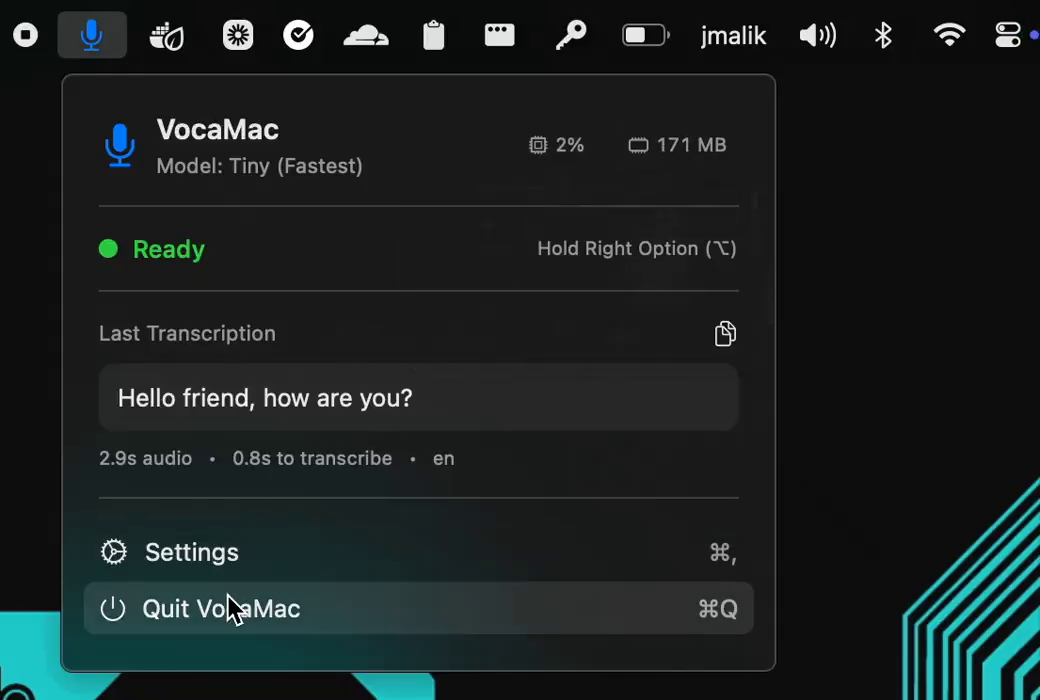 From the v0.1.0 demo: 2.9 seconds of audio, 0.8 seconds to transcribe, on the Tiny model.
For an alpha it was surprisingly stable and light on resources. When someone asked me about latency in June, my answer was the reason I’d picked WhisperKit in the first place. On the Neural Engine it has a massive edge over whisper.cpp on CPU: it feels instant and keeps the machine cool. Accuracy is basically the same since the core models match, so the native Apple integration made it an easy call.
Paying Apple $99 so my mum can install it
Until April, installing VocaMac meant meddling with CLI commands. An unsigned app on macOS gets Gatekeeper warnings and right-click-open tricks, and for anyone who isn’t used to that, it’s a dead end.
So I paid for the Apple Developer Program. On 10 April I had a proper drag-to-Applications installer working, simple enough that my mum could use it, and I called it “worth $99/year imo /s”. The next day VocaMac v0.4.0-beta went out Developer ID signed and Apple notarized. Download, drag, grant the permissions, talk.
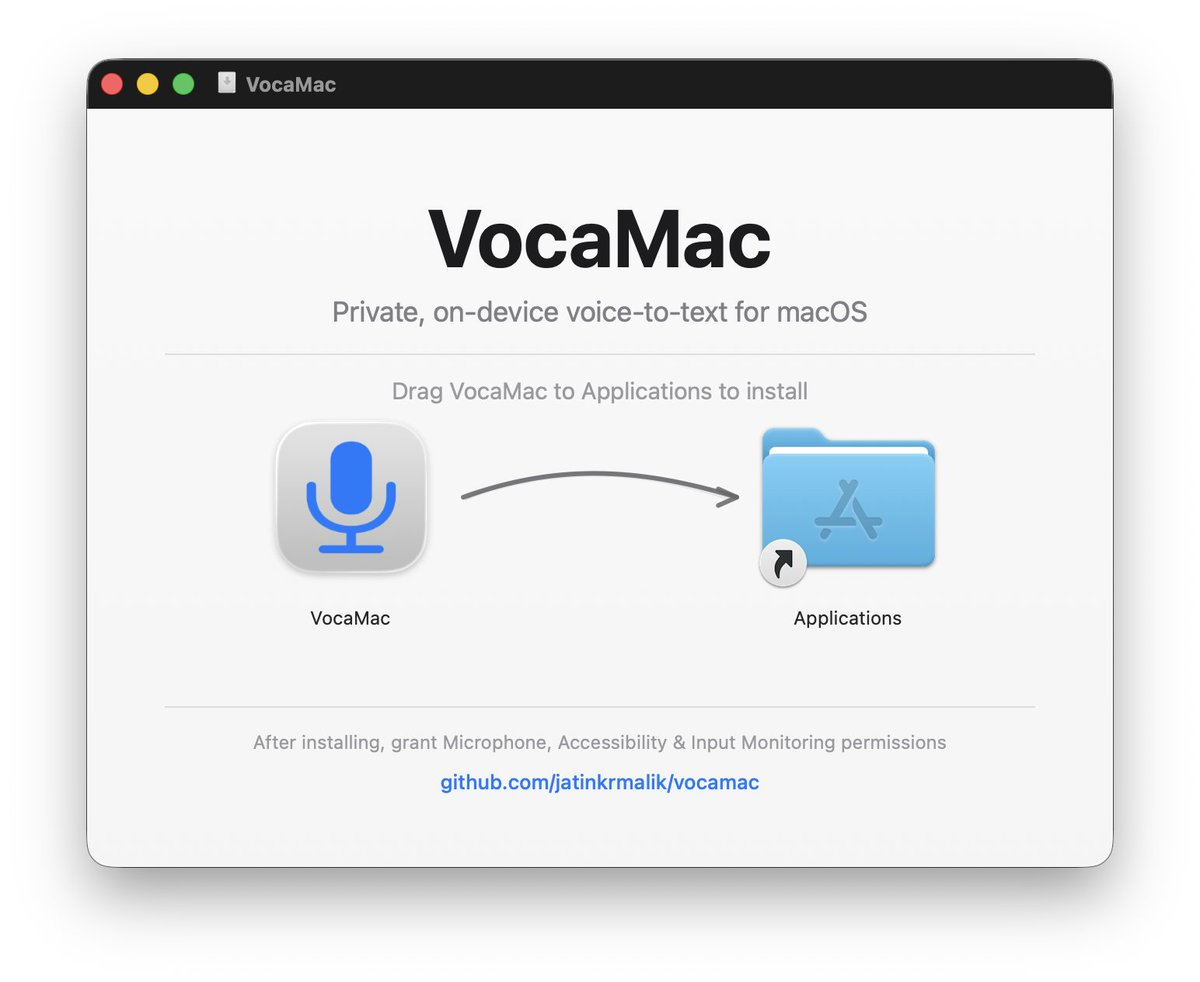 The v0.4 installer: drag, drop, grant three permissions.
After that it was the usual grind. v0.6.1 in April fixed two startup crashes and a paste bug on non-QWERTY layouts, and the in-app update checker offered it to v0.6.0 users automatically. v0.7.0 in July added custom vocabulary for names and jargon, usage stats (words, WPM, streaks), a mic picker and a Homebrew cask, so updating is now just brew upgrade --cask vocamac.
Meanwhile, Vocalinux kept growing
The Linux app didn’t slow down while I was busy with the Mac. In mid July the 0.14 beta got picked up by Phoronix, It’s FOSS, FOSS Force and Linuxiac, and on 17 July Vocalinux became my first GitHub project to cross 500 stars.
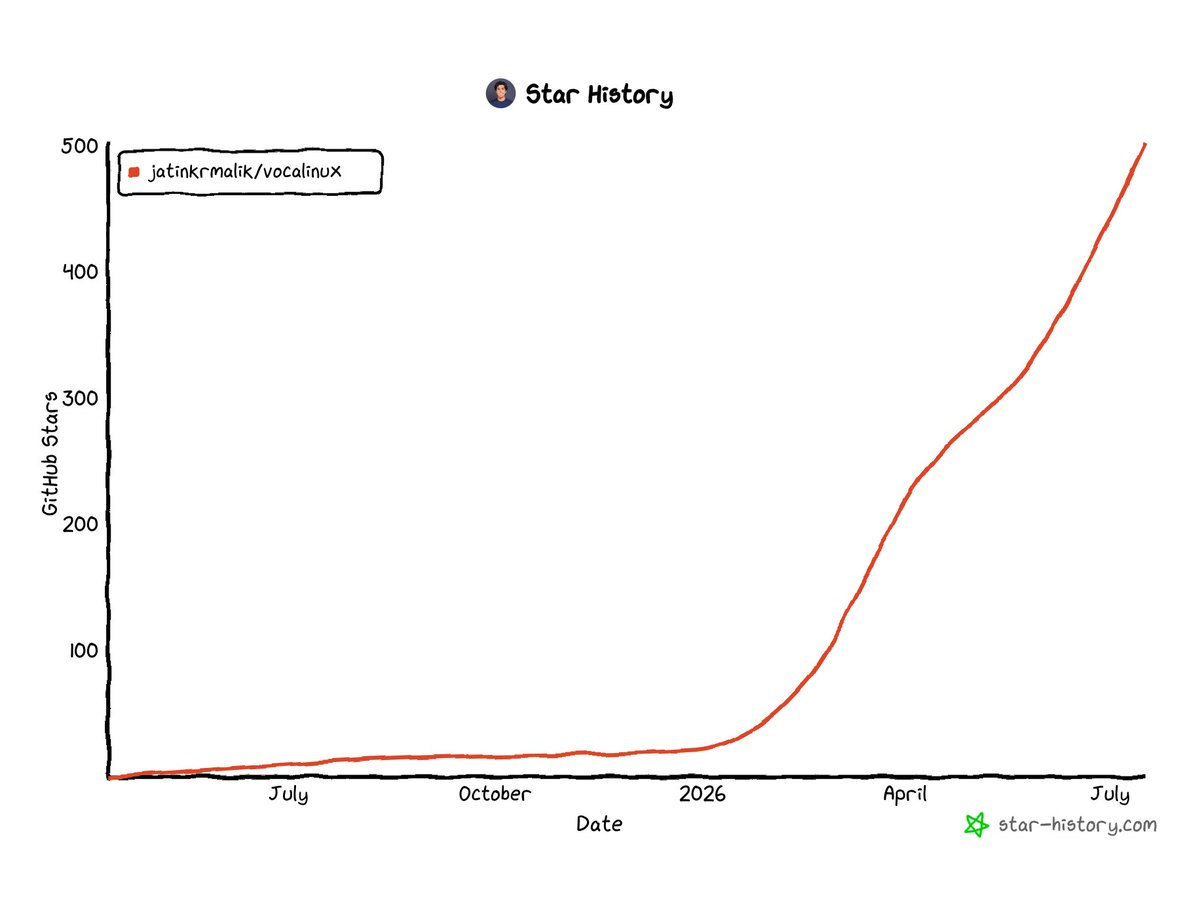 Months of almost nothing, then 2026.
On 28 July SwitchedToLinux reviewed it on YouTube. I’d been building it steadily for over a year, so watching a stranger install it and fumble through the settings had me sweating. Every wrong click, every awkward pause. But they got it working and they liked it, and as a first real review it hit harder than I expected.
v0.15.0 on 3 August brought a new settings panel, AppImage builds, around 33 speech languages, auto-pause and idle unload, and smarter Vulkan GPU picking. Remember the AppImage part, it comes back later.
One org for the whole family
By the summer, Vocalinux was one of several apps. There was VocaMac, a Windows version (VocaWin) and a phone app (VocaPhone), and a few active contributors were maintaining pieces of it with me. A shared org is simply easier for access and ownership than keeping all of that under a personal account.
So on 6 August everything moved under a new VocaHQ org. Same apps, same licenses, still free, and the old jatinkrmalik/... links redirect. Stars, issues, PRs and releases moved with the repos. The VocaPhone repo came over from a contributor’s own account a few days before the announcement.
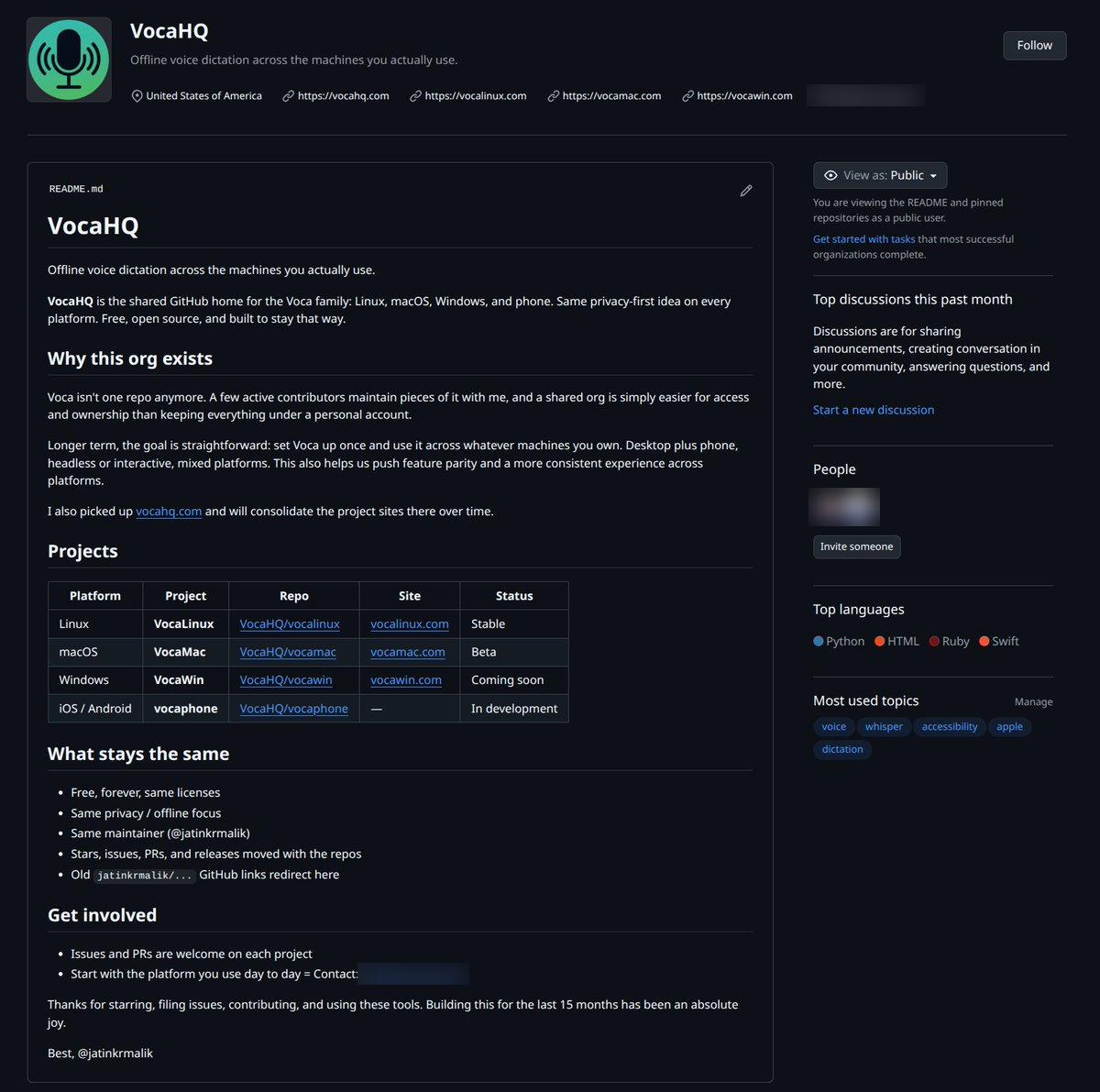 The org README on day one. VocaWin was “coming soon” and the phone app was “in development”.
The longer-term goal is in that README: set Voca up once and use it across whatever machines you own, desktop or phone, headless or interactive. The headless part arrived in September as VocaGateway, a transcription server you run on your own compute and point any of your machines at. Your other machines send their audio to it, and it stays on hardware you own.
At the end of August I was also asking for people to help test a beta on Windows. VocaWin is out now too.
VocaPhone, and three app stores
VocaPhone is an Android keyboard for voice dictation, with an iOS app alongside. On Android it plugs in as an input method, so dictation works in any text field. It runs models on-device and can also use a VocaGateway.
The keyboard part grew fast. One PR in mid August added a number row, keyboard heights, local English completions (switched off in password fields), a clipboard chip, emoji categories, spacebar cursor swipe, and a searchable model catalog with engine, size and language filters. By then I was typing some of my own replies on X with NVIDIA’s Parakeet 0.6B model running locally on my Android phone. On 3 September the public beta opened: Android 13+ builds and an iOS 17+ TestFlight.
Then came the stores. I had shipped Windows Phone apps and a Chrome extension before, but never to three stores in parallel, and each one checked for something different.
Google Play: prove people use it
Play wanted testers before production. On 18 August the tester list got an email with two links: the closed test, “the one Play counts toward review”, and an internal test that was already live for anyone who wanted it sooner. The build was 0.1.0-beta.16, and until Google reviewed the listing, Play showed the app by its package name with an “(unreviewed)” tag.
On 9 September Google granted VocaPhone production access. Play was the most straightforward of the three: run the closed test, wait, apply.
VocaPhone is live on Google Play now.
The App Store: the binary has to be right
I submitted VocaPhone 1.0 for iOS on 2 September. Apple had already flagged an earlier upload in August, and on 15 September it bounced builds 27 and 28, fourteen minutes apart, with the same error:
ITMS-90208: Invalid Bundle - The bundle VocaPhoneApp.app/Frameworks/onnxruntime.framework does not support the minimum OS Version specified in the Info.plist.
That error has nothing to do with your own code. A prebuilt framework you bundled declares a different minimum iOS version than your app does, and the upload pipeline rejects the whole build before a human ever looks at it.
The next day App Review came back with “Changes needed” on version 1.0. The email doesn’t say why; you have to open the App Review page in App Store Connect for that.
I got past both in the end, and VocaPhone is live on the App Store now.
F-Droid: prove you can build it from source
F-Droid barely looks at your listing. What it checks is whether it can build your app from source, and whether that build matches what you ship.
A contributor opened the fdroiddata merge request on 14 August, and it ran to 30 comments before the merge. Some asks were small: pin a full commit hash instead of a version tag, and drop a sudo block because the build server already runs JDK 21. The big one was reproducible builds.
VocaPhone ships two product flavors. The APK on our GitHub releases page was the full flavor, which bundles prebuilt native libraries: about 19 MB of ONNX Runtime and about 5 MB of sherpa-onnx. F-Droid doesn’t accept prebuilt binaries like that, so the fdroid flavor exists to drop them and compile whisper.cpp from a pinned submodule instead. That left two different APKs by design, and nothing for F-Droid to compare its own build against.
The fix was to publish the fdroid-flavor APK as its own release asset, signed by us. Then a reviewer pointed out that we had to decide on reproducible builds now, because switching from F-Droid’s signature to ours later would cut existing users off from updates. We chose upstream-signed reproducible builds from the very first F-Droid release, and the MR was merged on 3 October.
The funny part is that ONNX Runtime sat in the middle of both fights. Apple rejected the iOS build over its framework’s minimum OS version, and F-Droid needed a whole separate flavor to keep it out.
Hackaday couldn’t get it to work
On 15 September Hackaday ran a Linux Fu column on speech input. Vocalinux was in it. The writer said it looked nice, but a quick test kept complaining that his Intel extensions weren’t available, which made sense on his AMD CPU, and he never got it working. Handy was the one that worked for him. Fair enough, I had suggested Handy as a Vocalinux alternative on LibHunt myself back in January.
Late that night I introduced myself in the comments as the maintainer. I’d written Vocalinux on an AMD PC running Ubuntu, so an Intel extensions error was new to me, and I asked for his distro and the exact error.
He’d used the AppImage on openSUSE. The next morning he retried and it picked right up. A few minutes later he added that he had removed the model, and that the AMX messages only show up once a model is loaded. Either way, it was now working on his AMD machine.
From a public “never got it working” to working in under a day. I’ll take that.
Devin cleaned up my backlog
On 24 September I won my first giveaway ever, a $200 Devin plan from Cognition, for building VocaHQ. Its macOS VM (M4 Pro, 16 GB RAM) turned out to be handy for testing VocaMac too.
On 6 October I pointed it at Vocalinux and asked it to triage every open issue and PR, a backlog I’d been carrying since June 2025. Over about 10 hours it worked through the board bit by bit, ran end-to-end tests on a KDE desktop, and wrote its own skills for the job. Out of 60+ issues, I only had to bring in a different model for 2. Having Windows, Mac and Linux machines available to the agent made the biggest difference, because it could build each app on its native platform.
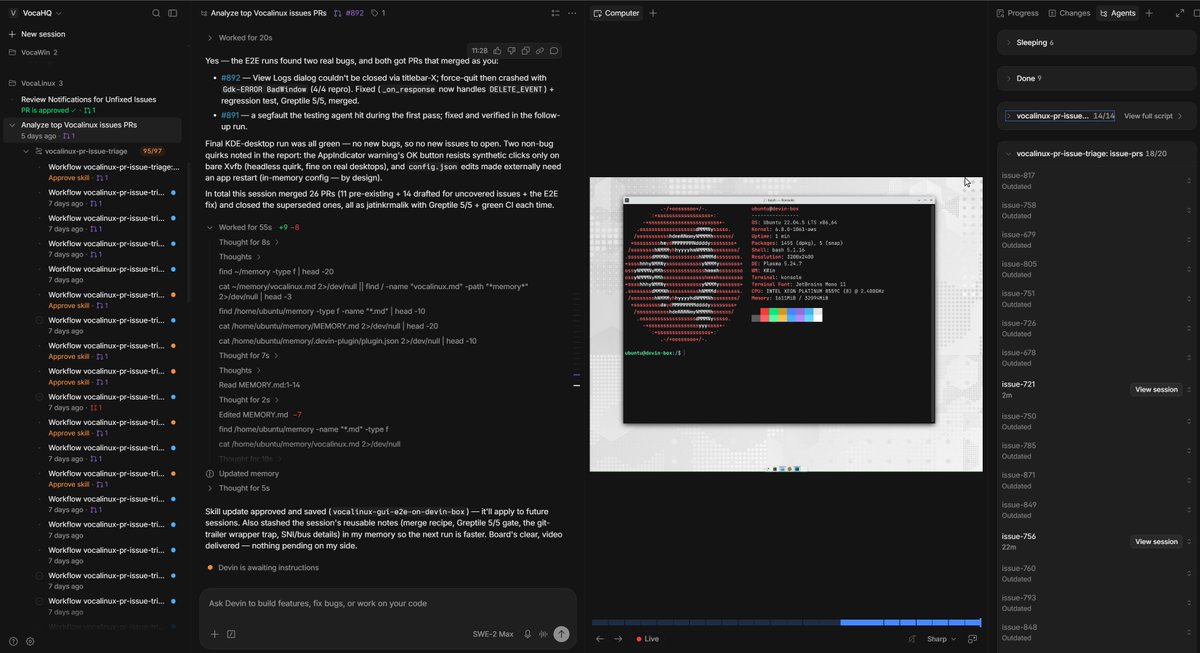 One session: 26 PRs merged, 11 that already existed plus 14 it drafted for issues nobody had picked up, and one E2E fix.
Seeing VocaMac on TechWiser
Four days ago I was watching TechWiser’s latest YouTube video about Mac apps over lunch, and they covered VocaMac. I’ve been building this in public since the start of the year and refining it bit by bit with the community, so seeing it pop up in someone else’s video was a validating moment. A lot of the credit goes to a contributor who revamped the UI and added a ton of features and models.
What I took away
Porting meant redoing almost everything except the idea. The engine, the installer and the way people get the app all changed between Linux and the Mac.
Each store checked something different. Play wanted a closed test before production, Apple wanted a binary that passed its upload checks and then a human sign-off, and F-Droid wanted to build the app from source and get the same APK we ship.
And most of this came from other people: user reports, PRs, and the few contributors who now maintain parts of it with me.
If you want dictation that stays on your device, on whatever you use: vocahq.com.
VocaHQ/vocamac Open-source, offline voice-to-text for macOS. Hold a hotkey, speak, and the text appears. Private on-device dictation with a choice of speech engines. VocaHQ/vocaphone On-device voice dictation for iPhone and Android, with an optional self-hosted VocaGateway.Keep reading
Coding on the Go: My Full-Stack Dev Environment Lives in My Phone Now
I used to think I needed a laptop. Then I dropped a phone into a lapdock, and now I ship code from hotel TVs.
iOS 101: Day 0 | Setting up the garage
Welcome to your first tutorial for iOS 101! Learn how to setup development environment on your Mac before you start shipping out kickass iOS apps. Dive in!
Eye strain? No more! Install this app to save your eyes.
Are you among those folks who use the computer at night and suffer from eye strain or sleep deprivation? Well, I just found an app to sort it out for you.
Leave a comment