I debloated my TCL Google TV over ADB, found Samba TV’s ACR inside a system service, and replaced the home screen with a 33 KB launcher
Debloating a TCL Google TV over ADB without root: auditing packages, finding Samba TV ACR in a system service, and building a lightweight custom launcher.
 Jatin Kumar Malik First published on
 Medium
Disable, never uninstall. Every number below came from dumpsys on the actual TV.
In October 2026, posts about debloating smart TVs went around X: cleanyourtv, dumbtv, chill-tv-launcher, tv-makeover. I tried the approach on my own TV. I used no root and installed nothing from theinternet, and every change can be reversed with one script. This post covers the whole process: the audit, what the TV was sending home, the parts that didn’t work, and a GPU problem on the MediaTek chip that took a while to track down. It’s the same ADB-first approach I used to fix my phone’s battery.
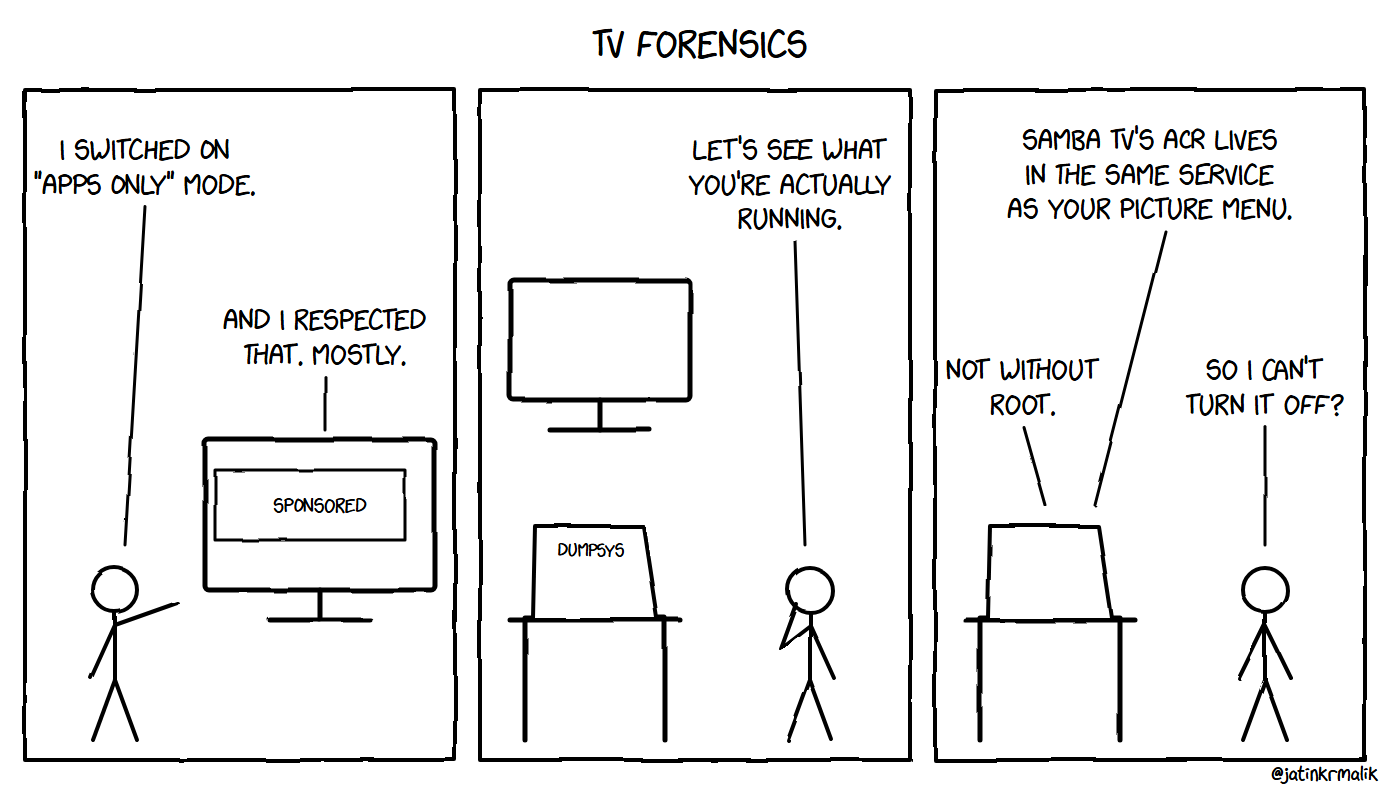
“Apps only” mode, sponsored banner included.
Quick summary
Before                                           After
-------------------------------------------  -----------------------------------------------  ----------------------------------
Home screen memory (PSS)                     148 MB (launcherx 106 MB + :coreservices 42 MB)  39 MB (custom launcher, 33 KB APK)
Used RAM, whole TV                           2,017 MB                                         1,621 MB
Packages disabled                            0                                                30 (+1 by hand)
Apps uninstalled                             0                                                7
Sponsored hero banner, TCL tv+, promo tiles  yes                                              gone
Launcher median frame time                   n/a                                              12 ms (1% janky)
Root required                                -                                                no
Reversible                                   -                                                restore.ps1, one command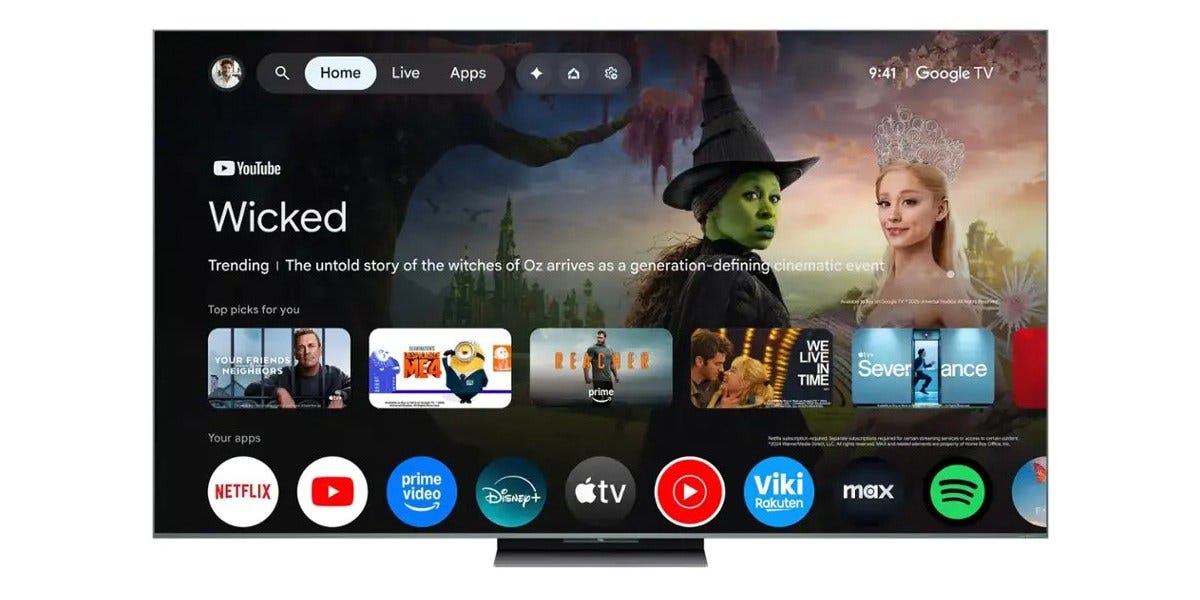
Stock Google TV out of the box: half the screen is a promoted “Trending” banner, and “Top picks for you” is personalized from your viewing. (Image: TCL, via 9to5Google)
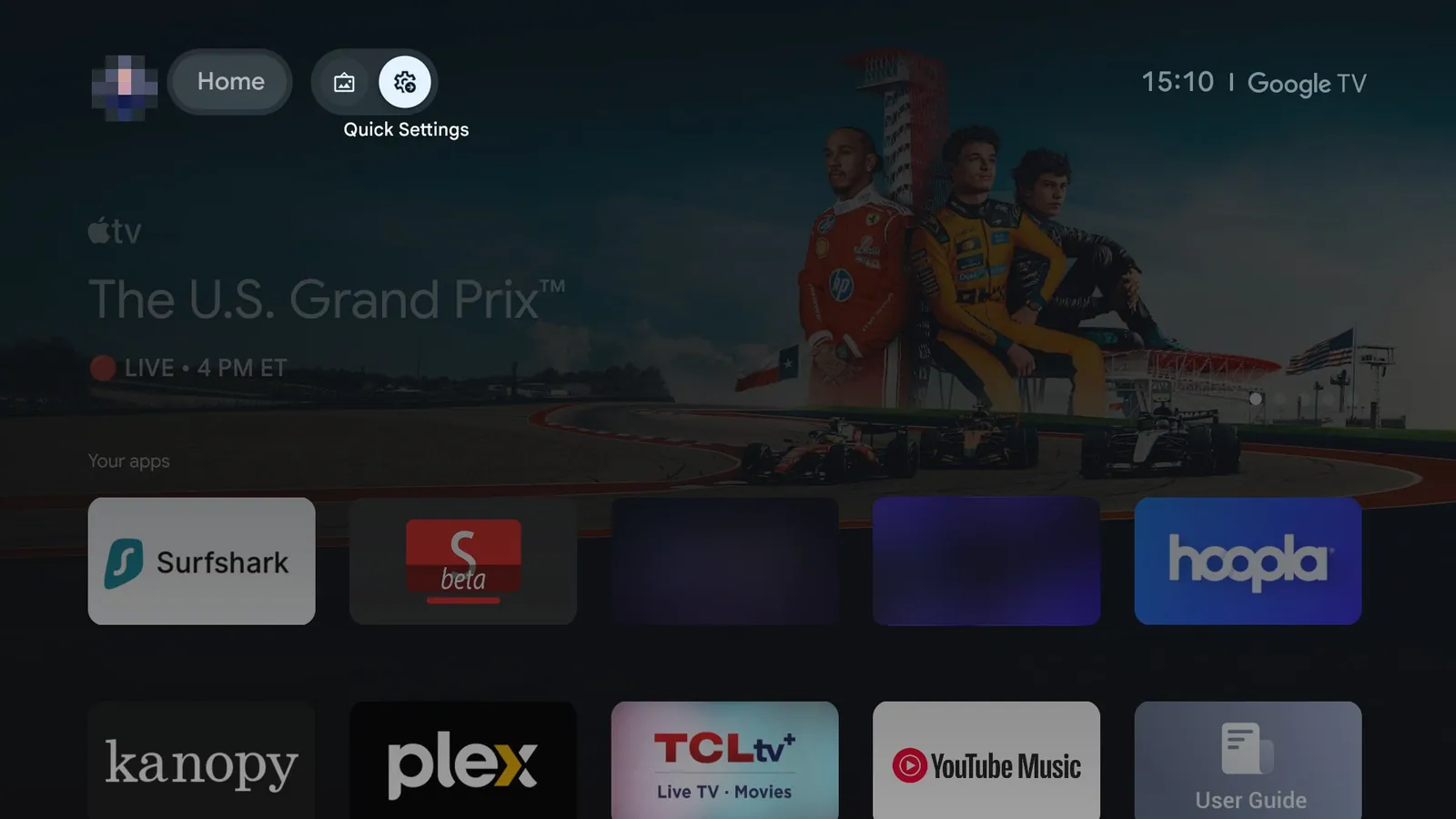
My TV before: Google TV with “Apps only” on, still showing a sponsored Apple TV+ hero plus TCL tv+ and User Guide tiles
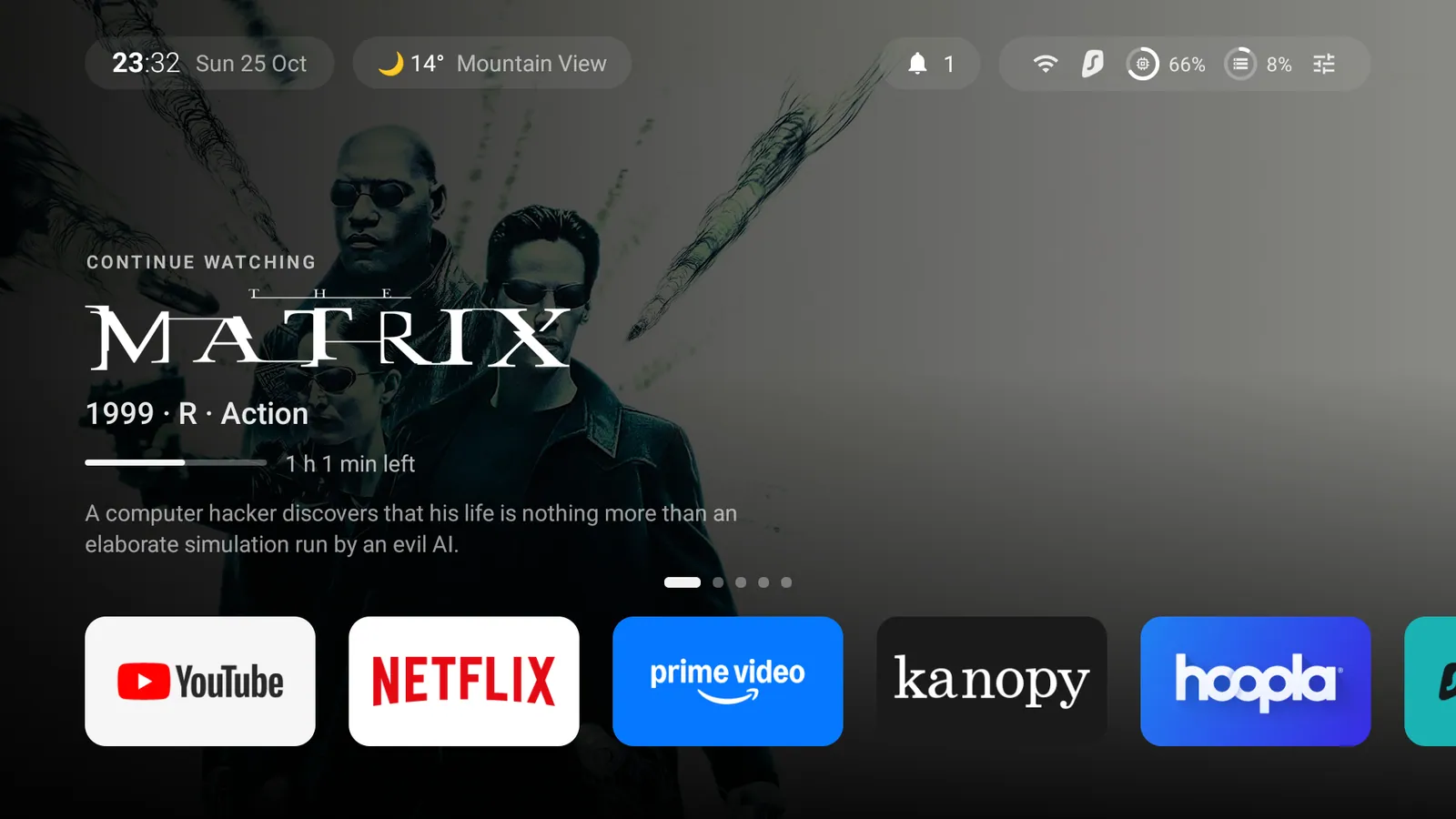
After: my own launcher. The hero is “Continue watching” from my Plex server, not a sponsored banner.
I already had Google TV’s “Apps only” mode switched on before I started, so my “before” screenshot is tamer than the stock experience. Even so, the sponsored hero banner was still there.
The hardware
ro.product.model         = Smart TV Pro
ro.product.device        = G08            (product G08_4K_US)
ro.build.version.release = 14  (SDK 34)
ro.build.fingerprint     = TCL/G08_4K_US/G08:14/UTT2.250416.001/AU14:user/release-keys
ro.hardware              = mt5896
ro.board.platform        = merak
ro.soc.manufacturer      = Mediatek    ro.soc.model = t50
MemTotal                 = 2,451,280 kB
Display                  = 3840x2160 panel, UI rendered at 1920x1080 (wm size override), 60 Hz
175 packages: 155 system, 20 user-installed, 0 disabled.
The SoC matters. On MediaTek TVs, disabling the partner customizer is known to send a system service into a crash loop, so com.tcl.partnercustomizer stayed on the do-not-touch list.
Rules I set before touching anything
pm disable-user --user 0, neverpm uninstall. A disabled package comes back withpm enable.- Back up the full package list first (
pm list packages -f -U,-d,-e,-s,-3). - Write the restore script and test it before the first change.
- Small batches (1 to 7 packages), with a health check after each.
- Ask before touching anything I might actually use.
Step 1: Connecting
Developer options → Network debugging, then:
adb connect 192.168.1.71:5555
# accept "Allow USB debugging?" on the TV, tick "Always allow"
Two gotchas came up right away:
- A phone was also connected over USB, so every command uses
adb -s 192.168.1.71:5555. - The TV’s 10-minute idle timeout put it into standby halfway through an
adb install. Network ADB died (“device offline”), then refused connections until I toggled Network debugging off and on. Fix (and set it back when you’re done, see Step 9):
adb shell settings put system screen_off_timeout 2147483647   # was 600000
adb shell settings put secure sleep_timeout -1                 # was 3539000
Step 2: Audit
adb shell pm list packages -f -U                 # path + uid tells you a lot
adb shell dumpsys package <pkg>                  # services, receivers, permissions
adb shell dumpsys meminfo                         # "Total PSS by process"
adb shell dumpsys activity services <pkg>        # what's actually running
The UID column turned out to matter most. Several TCL packages run as uid 1000 (system): com.tcl.ttvs, com.tcl.interactive, com.tcl.messagebox, com.tcl.esticker and com.tcl.providers.config. They share every system permission, including ACCESS_SURFACE_FLINGER, READ_LOGS, DUMP, PACKAGE_USAGE_STATS, RECORD_AUDIO and location. So a grep for “dangerous” permissions reports the same set for all of them, and it tells you nothing about any one package.
Top memory users at audit time (PSS):
162,450K  system
105,864K  com.google.android.apps.tv.launcherx (activities)
 72,697K  com.google.android.gms
 47,184K  com.tcl.ttvs
 44,372K  com.google.android.katniss:interactor
 41,897K  com.google.android.apps.tv.launcherx:coreservices
 36,199K  com.google.android.apps.tv.dreamx:smarthome
 26,803K  com.google.android.syncadapters.calendar      <- calendar sync. On a TV.
 23,079K  com.google.android.tungsten.setupwraith
 17,403K  com.tcl.usercenter
  9,553K  com.tcl.providers.config:cloud_service
Step 3: What the TV was sending home
No tv.anoki.acr.controller on this TV, but ACR is still there
The well-known TCL ACR package is not installed on this firmware. The ACR lives inside TCL’s core service instead:
$ adb shell dumpsys package com.tcl.ttvs | grep Samba
  com.tcl.ttvs/.ssm.frameserver.SambaVideoService  permission tcl.permission.SambaVideoService
SambaVideoService is a frame server for Samba TV, the automated content recognition (ACR) service that fingerprints what’s on screen. com.tcl.ttvs (“TCSCore”, version 10.56.38_165fdfc_251120_overseaTV, 47 MB resident) also runs these services:
com.tcl.trackdata.service.TrackDataService             event tracking
.oversea.usagest.core.service.UsagestService            app/input usage stats
.bi.core.BIService                                      "business intelligence"
.identifier.core.service.IdentifierService              device identifier
com.tcl.guard.onlinesupport.service.OnlineSupportService (com.tcl.guard, merged in)
com.tcl.messagebox_core.service.MessageService           pushed promos
The same process also runs casting (T-Cast/AllCast), the Alexa bridge, the remote’s soft keyboard, and the TV’s picture/sound menu service. So you can’t disable the whole package without breaking the TV menu.
Disabling only the tracking components fails without root
$ adb shell pm disable --user 0 com.tcl.ttvs/.ssm.frameserver.SambaVideoService
java.lang.SecurityException: Shell cannot change component state for
ComponentInfo{com.tcl.ttvs/com.tcl.ttvs.ssm.frameserver.SambaVideoService} to 2
The shell user can’t change component state for packages it doesn’t own. So the realistic options are:
- Turn off the Samba TV / “Viewing Information Services” opt-in in the TV’s privacy settings.
- Block it at DNS.
appops, as a gesture:cmd appops set com.tcl.ttvs RUN_ANY_IN_BACKGROUND ignore. It’s accepted, butam get-standby-bucketstays at 5 (exempted) because it’s a system process. Expect little effect.
Telemetry flags in settings global
tcl_diagnostic_status = 1   -> 0
upload_apk_enable     = 1   -> 0     # uploads your installed-app list
Where it connects
dumpsys netstats per-UID detail is empty on this build, but /proc/net/tcp{,6} is readable from the shell and includes the owning UID:
adb shell 'cat /proc/net/tcp6 /proc/net/tcp | awk "NR>1 && \$4==\"01\"{print \$3, \$8}"' | sort | uniq -cIPv4 addresses appear in little-endian hex: D842A814 decodes to 20.168.66.216. Before the debloat, uid 1000 held a connection to 20.168.66.216:6177. After the debloat, it still held 20.171.160.197:443 and 4.249.25.67:443, all Microsoft Azure ranges. That’s TTVS, and only DNS blocking will stop it.
Step 4: Disabling in verified batches
Every batch ran through the same script. The script clears logcat, disables the batch, waits 20 s for crash loops, then checks:
- that core TCL/Android services kept the same PIDs (no restarts),)
- which activity holds the Home intent,
- the crash buffer,
- the count of
has died/ANRlines.
It then presses Home and takes a screenshot.
for p in "$@"; do adb -s $S shell pm disable-user --user 0 "$p"; done
sleep 20
for p in com.android.systemui com.tcl.tv com.tcl.ttvs com.tcl.systemserver com.tcl.tvinput com.android.tv.settings; do
  printf '%-28s %s\n' $p "$(adb -s $S shell pidof $p)"
done
adb -s $S shell cmd package resolve-activity --brief -a android.intent.action.MAIN -c android.intent.category.HOME
adb -s $S logcat -d -b crash | grep -E "FATAL EXCEPTION|Process: "
Batch Packages What they did
----------- ---------------------------------------------------------------------------------------------------------------------------------------------------------------------- --------------------------------------------------------------------------------------------------------------------------------------------------
1 Ads com.tcl.tv.plus, com.tcl.channelplus, com.tcl.dashboard, com.tcl.exhibit, com.tcl.ocean.instructions TCL tv+ (internally com.tcl.waterfall.overseas), ad-supported channels registered as a TV input, promo dashboard, store-demo portal, e-manual tile
2 Telemetry com.tcl.usercenter, com.tcl.logkit, com.tcl.smartlink.core, com.tcl.messagebox, com.tcl.esticker, com.tcl.tv.tclhome_passive, com.google.android.feedback TCL account, log uploader, CustomInstallService (silent push-installs), promo inbox, in-store show mode, IoT companion, Google feedback
3 Google com.google.android.syncadapters.calendar, android.autoinstalls.config.google.gtvpai, YouTube, YouTube Music, com.tcl.smartalexa Calendar sync, Play Auto Install (re-pushes partner apps), apps I don't use
4 Home com.google.android.tungsten.setupwraith, com.google.android.apps.tv.launcherx Only after the replacement launcher was working (see below)
5 Ad stack com.android.adservices.api, com.android.ondevicepersonalization.services, com.android.federatedcompute.services Android 14 Privacy Sandbox. Disabled one at a time.
6 Extras com.android.tv.feedbackconsent, com.google.android.partnersetup, com.android.printspooler, com.android.healthconnect.controller, com.google.android.onetimeinitializer Feedback consent, partner attribution, unused servicesNo batch produced a single crash. The one process death, after batch 6, was com.tcl.gamebar at oom-importance 905: a cached app reclaimed for memory, unrelated to the change. A reboot after batches 3, 4 and 6 confirmed that state persisted and nothing crash-looped at boot.
Left alone on purpose: com.tcl.partnercustomizer, com.tcl.ttvs, com.tcl.tv, com.tcl.tvinput, com.tcl.systemserver, com.tcl.suspension (Quick panel), com.tcl.autopair (remote pairing), all com.mediatek.*, Dolby, Assistant/katniss (the mic button), AirPlay, Ambient Mode.
Step 5: The Home button
Google TV doesn’t give up the Home button easily. After installing my launcher:
$ adb shell cmd package set-home-activity --user 0 tv.dock.launcher/.HomeActivity
Success
$ adb shell cmd package resolve-activity --brief -a android.intent.action.MAIN -c android.intent.category.HOME
com.google.android.apps.tv.launcherx/.home.HomeActivity      <- "Success" changed nothing
Disabling setupwraith alone didn’t change it either. Only disabling launcherx made Home go to my launcher. Check with the role manager, not the Success string:
$ adb shell cmd role get-role-holders android.app.role.HOME
tv.dock.launcher
Then I tested the Home button from inside SmartTube, Plex, the HDMI input app and Settings, not just from the home screen. All four returned to the new launcher.
Order matters: install and verify the new launcher, then disable setupwraith, then launcherx. One reference repo reports a crash loop from the reverse order. They also warn that disabling setupwraith can wipe Wi-Fi networks saved during setup (all 10 of mine survived) and may break Google Cast. I haven’t tested Cast yet.
“Success” is a state of mind.
Step 6: A 33 KB launcher, no Gradle
With an agent doing the typing, writing my own home screen became a small side project, which is the shift I wrote about in The Age of Infinite Software Supply. Plain Java with no AndroidX, built straight from the SDK tools:
aapt2 compile --dir res -o build/res.zip
aapt2 link -o build/unsigned.apk -I android.jar --manifest AndroidManifest.xml \
  --min-sdk-version 28 --target-sdk-version 34 --java build/gen build/res.zip
javac -encoding UTF-8 -source 8 -target 8 -bootclasspath android.jar \
  -classpath build-tools/34.0.0/core-lambda-stubs.jar -d build/classes $(find src build/gen -name '*.java')
d8 --release --min-api 28 --lib android.jar --output build/dex build/classes/**/*.class
(cd build/dex && aapt add ../unsigned.apk classes.dex)
zipalign -f 4 build/unsigned.apk build/aligned.apk
apksigner sign --ks dock.keystore --out dock-launcher.apk build/aligned.apk
Two build errors worth knowing about:
cannot find symbol: method metafactorymeansandroid.jarhas noLambdaMetafactory. Addcore-lambda-stubs.jarfrom build-tools to the classpath, and d8 desugars the lambdas.unmappable character (0x8F) for encoding windows-1252comes from emoji in source on Windows. Add-encoding UTF-8.
Features:
- Manifest:
HOME+DEFAULT+LEANBACK_LAUNCHER,launchMode="singleTask",<queries>for package visibility rather thanQUERY_ALL_PACKAGES. - Dock: 8 favourites. Hold OK on any app to move, add or remove it, saved to
SharedPreferences. - HDMI inputs named by CEC:
TvInputManager.getTvInputList(), with CEC child inputs (getParentId() != null) mapped onto their HDMI port. My PS5 shows up as “PlayStation 5 · HDMI 1”. Selecting it firesACTION_VIEWonTvContract.buildChannelUriForPassthroughInput(id), which the TCL TV app handles directly. - Weather from Open-Meteo (no key, no account), geocoded once and cached. The city is set on the TV or over ADB:
am start -n tv.dock.launcher/.HomeActivity --es city "Mountain View, California". - Status strip: a Wi-Fi/Ethernet icon from
NetworkCapabilitiestransports, the VPN app’s own icon whenTRANSPORT_VPNis up (Surfshark here), and free storage fromStatFs. - Top bar: pills, as on tvOS. The time and date, then the weather, sit on the left. A notifications bell and the status pill sit on the right, and OK on the status pill opens a small controls panel. The status pill now also shows memory and storage as rings. The per-app colour glow is gone: the focus ring on the tile is enough to show what’s selected.
- Ambient home (Plex): with nothing selected, the backdrop shows the last five Continue Watching titles from my own Plex server at 1080p. Each page follows the tvOS layout in the lower third, just above the dock: a small “Continue watching” or “Up next” label, the show’s logo, the episode or year, rating and genre, a thin progress bar with the time left, and a two-line summary. Page dots are centred above the dock. It moves on every 10 seconds, Left and Right step through it, OK opens Plex, and the list refreshes every time I come back to the home screen.
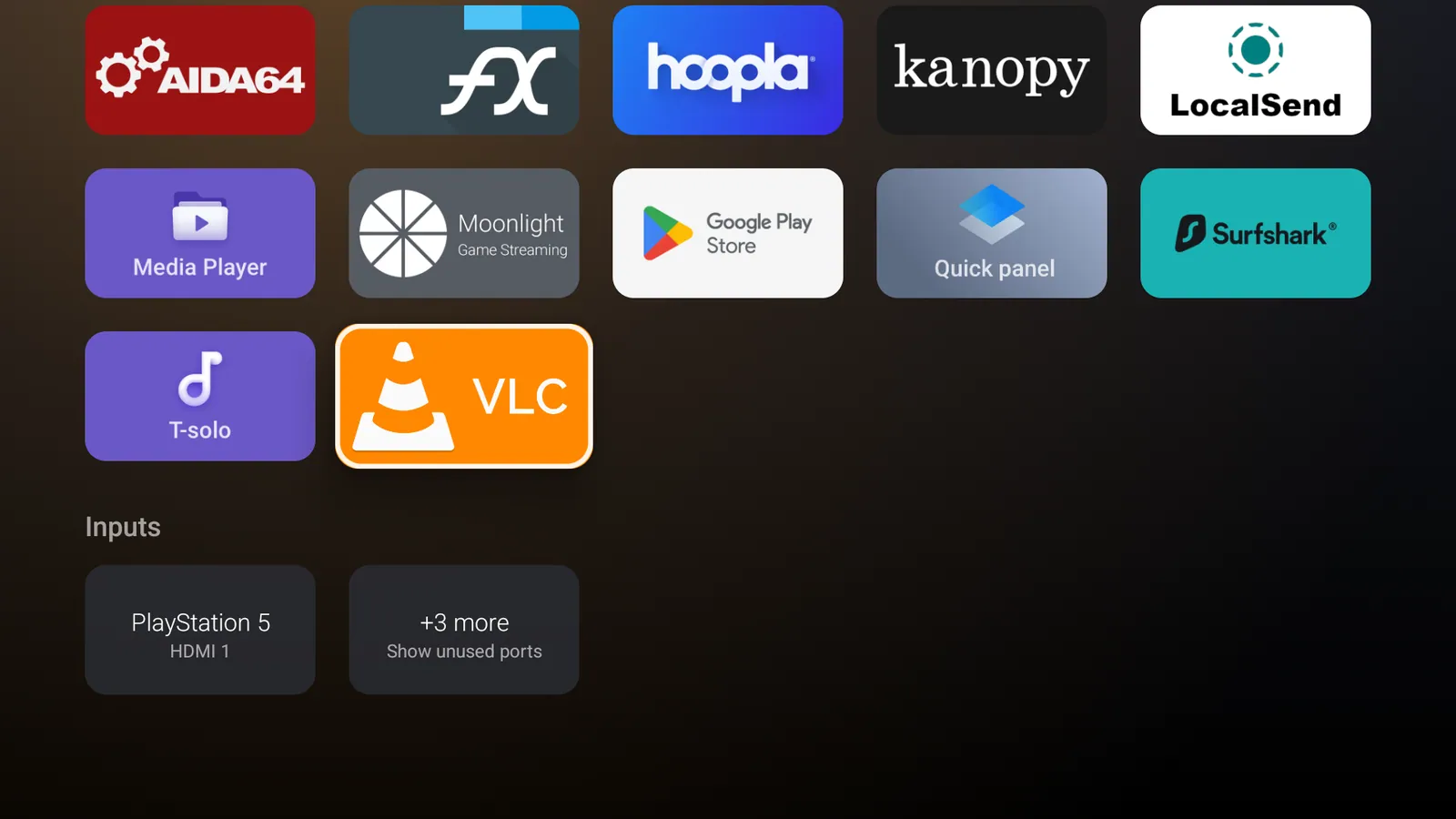
Inputs at the end of the app grid: HDMI-CEC names (my PS5), with unused ports folded away
Step 7: The GPU problem
The first redesign had a full-screen blurred backdrop (RenderEffect.createBlurEffect) and felt sluggish. dumpsys gfxinfo agreed:
Total frames rendered: 142
Janky frames: 35 (24.65%)
50th percentile: 48ms     <- 60 Hz budget is 16.7 ms
Number Slow issue draw commands: 12
For comparison, the TV’s own Settings app under the same D-pad input script:
Janky frames: 0 (0.00%) 50th percentile: 7msSo I removed things one at a time, driving the same 12-keypress D-pad sequence each time with input keyevent and resetting gfxinfo between runs:
Variant                                                                  p50    p90    Janky
-----------------------------------------------------------------------  -----  -----  -----
RenderEffect blur backdrop ×2 + gradient scrim + ScrollView fading edge  48 ms  65 ms  24.7%
Blur replaced by a 32×18 bitmap stretched with bilinear filtering        46 ms  61 ms  18.6%
- ScrollView fading edge (it's a saveLayer per frame)                    31 ms  31 ms  2.3%
- translationZ shadow on the focused tile                                31 ms  31 ms  1.2%
- backdrop ImageViews                                                    23 ms  25 ms  1.3%
- rounded clipToOutline on ~30 tiles                                     22 ms  24 ms  1.3%
- root black background and gradient scrim                               6 ms   8 ms   0%
black background only, put back                                          18 ms  18 ms  2.6%
black as window background instead of view background                    18 ms  18 ms  1.3%
On this MediaTek T50 GPU, a single opaque full-screen fill costs about 12 ms a frame, whether it’s a view background or a window background. Shadows and rounded clipping turned out to cost almost nothing. A blurred backdrop plus a dark scrim plus a background is three full-screen fills, which is the whole frame budget gone before any tile is drawn.
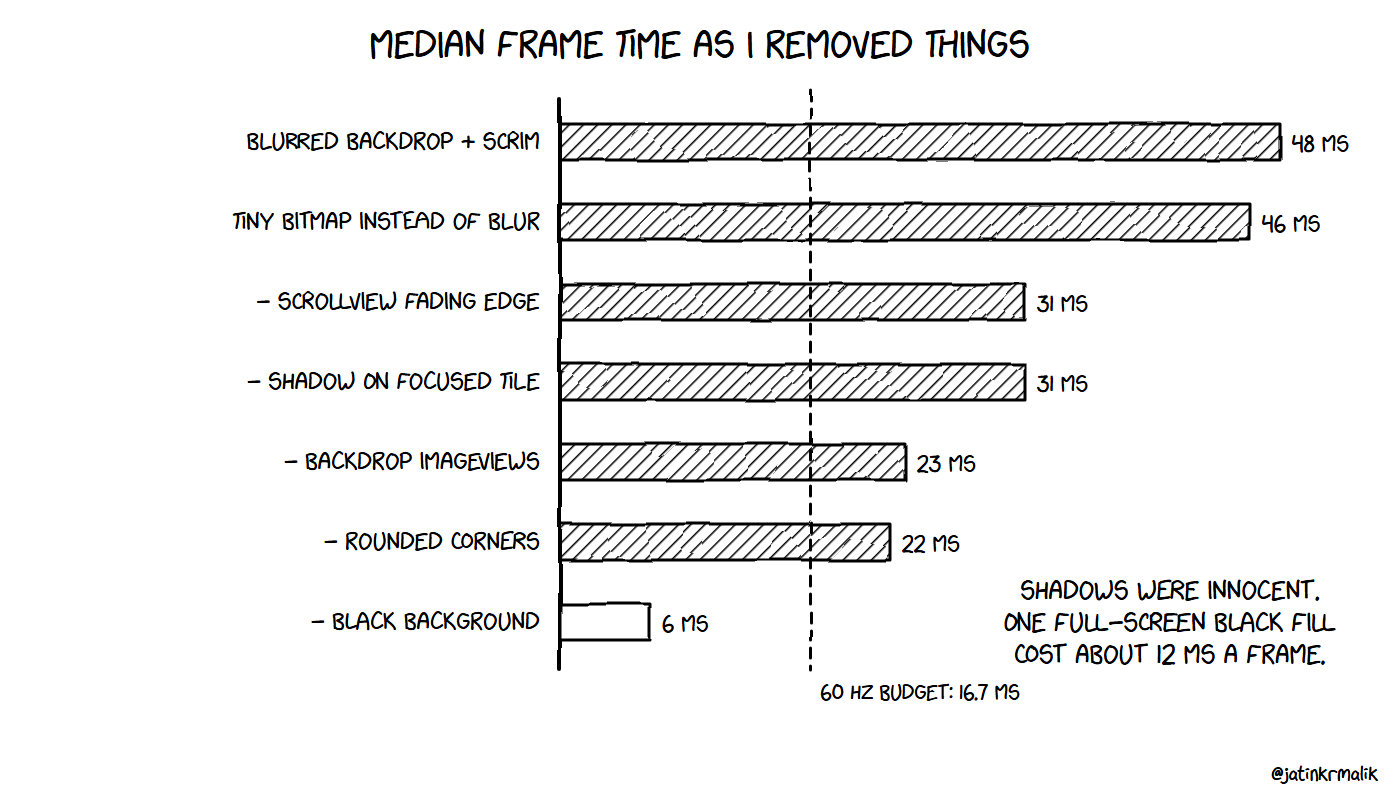
Shadows were innocent. The black background was not.
The fix: take the backdrop out of the UI layer
The backdrop moved to a SurfaceView behind the window, with a fixed buffer size of 480×270. The display hardware scales it to full screen, which costs the GPU nothing, and the upscale produces the blur on its own. Cross-fades are drawn with a software Canvas on a HandlerThread, and the scrim gradient is baked in:
view = new SurfaceView(context);
view.getHolder().setFixedSize(480, 270);   // HW scaler upsizes; free blur
private void draw() { // runs on the "backdrop" HandlerThread
Canvas c = holder.lockCanvas();
float t = step / (float) FADE_STEPS;
c.drawColor(Color.BLACK);
if (from != null && t < 1f) { art.setAlpha(Math.round(220 * (1f - t))); c.drawBitmap(from, null, dst, art); }
if (to != null) { art.setAlpha(Math.round(220 * t)); c.drawBitmap(to, null, dst, art); }
c.drawRect(dst, scrim); // LinearGradient baked into the same small buffer
holder.unlockCanvasAndPost(c);
}The root view has no background at all. The UI layer only draws tiles and text, which measured at 6 ms. Final numbers, with shadows and rounded corners back on:
Total frames rendered: 86
Janky frames: 1 (1.16%)
50th percentile: 12ms
90th percentile: 15ms
TOTAL PSS: ~38-39 MB at rest (24 MB of it decoded app banners)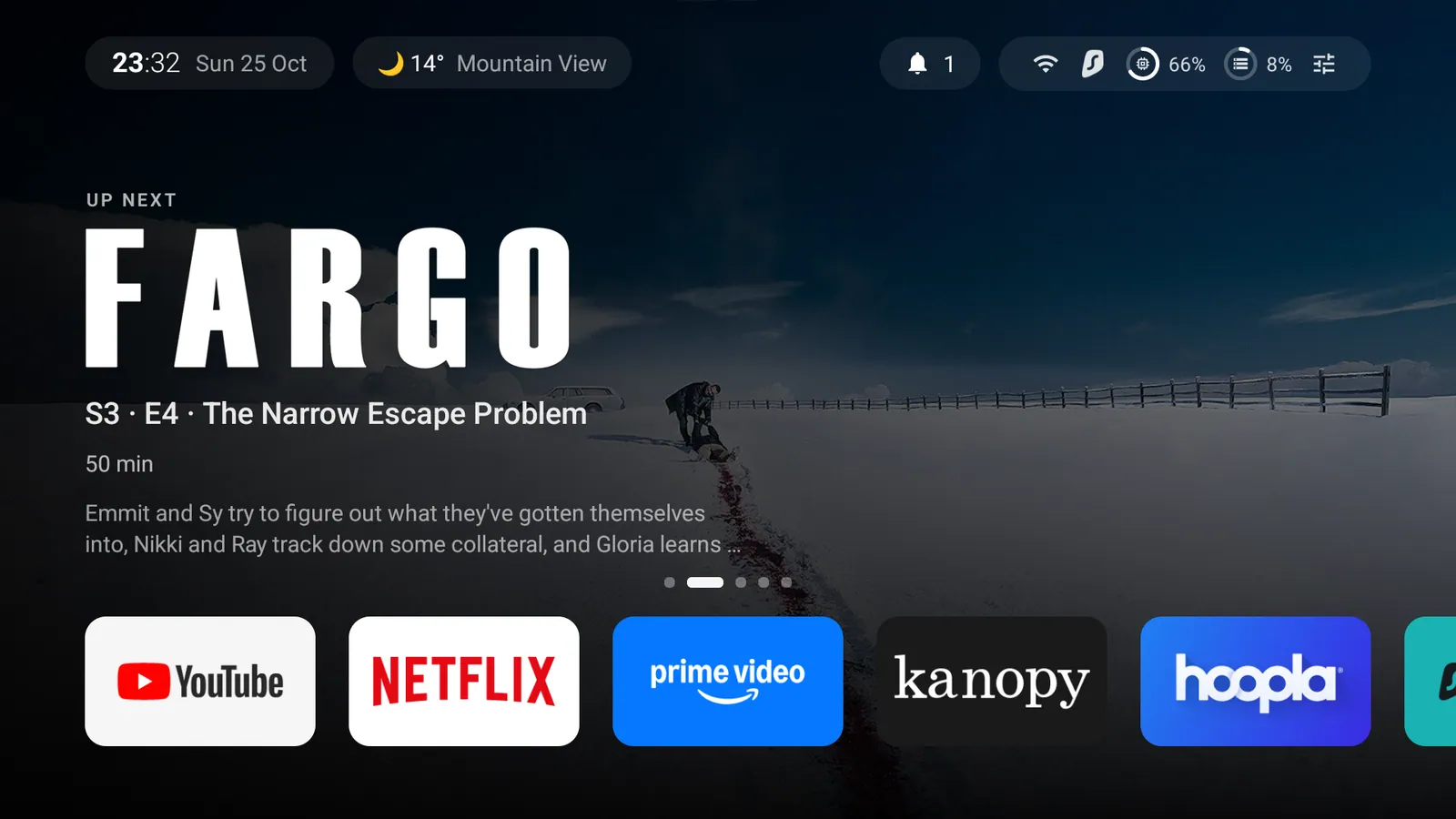
Final launcher: time, weather, notifications and a status pill (Wi-Fi, VPN, memory, storage, controls) over a Plex “Up next” carousel and the dock
Then the Plex redesign undid some of that. Moving the artwork up to 1080p and drawing each app’s colour glow live pushed median frames from 10 ms to 28 ms. The fix was the same lesson as before: keep full-screen work out of the UI layer. Every backdrop is now a pre-rendered bitmap, so a cross-fade is just two bitmap draws, and the glow went in favour of the focus ring. Frames are back to 11 ms while moving around, and the carousel’s fades take about 5 ms.
Step 8: Making it survive updates
TCL and Google updates re-enable packages and reset the Home app. So there are two scripts:
restore.ps1re-enables every package from the audit-time backup, restores the settings to their recorded values, resets the TTVS appops and sets the stock launcher as Home.reapply.ps1is idempotent: it fixes only what has drifted, then verifies withcmd role get-role-holders android.app.role.HOME. It disablessetupwraithbeforelauncherx, onepmcall per package, and waits about 15 s before any reboot so the package state is written to disk.
Step 9: Updates, cleanup, codecs, and why not root
Is anything out of date?
Channel                    Result
-------------------------  ---------------------------------------------------------------
TCL firmware               V8-0012T02-LF1V321.001899 (AU14). TCL server: CHECK_RESULT_NONE
Android security patch     2025-12-05. Only TCL firmware can move it.
Google system update       "Your system is up to date"
Google Play system update  2024-09-01. Nothing newer offered for TV.
Play Store apps            Surfshark 3.36.0 -> 3.37.0, BrowseHere 8.20.060 -> 8.20.066
TCL’s updater lives inside com.tcl.ttvs, which is one more reason not to disable that package. It can’t be started from ADB:
Permission Denial: starting Intent { act=com.tcl.versionUpdateApp.action.updateEntrance ... }
from null (pid=5136, uid=2000) requires com.tcl.permission.START_CHECK_SYSTEMUPDATE
The check has to be run by hand (Settings → System → About → System update → Network Update). Its log shows one more piece of telemetry: every update check uploads the TV’s full list of system modules and their versions to TCL.
versionUpdate: [CommonUtils]getLocalApexList get ApexBean{packageName='com.tcl.tcore', versionCode=653321001}
versionUpdate: [CommonUtils]getLocalApexList get ApexBean{packageName='com.tcl.hera', versionCode=653321001}
...
versionUpdate: [ComponentStateController]current state is CHECK_RESULT_NONE
Two side effects of my own changes turned up here:
- The Play updates had been pending for five days, even with “Auto-update apps at any time” switched on. Android runs automatic app updates and app optimisation only while the device is idle (
dumpsys deviceidleshowedmState=ACTIVE). A TV that never sleeps never goes idle. So the never-sleep setting from Step 1 is for ADB sessions only. I set it back to 10 min / 59 min afterwards. - Updating Surfshark dropped the VPN silently. The network went from
Transports: WIFI|VPNto plainWIFI. Opening the app reconnected it.
Cleanup by usage data, not guesswork
dumpsys usagestats gives last-used time and total time for every app, and dumpsys diskstats gives sizes:
org.xbmc.kodi                  159 MB  never opened
com.hbo.hbonow                  78 MB  last 2026-03-17
com.peacocktv.peacockandroid    22 MB  last 2026-04-05
com.roku.web.trc                19 MB  last 2026-04-05
tv.pluto.android                58 MB  last 2026-05-02
com.sec.android.app.sbrowser   239 MB  last 2026-07-26  (sideloaded, v28.0.0.59 from May 2025)
cm.aptoidetv.pt                115 MB  last 2026-07-17  (sideloaded, v5.1.2 from Nov 2024)
com.netflix.ninja 122 MB 27 seconds of total use- Uninstalled (user-installed, so they can come back from Play): Kodi, Max, Pluto TV, Peacock, The Roku Channel.
- Uninstalled because sideloaded apps never update: Samsung Internet (a browser 17 months out of date) and Aptoide TV (a third-party app store).
- Disabled (preinstalled): Netflix, Prime Video, BrowseHere.
What the chip decodes
/vendor/etc/media_codecs-mt5896.xml lists hardware decoders for AV1, HEVC, VP9, H.264, MPEG-2, VC-1 and H.266/VVC. It also has every common Dolby Vision profile, including c2.mtk.dvhe.dtb.decoder, which is Profile 7 (UHD Blu-ray content with an enhancement layer). There are secure (DRM) variants of the main ones. You can’t add codecs to that list without root, and on this chip you don’t need to for video.
Audio is the gap. Dolby and DTS aren’t exposed as regular decoders, but the speaker output accepts them as bitstream:
profiles: ENCODING_AC3, ENCODING_E_AC3, ENCODING_E_AC3_JOC, ENCODING_DTS, ENCODING_DTS_HD
mIsDtsVirtualXSupported: true
So in Plex, set Passthrough to Auto even with no soundbar. The TV’s own audio processor decodes Atmos (E-AC3 JOC) and DTS. With Off, Plex converts everything to stereo PCM first. TrueHD isn’t supported at all, so the Plex server converts that track. For players that can’t handle TrueHD or PGS/ASS subtitles, use VLC as the external player.
Why not root (or a newer Android)?
ro.boot.vbmeta.device_state = locked
ro.boot.verifiedbootstate   = green
ro.boot.veritymode          = enforcing
ro.oem_unlock_supported     = (empty)
ro.build.type               = user
There’s no OEM-unlock path, and I know of no public bootrom exploit for this TV SoC. Even with one, unlocking drops Widevine from L1 to L3, so 4K/HDR streaming falls back to SD. There are no custom ROMs, because the panel, picture-processing, CEC and tuner drivers are closed TCL/MediaTek code. Root would mainly let you disable the Samba components inside com.tcl.ttvs. A DNS blocklist gets most of that benefit with no risk.
Step 10: Blocking the tracking at DNS
I haven’t deployed this part yet, but it’s the only way to stop what ADB can’t touch. TCL’s US backend is almost entirely *.api.leiniao.com (Leiniao is TCL’s smart-TV software company), hosted on Microsoft Azure. Every address the TV was seen talking to maps back to it:
Seen on the TV        Hostname                                    Role
20.168.66.216:6177    hwmsg-as1-azure-usa-o.api.leiniao.com       push channel, always on
20.168.49.140:6178    hwmsg-as6-azure-usa-o.api.leiniao.com       push channel, always on
20.171.160.197:443    hw-tdp-o / hwupgrade-o / hwlauncher-o ...   updates and launcher (shared IP)
4.249.25.67:443       hwtpc-o.api.leiniao.com                     unclear
The hwmsg-as1 to as6 hosts are one pool, which is why the push address changed between checks. I built the list below from the hostnames compiled into TCL’s own apps (pulled off the TV), the live connections above, Netify’s passive DNS for leiniao.com, and the Perflyst and hkamran80 smart-TV lists. Every hostname resolved on 25 October 2026. It works as a denylist in Pi-hole, AdGuard Home, NextDNS or any router with DNS blocking:
# Tier 1: push channel, log upload, device registration, Samba TV ACR
hwmsg-as1-azure-usa-o.api.leiniao.com
hwmsg-as2-azure-usa-o.api.leiniao.com
hwmsg-as3-azure-usa-o.api.leiniao.com
hwmsg-as4-azure-usa-o.api.leiniao.com
hwmsg-as5-azure-usa-o.api.leiniao.com
hwmsg-as6-azure-usa-o.api.leiniao.com
on-hweudc-o.api.leiniao.com
hweudc-o.api.leiniao.com
analysis.leiniao.com
na-newuser-tcl.cedock.com
na-neuser-tcl.cedock.com
api.cid.samba.tv
events.cid.samba.tv
platform.cid.samba.tv
preferences.cid.samba.tv
dpn.cid.samba.tv
fling.cid.samba.tv
alphonso.tv
# Tier 2: ads and TCL content (safe once TCL tv+ and Channel+ are disabled)
cmp-ads.api.leiniao.com
file-hw-ads-o.api.leiniao.com
hwads-o.api.leiniao.com
ffalconnow-us.api.leiniao.com
bmtchannel-o.api.leiniao.com
hwpreins-o.api.leiniao.com
hwapps-o.api.leiniao.comDon’t block hw-tdp-o.api.leiniao.com or the IP 20.171.160.197: firmware update checks fail (HaGeZi dns-blocklists issue #4347). For the same reason, don’t block all of leiniao.com, and don’t block Azure IP ranges wholesale, because they’re shared with countless unrelated services.
The VPN catch. While a VPN is connected on the TV, its DNS lookups travel inside the tunnel, so a Pi-hole on your network never sees them. Either exclude TCL’s service from the VPN with split tunnelling, or use a filtering DNS the TV queries directly, such as NextDNS set as the TV’s Private DNS with these hostnames on its denylist.
To check it worked, look for system (uid 1000) connections to ports 6177 to 6179 (hex 1821 to 1823):
adb shell 'cat /proc/net/tcp /proc/net/tcp6' | awk 'NR>1 && $4=="01" && $8==1000 {print $3}'Gotchas, all in one place
set-home-activityprintsSuccesseven when it changes nothing. Checkcmd role get-role-holders android.app.role.HOME.- The shell can’t disable individual components (
SecurityException), sopm disableon a component needs root. dumpsys netstatsper-UID data may be empty, but/proc/net/tcp{,6}carries UIDs and is readable from the shell.- uid-1000 TCL packages all share system permissions, so permission greps can’t tell them apart.
- Network ADB dies in standby. Raise
screen_off_timeoutbefore long operations. - On weak TV GPUs, measure with
dumpsys gfxinfoand compare against a first-party app on the same TV. Full-screen fills are expensive here, but shadows aren’t. exec-out screencapreturns an empty file while a live HDMI/TV input is on screen (secure layer). That’s expected, not an error.- Git Bash on Windows rewrites
/sdcard/...paths passed toadb shell. SetMSYS_NO_PATHCONV=1. - TCL’s input panel still shows tiles for disabled apps (Google TV Home, TCL tv+, User Guide). They just do nothing.
- A TV that never sleeps never goes idle, so Play auto-updates and app optimisation stop. Restore the sleep timer after ADB work.
- Updating a VPN app can drop the VPN without reconnecting. Check Transports: in dumpsys connectivity.
Still open
- Google Cast with
setupwraithdisabled is untested. If it reports “Untrusted device”, re-enablesetupwraithand keep the custom launcher as Home. - DNS blocking for TTVS: the list in Step 10 is built but not deployed yet, so I can’t say yet whether blocking it breaks anything.
Credits
The debloat lists and gotchas from these projects shaped the plan. I read them, but I didn’t run any of their code.
- cleanyourtv, which has a G08 example config
- dumbtv
- chill-tv-launcher
- tv-makeover
Keep reading
Adgaurd - An ad blocker which works without root!
Adgaurd is an ad blocker which works without root! You can block those unwanted ads on your Android devices using this application which use VPN technology.
Zion, part 3: a dashboard that says 'All good' and a 2015 tablet on the wall
Why I wrote my own homelab dashboard in stdlib Python, and what it took to keep a 2015 Fire 7 on LineageOS showing it on the wall 24/7.
Own a car? Be pro-auto with ELM 327 OBD-II Bluetooth Scanner
Discover how you can be a pro-auto guy & save some bucks by doing a self-diagnosis of your machine using ELM 327 OBD-II Bluetooth Scanner. Review inside.
Leave a comment