Lesson 2 -- Comments and Statements
JavaScript Lesson 2: how single line and multi-line comments make code readable, and what statements are, the set of instructions a program follows.
 Jatin Kumar Malik First published on
 The JavaScript Journey
Let’s us suppose, You are given a 10 page Code of a Program/Module (be it in any programming language) and you are asked to understand and explain the same in 30 minutes or even few hours. Can you do it? Trust me if you don’t have any documentation or help from the Programmer who coded it, you will be in deep trouble as you will have to review the whole code line by line to understand the flow of control and how variables and functions/methods are used to achieve the functionality.
This is where Comments come in.
Comment
It is basically a Line of text which your browser ignores completely while executing the JavaScript code.
The benefits of Comments in JavaScript are:
- JavaScript comments can be used to explain the code, and make the code more readable.
- JavaScript comments can also be used to prevent execution, when testing alternative code.
We have 2 types of Comments in Javascript:
Single Line Comments
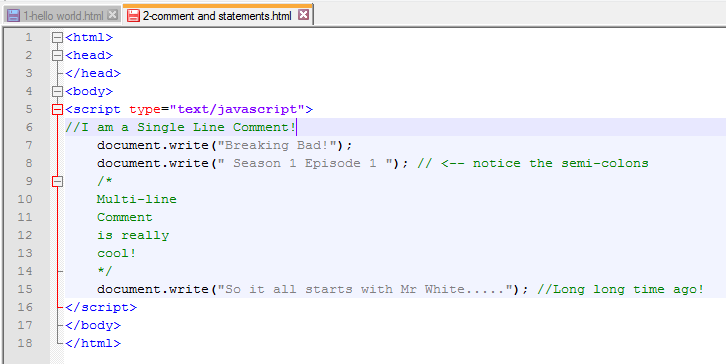
Single line comments start with //.
Any text between // and the end of a line, will be ignored by JavaScript (will not be executed).
Multi-line Comments
Multi-line comments start with /* and end with */.
Any text between /* and */ will be ignored by JavaScript.
and now coming on the second basic part;
Statements
Guys let me tell you one very basic thing about Programming. In basically any programming language our computer basically follows a set of Instructions also known as Statements.These statements are arranged in chronological order of execution, basically step by step.
For ex : Let’s say you want to tell a friend, how to make tea. Here’s how you will tell him :
Step 1 : Boil Water in a pan.
Step 2 : Put some Tea Leaves in the pan.
Step 3 : Put some Sugar in the pan.
Step 4 : After 5 mins, Pour some Milk in the pan.
Step 5 : Now let it boil for few mintues.
Step 6 : Tea is ready to serve.
So, see similar concept is used in the programming too. We need to provide the code in form of Step or as we say Statements. Each statement is followed by a Semi-colon (;). Now we already saw this in last lesson where we printed “Hello World” using the document.write(); statement.
So if we have multiple instructions statements in the code, we will use Semi-colon to separate them, so that our Browser can Interpret them easily and show us the output.
Let’s see the following example with implementation of both Comments and Statements :
Code:
Output: (Ctrl+Alt+Shift+R)
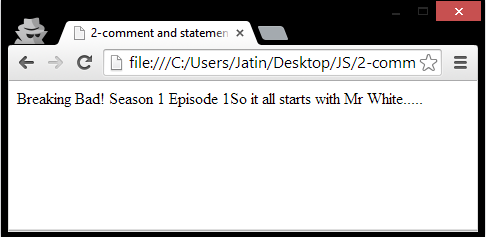
Breaking Bad! - Big fan here :)
See! That was easy. Wasn’t it? So go ahead and practice writing your own JavaScript code today and tell your own story using document.write() and post your code and output in comments below.Note: You must have noticed that instead of copy pasting the Sample code, I decided to simply use the Screenshots. This is because, if someone is following my journey and want to learn, in my opinion it is much much better if he/she types the code manually instead of copy and pasting to ensure effective learning :)
Keep reading
Hands on with Node.js | HTTP Server - Hello, World!
Setup an HTTP server using Node.js in less than 5 lines of code. Sounds good? Come over and make your first WebApp coded wholly in JavaScript. Badass?!
LLMFeeder: the browser extension I built to feed web pages to LLMs
A Wes Bos post, a quick prototype, a friend's Firefox PR, 100 GitHub stars in about two weeks, and the first people trying to sell me installs.

How to claim 100GB on OneDrive if you are outside U.S.!
Everyone loves extra storage, specially when it comes for free. Follow 6 easy steps to Claim 100GB on OneDrive even if you are living outside United states.
Leave a comment