Lesson 3 -- Variables
Hello guys! Variables is one of the most important concept of Programming and we will be learning today to use variables in JavaScript.
 Jatin Kumar Malik First published on
 The JavaScript Journey
Hello guys! Variables is one of the most important concept of Programming and we will be learning today to use variables in JavaScript.
Let’s drift back to memories of our Elementary Math education where we first learnt about variables(remember dreadful x? Anyone?) in our Algebra class. If you guys cant remember, here is a little example for some help.
In variables we basically take something like letter ‘x’ and equate it to some value:
x = Jatin
So whenever we will say:
x is a good boy. //Statement 1
It will actually mean that:
Jatin is a good boy.
So, here we see the logical interpretation of Statement 1. “x” is replaced by it’s value which is “Jatin”.
That is all what a variable is, it is just a fancy name for a placeholder. I hope you got the point, even if not, then also you will be clear soon when we will try to create an example and execute and then you will get the concept.
So the syntax to use variables in JavaScript is:
var <variable_name> = <value>;
So, let’s go ahead and see a program to understand the usage of variables and then we will see the code and analyse it.
Code:
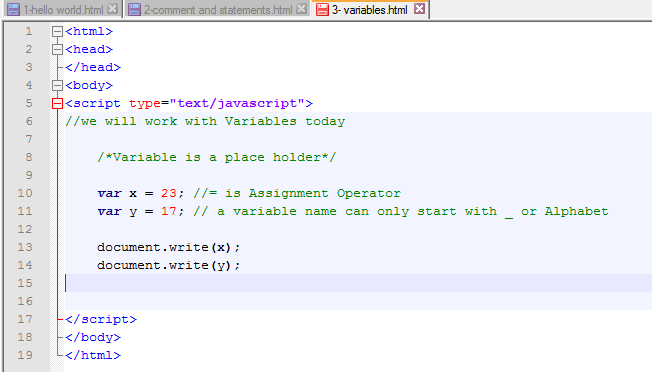
Now let’s Compile it. You know the shortcut Ctrl+Alt+Shift+R ;)
Output:
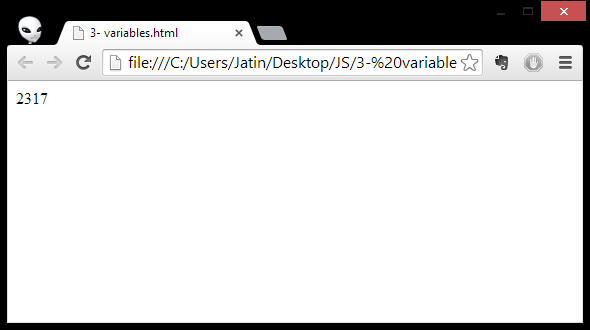
Perfect, so we can see in the output windows that our variable(x,y) are replaced by their values(23,17). So this was the basic exercise for you guys.
Syntax Explained:
- var x = 23;
here:
x : name of the variable
= : assignment operator
23 : the value of our variable ‘x’ - document.write(x);
here it is used to print out the value of our variable x.
So, here we go, this was basic of Variables. In next lesson we will learn about types of variables, and how to implement them in a more advanced manner.
See you guys in the next lesson. Peace!
Keep reading
Hands on with Node.js | HTTP Server - Hello, World!
Setup an HTTP server using Node.js in less than 5 lines of code. Sounds good? Come over and make your first WebApp coded wholly in JavaScript. Badass?!
LLMFeeder: the browser extension I built to feed web pages to LLMs
A Wes Bos post, a quick prototype, a friend's Firefox PR, 100 GitHub stars in about two weeks, and the first people trying to sell me installs.
How to claim 100GB on OneDrive if you are outside U.S.!
Everyone loves extra storage, specially when it comes for free. Follow 6 easy steps to Claim 100GB on OneDrive even if you are living outside United states.
Leave a comment