Lesson 4 -- Variables (Advanced)
In this lesson, we will learn about the Types of Variables and how to use and manipulate them.
 Jatin Kumar Malik First published on
 The JavaScript Journey
In this lesson, we will learn about the Types of Variables and how to use and manipulate them. In case you skipped or missed the last lesson about Introduction to Variables, please check it out first as I will assume you are well versed with the concept of Variables for this lesson.
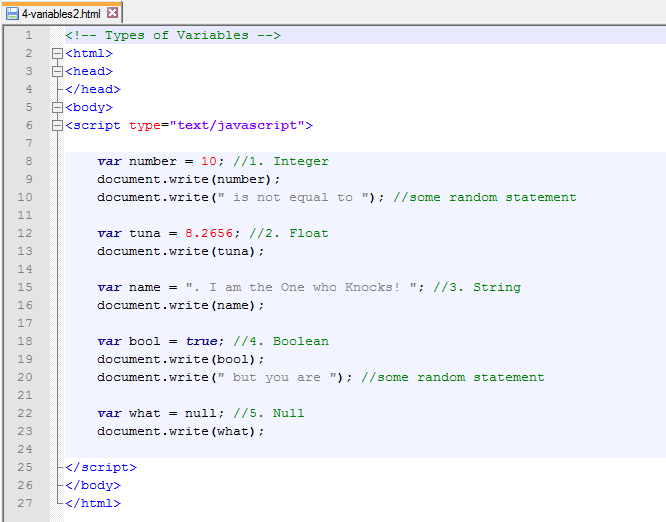
So, let’s see the types of Variables we can use by analysing the following code:
Code:
Output:
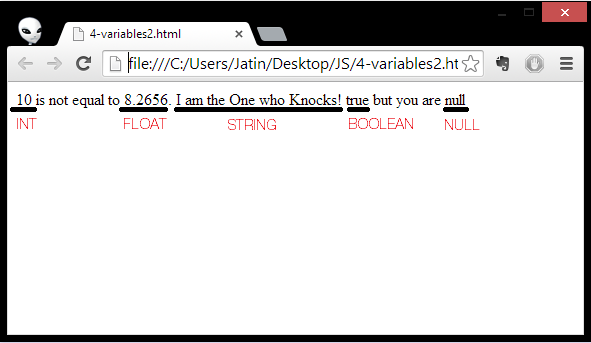
Now, let’s look up the explanation of All types of Variables one by one:
- Integer (INT): As the name suggests, It is used to store the value of an Integer number (like 12,4,6..).
- Float: It is also used to store a Number but with Decimal structure (like 0.02, 0.6, 13.5..).
- String: A string is a variable which stores a series of characters like “John Doe”. Strings are written with quotes.
- Boolean: Booleans can only have two values: true or false. They are generally used as Flags/Switch.
- Null: The value of a variable with no value is undefined. Variables can be emptied by setting the value to null. Note: Null is not equal to Zero (0).
So, here we go. This lesson was to make you understand different types of Variables and how to use them.
#DIY-1
Now I have a DIY(Do-it-yourself) for you guys. I want you to write the code to print out an exciting Story using all the types of variables. It can be any story from a fictional one to your own personal experience. You can post the following in the comment section.
Once you are comfortable with your understanding of Different types of variables in JavaScript, you can move on to the next lesson where we will learn how to use both the strings and variables together in a single statement. Till then, See you guys.
Keep reading
Hands on with Node.js | HTTP Server - Hello, World!
Setup an HTTP server using Node.js in less than 5 lines of code. Sounds good? Come over and make your first WebApp coded wholly in JavaScript. Badass?!
LLMFeeder: the browser extension I built to feed web pages to LLMs
A Wes Bos post, a quick prototype, a friend's Firefox PR, 100 GitHub stars in about two weeks, and the first people trying to sell me installs.
How to claim 100GB on OneDrive if you are outside U.S.!
Everyone loves extra storage, specially when it comes for free. Follow 6 easy steps to Claim 100GB on OneDrive even if you are living outside United states.
Leave a comment