Lesson 5 -- Using Variables with Strings
A beginner JavaScript lesson on printing strings and variables together in one document.write statement using the + concatenation operator, with a DIY exercise.
 Jatin Kumar Malik First published on
 The JavaScript Journey
Hey! What’s up guys? Today we will be learning an awesome concept of How to use Variables with Strings in JavaScript. Trust me, you will be using this concept a lot in JavaScript programming.
So, let’s suppose you want to print out a String! What will you do?
Yes you will use:
document.write(“Hey! I am a String”);
and in another case you want to print the value of a Variable! You will use
var name = “Jatin”;
document.write(name);
but what if you want to print both the String and the value of a Variable?
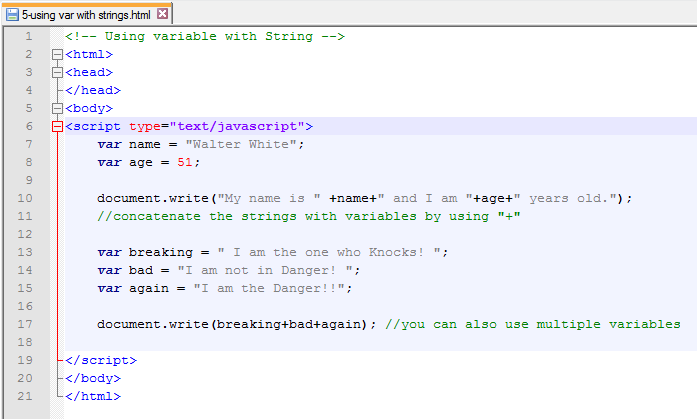
Let’s consider the following.
Code:
Output:
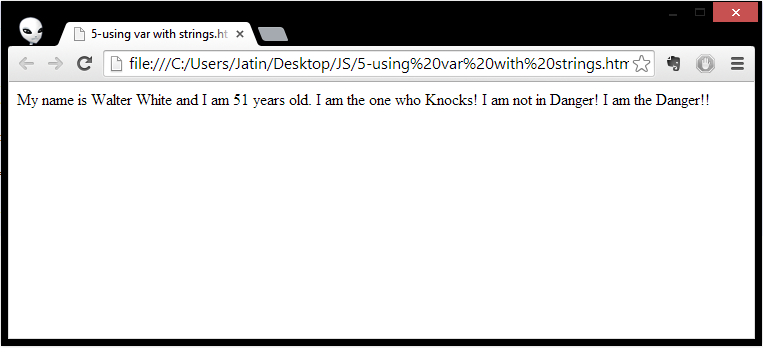
So, here we see how we used Plus (+) symbol to concatenate both Strings and Variables in one print statement.
Syntax Explained:
- document.write(“My name is ” +name+” and I am “+age+” years old.”); Here we are using ’+’ sign to concatenate both the variables (name,age) and the strings (“My name is”, “and I am”..) in a single print statement i.e document.write( );
- document.write(breaking+bad+again);
Same concept as above print statement but we are printing the value of 3 variables in a Single print statement instead of using it 3 times.
I hope this explains the concept well. We will be using it multiple times in advanced lessons. This is all for you guys for the day. I would recommend to try typing and executing the code yourself and also mess up with it, because that’s what keep our mind interested. Try the following DIY exercise for same.
#DIY-2
Try it yourself to print out both strings and variables without using the Addition operator (+) aka Plus symbol and see what happens. Post your observation in comments.
Keep reading
Hands on with Node.js | HTTP Server - Hello, World!
Setup an HTTP server using Node.js in less than 5 lines of code. Sounds good? Come over and make your first WebApp coded wholly in JavaScript. Badass?!
LLMFeeder: the browser extension I built to feed web pages to LLMs
A Wes Bos post, a quick prototype, a friend's Firefox PR, 100 GitHub stars in about two weeks, and the first people trying to sell me installs.
How to claim 100GB on OneDrive if you are outside U.S.!
Everyone loves extra storage, specially when it comes for free. Follow 6 easy steps to Claim 100GB on OneDrive even if you are living outside United states.
Leave a comment